What is a programming language? Compare machine, assembly and high-level languages.
5 marks
Answer in brief
A programming language is a set of words, symbols and rules used to write instructions for a computer.
Types of programming languages
Machine language: Instructions are written as machine codes, usually shown using 0s and 1s. The processor can execute the correct machine code directly. It is difficult for people to read and write.
Assembly language: Short names such as ADD are used instead of binary instructions. An assembler converts assembly code into machine code. The instructions depend on the processor.
High-level language: Instructions are written using readable words and expressions. Examples include C and Python. A suitable translator is needed before or during execution.
Example
To add two numbers in C, we can write total = a + b;. The compiler translates the C instructions for the selected computer. We do not need to write the processor’s binary instructions ourselves. The translated code may contain several machine instructions.
Advantages of high-level languages
Easy to read: Meaningful names and familiar expressions make programs easier to understand.
Easy to maintain: A programmer can find and change the required part more easily.
Better portability: The same source can often be used on different computers when suitable compilers and libraries are available.
Compiler and interpreter
A compiler translates a program into another form before the translated program runs. An interpreter carries out instructions through another program. These are ways of implementing a language. C programs are commonly compiled. A language and a compiler are different: C is a language, while GCC is one compiler that supports it.
Reference tables
↔ Scroll horizontally on a small screen
Levels of programming languages
Level
How instructions are written
Translation and use
Machine language
Encoded processor instructions, commonly represented as binary or hexadecimal
Executed by the matching processor; difficult for people to maintain.
Assembly language
Mnemonic instructions such as ADD, with symbolic labels
An assembler produces machine code for a particular architecture.
High-level language
Expressions, functions and control structures close to human reasoning
A compiler or interpreter implements the language. C source is commonly compiled.
↔ Scroll horizontally on a small screen
Translation methods
Method
Typical behaviour
What to remember
Compilation
Translates a source program into another representation before the resulting program runs.
C implementations commonly compile source to native code.
Interpretation
Executes a representation of the program through another program.
A language may have more than one implementation strategy.
Key points
Machine code is processor-specific.
An assembler translates assembly; a compiler can translate C.
Explain the stages of program development with an example.
5 marks
Answer in brief
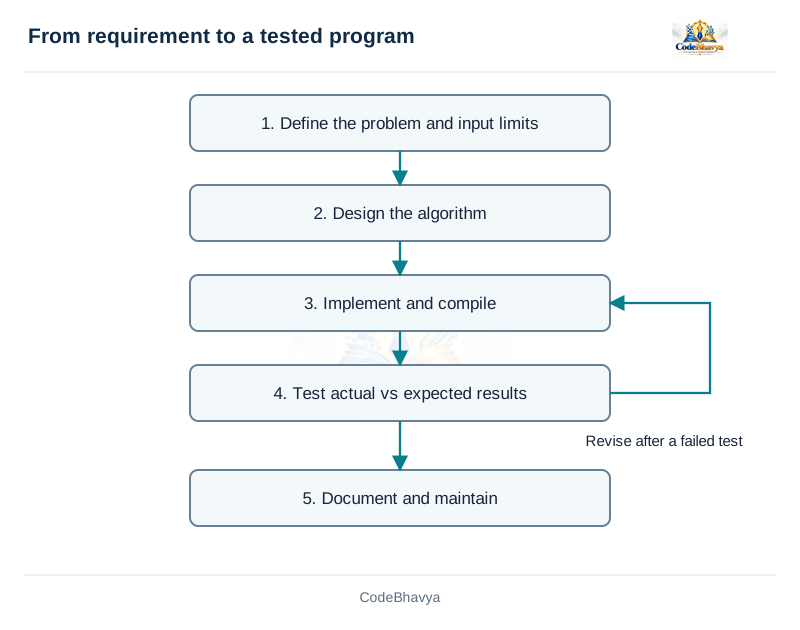
Program development is the process of understanding a problem, planning its solution, writing the program, testing it and maintaining it.
Stages of program development
Problem analysis: Understand what the program must do. Identify the inputs, outputs and limits on the input values.
Solution design: Prepare an algorithm, pseudocode or flowchart. Choose the steps needed to solve the problem.
Coding: Write the planned solution in a programming language such as C. Use suitable variables, operators and statements.
Compilation: Translate the source program. Read the compiler messages and correct syntax mistakes.
Testing and debugging: Run the program with different inputs. Compare its output with the expected result. Find and correct the causes of wrong results.
Documentation and maintenance: Write useful notes about the program. Update it when requirements change or a mistake is found.
Example: average of three marks
Inputs: three marks. Output: their average. First add the marks, then divide the total by 3.0. In C, using 3.0 allows a fractional result when the total is an integer. For marks 60, 75 and 90, the total is 225 and the average is 75.
Testing
Try ordinary values, boundary values and invalid values. If marks must be between 0 and 100, the program should check that rule. Testing finds a failure; debugging finds and fixes its cause. If a change introduces another mistake, test the corrected program again. Successful compilation alone does not prove that the answer is correct.
How do you create, compile and run a C program? Explain the translation stages.
5 marks
Answer in brief
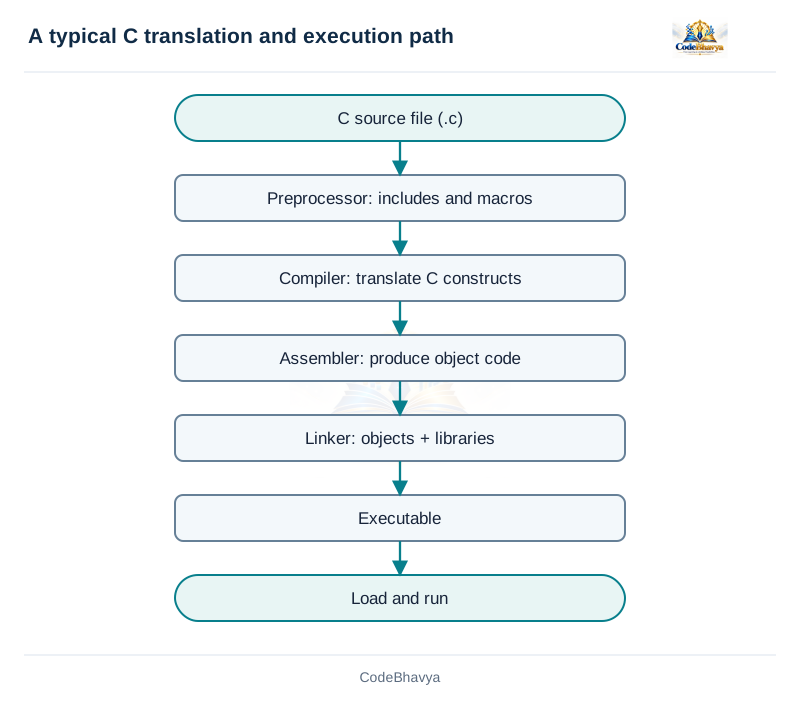
A C program is created by writing source code, translating it, linking the required code and running the resulting executable file.
Steps to create and run a program
Write the source: Use an editor to write valid C code. Save the file with the .c extension, such as hello.c.
Preprocess: The preprocessor handles instructions such as #include and #define. Header information and macro replacements are prepared.
Compile: The compiler checks the C code and translates it for the selected target. Correct the reported errors.
Assemble: In a usual toolchain, assembly instructions are converted into object code. Some implementations combine these stages.
Link: The linker combines the object files and required library code. It produces an executable program.
Run: The operating system loads the executable. In a hosted C program, execution starts at main.
Object code and executable code
An object file contains translated code, but it may still need code from other files or libraries. An executable is the linked program prepared for the target environment. A successful compilation can still be followed by a linking error, for example when a required function definition is missing.
Types of errors
Syntax error: The code breaks a language rule, such as a missing semicolon. The compiler reports the problem.
Link error: The linker cannot find a required definition or compiled component.
Runtime failure: A problem occurs while the program is running, such as an invalid memory access.
Logical error: The program runs but uses the wrong steps or formula. For example, it subtracts marks instead of adding them.
Compile and run commands
With GCC installed, use the command below. On Linux or macOS, run ./hello. In Windows PowerShell, create hello.exe and run .\hello.exe. Read warnings as well as errors.
Define an algorithm and explain its essential properties.
5 marks
Answer in brief
An algorithm is a finite sequence of clear steps used to solve a problem.
Essential properties
Input: The values needed by the algorithm must be clearly stated. Some algorithms may need no external input.
Output: The result to be produced must be clearly stated.
Definiteness: Every step must be clear. A person following it should not have to guess what to do.
Finiteness: The algorithm must finish after a finite number of steps for every allowed input.
Effectiveness: Each step must be simple enough to carry out using the available operations.
Example: largest of three numbers
Read a, b and c. Set maximum = a. If b is larger than maximum, replace maximum with b. Then compare c with maximum and replace it if needed. Display maximum. For 4, 9 and 2, the result is 9. Each step has a clear action, and the algorithm finishes after two comparisons.
Correctness
An algorithm must give the required result for every allowed input. Check negative numbers and equal values as well as an ordinary example. An algorithm can have clear steps and still use a wrong formula, so clarity alone does not prove correctness.
Time and space complexity
Time complexity describes how the number of operations grows as the input size grows. Space complexity describes the memory needed. Big O is used to describe an upper growth limit. Comparing exactly three numbers takes constant work, O(1). Checking n values one by one takes O(n) time. The best case is the input of a given size that needs the least work; the worst case needs the most work.
Reference table
↔ Scroll horizontally on a small screen
Properties of an algorithm
Property
Meaning
Example for finding a maximum
Input
The permitted starting data is specified.
Three comparable numbers.
Output
The result is specified.
Their maximum value.
Definiteness
Each step has an unambiguous meaning.
Compare b with the current maximum.
Finiteness
The procedure terminates for every permitted input.
Only a fixed number of comparisons is needed.
Effectiveness
Each step is basic enough to perform.
Assignment and comparison are executable operations.
Key points
State the permitted input domain.
Finiteness is about termination, not about a particular programming language.
Related exam questions
Topic matches from the supplied JNTUH papers. Marks below are the printed allocations for those questions.
Explain the advantages and limitations of algorithms.
5 marks
Answer in brief
An algorithm helps us plan a solution step by step before writing a program. It has several advantages and some limitations.
Advantages of algorithms
Easy to understand: The solution is written as simple, ordered steps. A student can follow one step at a time.
Helps before coding: We can decide the inputs, calculations and output before writing C statements. This reduces confusion while coding.
Independent of a programming language: The same solution can be implemented in C, Python or another language. The syntax changes, but the main steps can remain the same.
Helps find mistakes: We can follow the steps with sample values and check the result. Missing steps and incorrect conditions can be found before coding.
Makes coding easier: Once the steps are clear, each step can be converted into suitable program statements.
Limitations of algorithms
Takes time to prepare: A detailed solution needs careful planning, especially for a large problem.
Can become lengthy: A large problem may need many steps. A long description can become difficult to follow.
Has no single writing format: Different people may describe the same steps differently. The wording must still be clear.
Does not show paths visually: Choices and repeated steps may be easier to see in a flowchart.
Cannot be executed directly: An algorithm written in ordinary language must be converted into a program before the computer can run that program.
Simple example
To add two numbers: read the two values, add them and display the sum. For inputs 8 and 5, the result is 13. These steps can be understood before writing any C code. They can also be used to write a program in another language. The algorithm is useful for planning, but the computer still needs an implementation to execute.
READ a, b
sum ← a + b
OUTPUT sum
Key points
Algorithms support reasoning before implementation.
Choose enough detail that another person can follow the steps.
What is a flowchart? Explain the standard symbols and drawing guidelines.
5 marks
Answer in brief
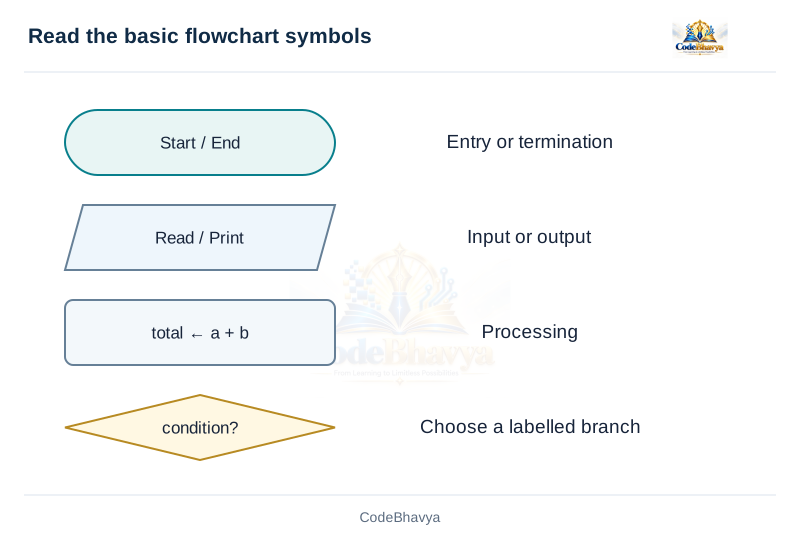
A flowchart is a diagram that shows the steps of an algorithm using symbols connected by arrows.
Main flowchart symbols
Start/End: A rounded terminal shows where the algorithm begins or finishes.
Input/Output: A parallelogram shows reading input or displaying a result.
Process: A rectangle shows a calculation or assignment, such as sum = a + b.
Decision: A diamond contains a condition. Its branches are labelled Yes/No or True/False.
Flow line: An arrow shows which step is followed next.
Connector: A small labelled connector joins parts of a chart when a long arrow would make it difficult to read.
Example: even or odd
Start by reading n. Test n % 2 == 0 in a decision diamond. If the answer is Yes, print Even. If it is No, print Odd. Both paths then reach End. For n = 8, the Yes path is followed. For n = 7, the No path is followed.
Advantages
A flowchart makes the order of steps easy to see. It is useful for explaining choices and loops. It also helps us follow the solution using sample values before writing the program.
Drawing rules
Use clear labels: Keep the text inside a symbol short and meaningful.
Label each branch: A decision must show which arrow is followed for each result.
Use arrowheads: The direction of execution must be clear.
Check every path: Make sure the steps reach a valid result or continue through a clearly shown loop.
Avoid crowding: Large flowcharts should be divided into smaller, understandable parts.
What is pseudocode? Explain its conventions with an example.
5 marks
Answer in brief
Pseudocode is a way of writing an algorithm using simple words and structured statements, without following all the syntax rules of a programming language.
Common statements
READ: Accept an input value. Example: READ number.
Assignment: Store a value. Example: total ← 0. The arrow means assignment in this notation.
IF and ELSE: Choose between actions based on a condition.
WHILE or REPEAT: Carry out a group of steps repeatedly.
OUTPUT: Display the required result.
Example: larger of two numbers
READ a, b
IF a >= b THEN
    larger ← a
ELSE
    larger ← b
END IF
OUTPUT larger
For a = 8 and b = 5, the condition is true and larger becomes 8. If both inputs are 8, choosing either one gives the correct largest value.
Advantages of pseudocode
Easy to read: The writer can focus on the solution instead of semicolons and header files.
Easy to change: Steps can be added or corrected before coding.
Useful for coding: The structured steps can later be converted into C statements.
Writing rules
Write one clear action at a time. Indent statements that belong to a condition or loop. State how a loop ends and whether a boundary is included. Use the same notation throughout. Pseudocode has no single compulsory syntax, but another reader must be able to follow it. It is not a C program and cannot normally be compiled as C without conversion.
Key points
Pseudocode communicates logic rather than compilable syntax.
Indentation and explicit end markers clarify structure.
Differentiate an algorithm, a flowchart and pseudocode.
5 marks
Answer in brief
An algorithm is the step-by-step solution to a problem. A flowchart and pseudocode are two ways of presenting that solution.
Algorithm
An algorithm is usually written as numbered steps. It states what input is needed, what actions must be performed and what result must be produced. It is useful for explaining a short solution in ordinary language.
Flowchart
A flowchart presents the steps as a diagram. Rectangles show processing, diamonds show decisions and arrows show the direction of execution. It is useful when we need to see different choices or repeated paths. Large charts can be difficult to draw and change.
Pseudocode
Pseudocode uses structured text such as READ, IF, WHILE and OUTPUT. It is useful for writing longer logic before choosing the exact C syntax. It is generally easier to edit than a large diagram.
Example: sum of two numbers
The algorithm says: read two numbers, add them and display the sum. Pseudocode writes the same actions using named variables. The flowchart uses Start, input, process, output and End symbols. All three must describe the same calculation.
READ a, b
sum ← a + b
OUTPUT sum
Important difference
The solution itself does not change when its presentation changes. For example, a condition must not become its opposite when it is copied from pseudocode to a flowchart. Check that the starting values, conditions and output agree in every version. None of these ordinary descriptions is automatically an executable C program.
Reference table
↔ Scroll horizontally on a small screen
Three ways to discuss a solution
Aspect
Algorithm as numbered steps
Flowchart
Pseudocode
Form
A sequence of precisely written steps
Connected graphical symbols
Indented, structured text
Strength
Easy to introduce in ordinary language
Makes branches and loops visible
Scales well to detailed structured logic
Editing
Simple for short descriptions
Layout may need rearranging
Usually easy to revise
Execution
Not directly executable
Not directly executable
Not directly executable
Correctness
Depends on the logic
Depends on the same logic
Depends on the same logic
Key points
The algorithm is the logic, rather than a particular drawing format.
Different representations must agree on decisions and results.
Related exam questions
Topic matches from the supplied JNTUH papers. Marks below are the printed allocations for those questions.
January/February 2024 · Q2(b) · 5 marks
Discuss the importance of flowcharts and pseudocode in designing algorithms.
Develop an algorithm, pseudocode and flowchart to find the maximum of three numbers.
5 marks
Answer in brief
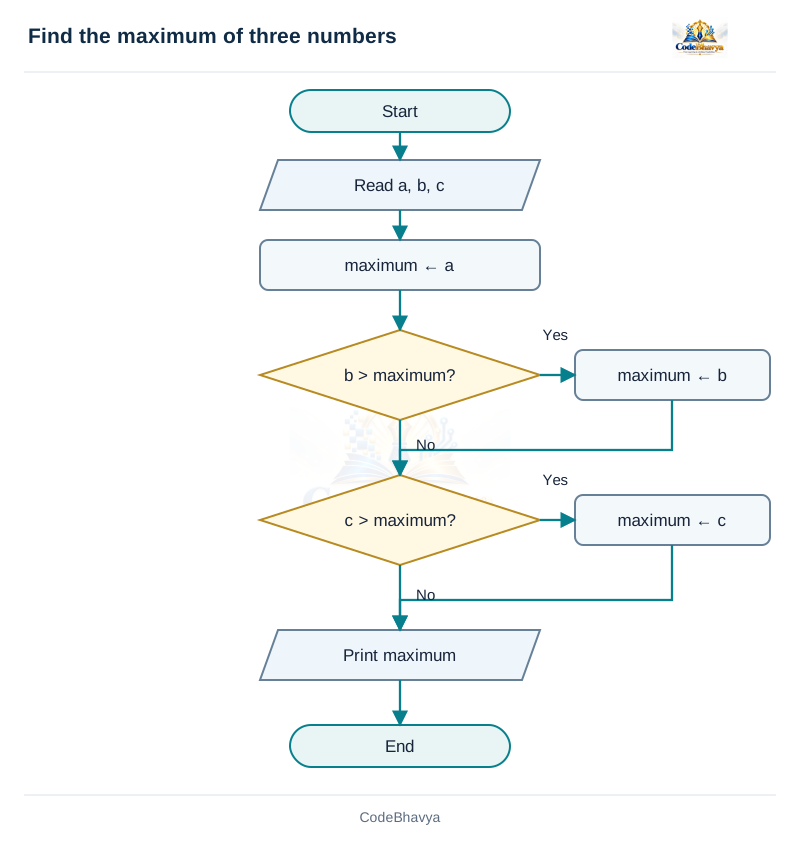
The maximum of three numbers can be found by keeping the largest value seen so far.
Algorithm
Read the values: Accept a, b and c.
Start with the first value: Set maximum = a.
Compare the second value: If b > maximum, set maximum = b.
Compare the third value: If c > maximum, set maximum = c.
Display the result: The value in maximum is the largest of the three.
Explanation
After the first assignment, maximum contains a. After comparing b, it contains the larger of a and b. After comparing c, it contains the largest of all three. A replacement is needed only when the new value is larger. Equal values do not cause a problem because the question asks for the maximum value.
Example
For a = −4, b = 9 and c = 9, maximum first contains −4. The comparison with b changes it to 9. Since c is not greater than 9, the last comparison leaves it unchanged. The output is 9.
Special cases
The method also works when all values are negative or all are equal. Do not start maximum at zero unless the input rules justify that choice. For inputs −9, −4 and −12, zero would be an incorrect answer. Starting from the first actual value avoids that mistake.
Time and space complexity
The method uses exactly two comparisons, regardless of the input values. Therefore its time complexity is O(1). It uses a fixed number of variables, so its extra space is also O(1). Finding the maximum of n values is a different problem that requires a repeated scan.
Reference tables
↔ Scroll horizontally on a small screen
Trace for -4, 9, 9
Step
Condition
maximum
Initial
Not yet compared
-4
Compare b
9 > -4 is true
9
Compare c
9 > 9 is false
9
↔ Scroll horizontally on a small screen
Maximum boundary cases
Inputs
Expected maximum
Reason to test
-9, -4, -12
-4
Detects an incorrect zero initialisation.
6, 6, 2
6
Checks a tied maximum.
3, 3, 3
3
Checks complete equality.
9, 2, 1
9
Checks that the initial candidate can remain unchanged.
/* CodeBhavya | PPS AR25 | Learning example */
#include <stdio.h>
int main(void)
{
    int a = -4, b = 9, c = 9;
    int maximum = a;
    if (b > maximum) { maximum = b; }
    if (c > maximum) { maximum = c; }
    printf("Maximum = %d\n", maximum);
    return 0;
}
Sample input and output
This example uses values already written in the program.
Output
Maximum = 9
Key points
Keep the maximum seen so far.
A strict comparison still works when the maximum occurs twice.
Related exam questions
Topic matches from the supplied JNTUH papers. Marks below are the printed allocations for those questions.
March/April 2023 · Q3(b) · 5 marks
What is an algorithm? Write an algorithm to find the largest of three numbers.
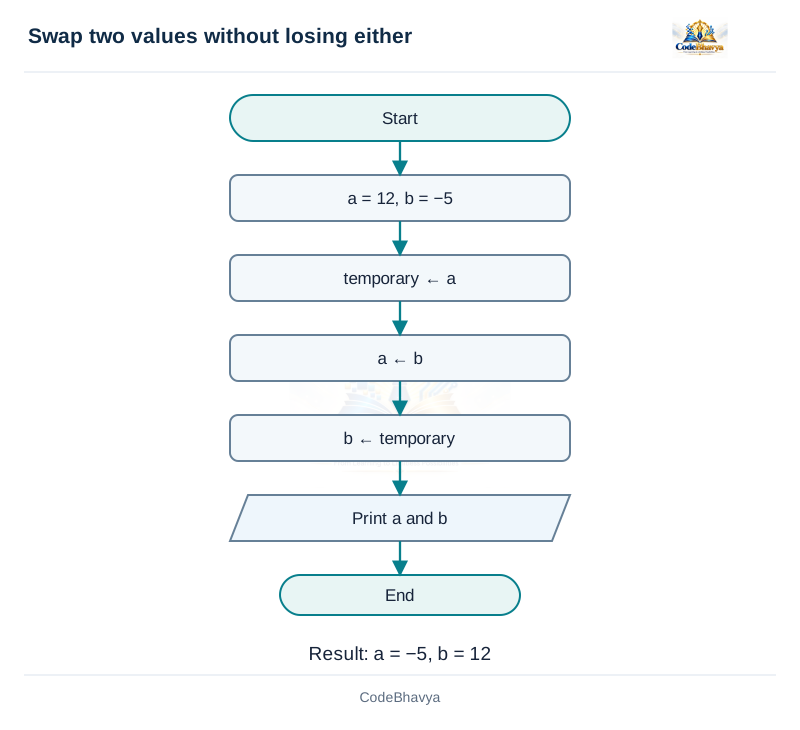
Develop an algorithm and C program to swap two values using a temporary variable.
5 marks
Answer in brief
Swapping means exchanging the values of two variables. A temporary variable holds one value while the exchange takes place.
Algorithm
Save the first value: Set temporary = a.
Replace the first value: Set a = b.
Restore the saved value: Set b = temporary.
Display a and b: They now contain the exchanged values.
Explanation with an example
Suppose a = 12 and b = −5. First, temporary receives 12. Next, a receives −5. Finally, b receives the saved 12. The final values are a = −5 and b = 12. After the second statement, both a and b briefly contain −5, but the old value 12 is still safe in temporary.
Need for the temporary variable
If we first write a = b, the old value of a is overwritten. We cannot copy it into b afterward unless it was saved. The temporary variable prevents this loss. Assignment copies a value; it does not permanently connect the variables. Changing a later does not automatically change temporary.
Important points
Use a temporary variable of a suitable type. The same three steps work for negative values and equal values. This method is clearer than addition-and-subtraction swapping, which may overflow during an intermediate calculation. If a swap is placed inside a function, additional care is needed to change the caller’s variables; ordinary value parameters are copies.
Time and space complexity
There are three assignments and one extra temporary variable. These do not grow with the input values, so time and extra space are both O(1).
/* CodeBhavya | PPS AR25 | Learning example */
#include <stdio.h>
int main(void)
{
    int a = 12, b = -5;
    int temporary = a;
    a = b;
    b = temporary;
    printf("a = %d, b = %d\n", a, b);
    return 0;
}
Sample input and output
This example uses values already written in the program.
Output
a = -5, b = 12
Key points
Save a value before overwriting it.
The temporary variable should have a compatible type.
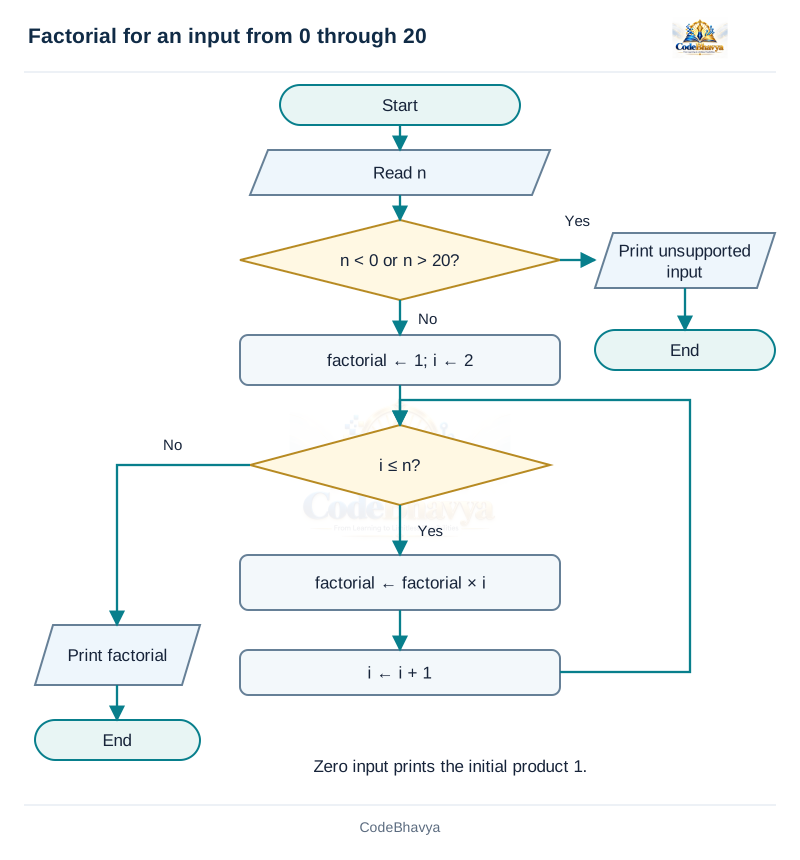
Develop an algorithm and flowchart to calculate the factorial of a non-negative integer.
5 marks
Answer in brief
The factorial of a non-negative integer n is the product of the integers from 1 to n. It is written as n!. By definition, 0! = 1.
Algorithm
Read n: Use an integer in the supported range.
Initialise the product: Set factorial = 1 and i = 2.
Multiply: While i <= n, set factorial = factorial × i.
Move to the next factor: Increase i by 1 and repeat the test.
Display factorial: It contains the required product.
Example: 5!
For n = 5, the product starts at 1. Multiplying by 2 gives 2; multiplying by 3 gives 6; multiplying by 4 gives 24; multiplying by 5 gives 120. Thus 5! = 120. Each loop step adds one required factor to the product.
Initial value and boundary cases
The product must start at 1, not 0. A product that starts at zero stays zero after every multiplication. When n is 0 or 1, the loop is not entered and the answer remains 1. Negative inputs are rejected because they are outside this elementary factorial definition.
Range of the program
Factorials grow quickly. The example accepts only 0 through 20 and uses unsigned long long. This type has enough guaranteed range for 20!, but not for every factorial. A larger input needs an overflow check or a different way to store large numbers.
Time and space complexity
The repeated multiplication takes O(n) time in the usual analysis, because the number of loop steps grows with n. Only a few variables are used, so extra space is O(1). The supplied fixed-width program restricts the input to avoid overflow.
/* CodeBhavya | PPS AR25 | Learning example */
#include <stdio.h>
int main(void)
{
    int n;
    unsigned long long factorial = 1;
    if (scanf("%d", &n) != 1 || n < 0 || n > 20) {
        puts("Unsupported input");
        return 1;
    }
    for (int i = 2; i <= n; ++i) {
        factorial *= (unsigned long long)i;
    }
    printf("%d! = %llu\n", n, factorial);
    return 0;
}
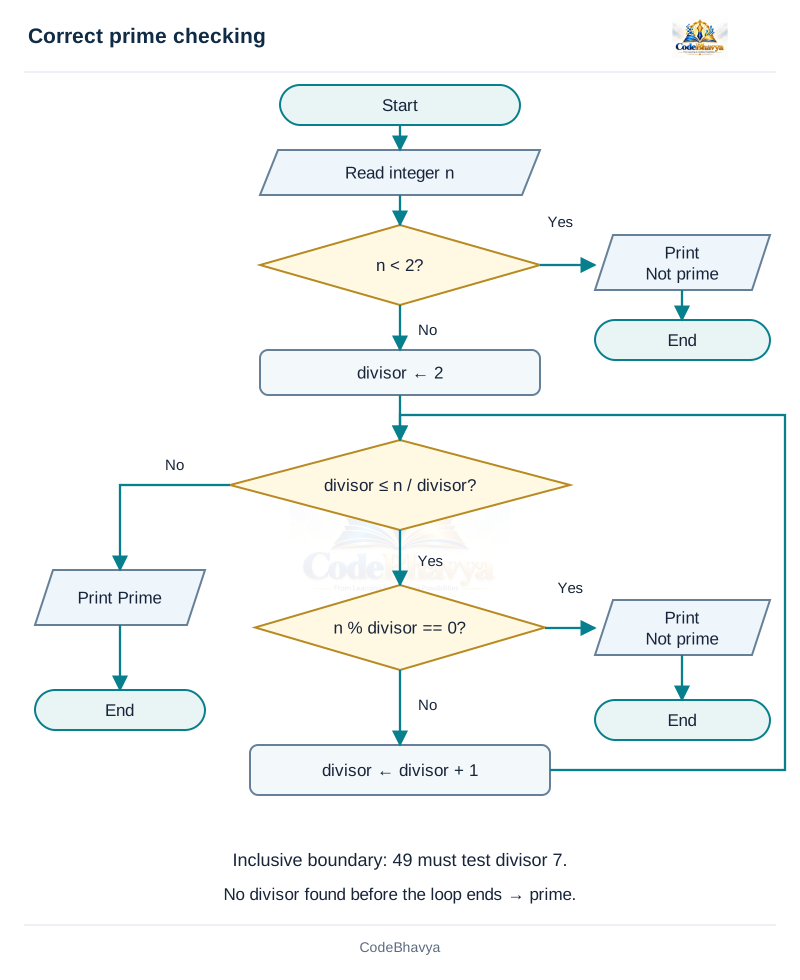
Develop a correct algorithm and flowchart to test whether an integer is prime.
5 marks
Answer in brief
A prime number is an integer greater than 1 whose only positive divisors are 1 and itself.
Algorithm
Handle small inputs: If n < 2, report Not prime.
Start testing: Set divisor = 2.
Test possible divisors: Continue while divisor <= n / divisor.
Check the remainder: If n % divisor == 0, report Not prime and stop.
Increase divisor: If it does not divide n, test the next integer.
Report Prime: If the tests finish without finding a divisor, n is prime.
Reason for the square-root limit
If n has a factor pair a × b = n, at least one factor is not greater than √n. Otherwise their product would be greater than n. So it is enough to look for a divisor up to and including √n. The program uses divisor <= n / divisor instead of multiplying divisor by itself, to avoid a possible multiplication overflow.
Examples
For n = 29, the values 2, 3, 4 and 5 do not divide it. The number is prime. For n = 49, divisor 7 gives a zero remainder, so 49 is not prime. The boundary must include 7. The values 0 and 1 are not prime, while 2 is prime.
Common mistakes
Testing only divisibility by 2 misses odd composite numbers such as 9 and 25. Stopping before the square-root boundary misses perfect squares such as 49. Also, do not count divisors only up to n/2 and then expect two divisors; that mixes two different methods.
Time and space complexity
In the worst case, about √n possible divisors are checked. Hence time is O(√n), where n is the number being tested. A fixed number of variables is used, so extra space is O(1).
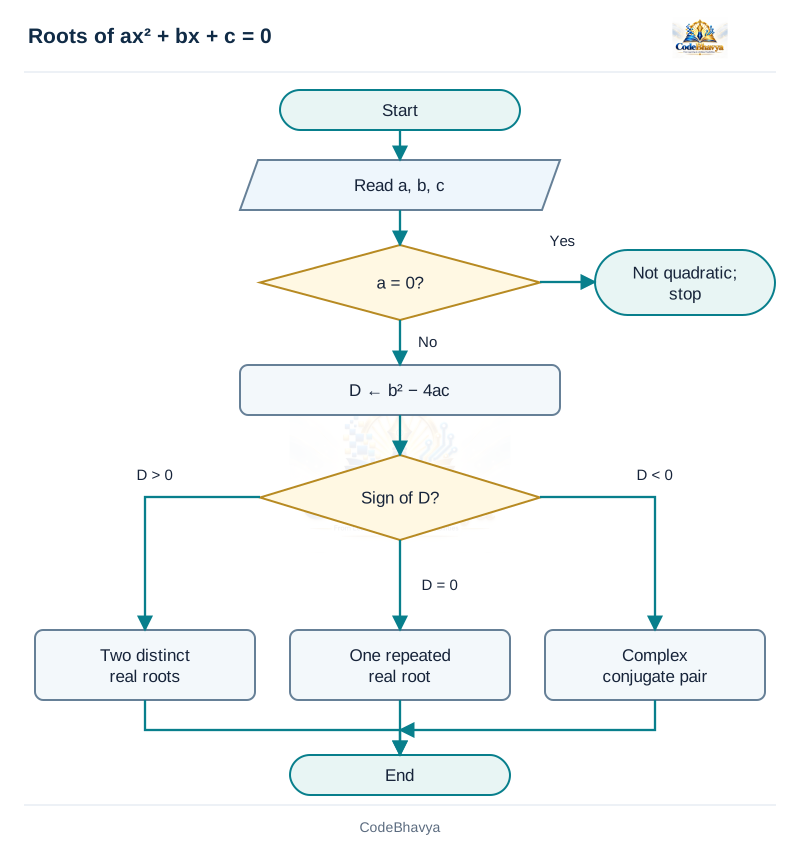
Develop an algorithm and flowchart to find the roots of a quadratic equation.
5 marks
Answer in brief
For the equation ax² + bx + c = 0, where a is not zero, the roots are found using the discriminant D = b² − 4ac.
Types of roots
D > 0: There are two different real roots: (−b + √D)/(2a) and (−b − √D)/(2a).
D = 0: There is one repeated real root: −b/(2a).
D < 0: There are two complex roots. Their real part is −b/(2a), and their imaginary magnitude is √(−D)/|2a|. The pair is written as real part ± imaginary magnitude × i.
Algorithm
Read a, b and c: If a is zero, report that the equation is not quadratic.
Calculate D: Use D = b² − 4ac.
Choose the correct formula: Test whether D is positive, zero or negative.
Display the roots: Show the real roots or the complex pair as required.
Example
Let a = 1, b = −3 and c = 2. Then D = 9 − 8 = 1. The roots are (3 + 1)/2 = 2 and (3 − 1)/2 = 1. Checking them in the equation confirms the result: 2² − 3(2) + 2 = 0 and 1² − 3(1) + 2 = 0.
Important points
Check a before dividing by 2a. Do not use the real square-root function on a negative D. In the complex case, calculate √(−D). The program uses small fixed coefficients for a clear example. Floating-point rounding can affect values very close to zero, and the basic formula can lose accuracy for extreme inputs. With GCC, mathematical functions may require the -lm option when linking.
Time and space complexity
The method uses a fixed number of calculations and comparisons. Under the usual fixed-width analysis, time and extra space are O(1).
Reference table
↔ Scroll horizontally on a small screen
Boundary checks
Case
Expected behaviour
a = 0
Reject as not quadratic.
D = 0
Report the repeated root once.
D < 0
Report complex conjugates, not a real sqrt of a negative value.
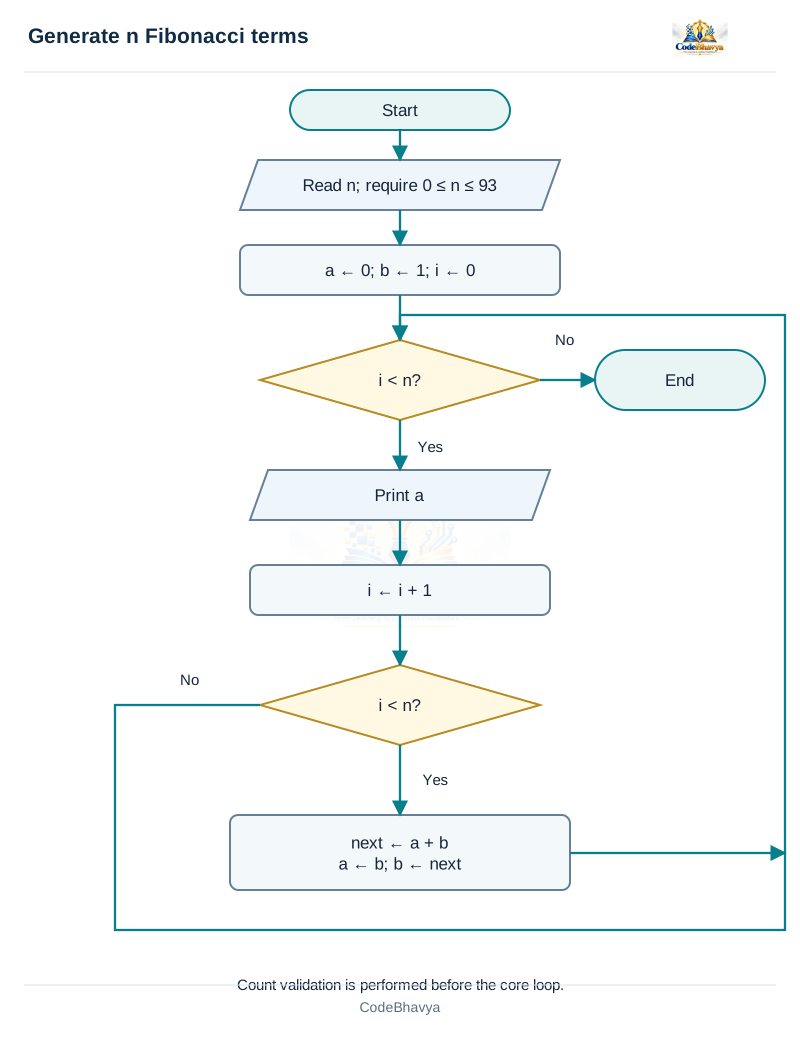
Develop an algorithm and flowchart to generate the first n Fibonacci terms.
5 marks
Answer in brief
A Fibonacci sequence begins with 0 and 1. Each later term is the sum of the two previous terms.
Algorithm
Read the count: Accept n, the number of terms required.
Set the starting values: Use a = 0, b = 1 and i = 0.
Print a: It is the next required term. Increase i by 1.
Update the pair if more terms are needed: First calculate next = a + b. Then set a = b and b = next.
Repeat: Continue until exactly n terms have been printed.
Example: first seven terms
The output is 0, 1, 1, 2, 3, 5, 8. After printing 0, the pair becomes 1 and 1. After printing the first 1, it becomes 1 and 2. Each new pair is prepared using the old pair. The count n means the number of terms, not the largest value allowed in the sequence.
Need for the temporary sum
Both old values are needed to calculate the next term. If a is replaced by b before the sum is calculated, the old a is lost. Saving next = a + b first avoids this mistake. The program does not calculate an extra unused term after the last output.
Boundary cases
For n = 0, no terms are printed. For n = 1, only 0 is printed. For n = 2, the result is 0 and 1. Negative counts are invalid. The supplied program accepts counts from 0 to 93 so that the values fit its unsigned long long variables.
Time and space complexity
The loop prints n terms and performs at most n − 1 pair updates. Therefore time is O(n). Only the count, counter and a few sequence values are stored, so extra space is O(1). This is an iterative method using a loop, not a recursive method.
/* CodeBhavya | PPS AR25 | Learning example */
#include <stdio.h>
int main(void)
{
    int n;
    if (scanf("%d", &n) != 1 || n < 0 || n > 93) {
        puts("Unsupported input"); return 1;
    }
    unsigned long long a = 0, b = 1;
    for (int i = 0; i < n; ++i) {
        printf("%s%llu", i == 0 ? "" : " ", a);
        if (i + 1 < n) {
            unsigned long long next = a + b;
            a = b; b = next;
        }
    }
    putchar('\n');
    return 0;
}
Sample input and output
Input
7
Output
0 1 1 2 3 5 8
Key points
Start with a = 0 and b = 1. Output the current a, then move to the next pair by computing the sum before overwriting either old value.
Calculate the next sum before replacing the old pair.
Related exam questions
Topic matches from the supplied JNTUH papers. Marks below are the printed allocations for those questions.
September/October 2021 · Q1(a) · 7 marks
What is flow chart? Draw a flowchart to generate Fibonacci sequence up to n numbers.
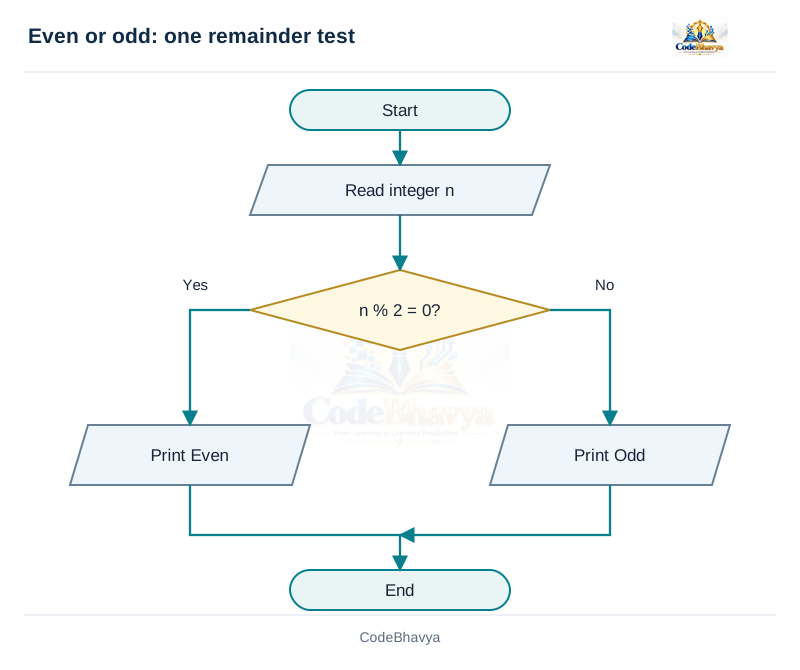
Draw and explain a flowchart to determine whether an integer is even or odd.
5 marks
Answer in brief
An integer is even if it is divisible by 2 without a remainder. Otherwise it is odd.
Algorithm
Read n: Accept an integer.
Test n % 2 == 0: The % operator gives the remainder of integer division.
Print Even: Use this result when the remainder is zero.
Print Odd: Use this result when the remainder is not zero.
End: Only one of the two results is printed.
Explanation
The condition directly checks divisibility by 2. If the remainder is zero, n can be written as 2 multiplied by an integer. In a flowchart, place this condition inside a decision diamond. Label the true branch Yes and the false branch No. Each branch displays its result and reaches End.
Examples
For n = 8, 8 % 2 is 0, so the output is Even. For n = 7, the remainder is 1, so the output is Odd. Zero is even because 0 = 2 × 0. For n = −3, C gives a remainder of −1; it is non-zero, so the number is still correctly reported as Odd.
Important point
Do not test oddness only by n % 2 == 1 when negative inputs are allowed. A negative odd number can give remainder −1. Testing for a zero remainder and using the other branch for Odd handles both signs. The program also checks that reading the input succeeds before using n. Input values must fit int.
Time and space complexity
One remainder and one comparison are enough. There is no loop, so time is O(1). Only a fixed number of variables is required, giving O(1) extra space.
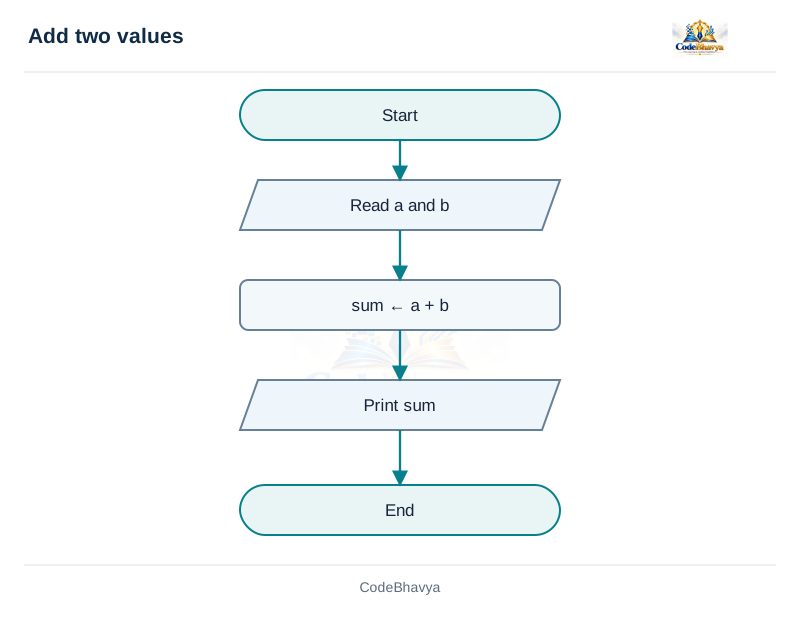
Develop an algorithm and flowchart to find the sum of two numbers.
5 marks
Answer in brief
To find the sum of two numbers, read both values, add them and display the result.
Input and output
Inputs: two numbers a and b. Output: their sum. Choose a numeric type that can hold the allowed values and their result. Use an integer type for whole-number examples or a floating type when fractional inputs are required.
Algorithm
Start: Begin the solution.
Read a and b: Obtain both input values.
Calculate sum: Set sum = a + b.
Display sum: Show the calculated value.
Stop: The required result has been produced.
Pseudocode
READ a, b
sum ← a + b
OUTPUT sum
Example
Let a = 12 and b = 15. After reading the inputs, the addition gives 27. Store 27 in sum and display it. For a = −5 and b = 5, the sum is zero. No decision or repeated calculation is needed for these stated examples.
Flowchart and program
The flowchart contains Start, an input symbol, a processing rectangle for addition, an output symbol and End. The supplied program uses fixed small values so that the output can be checked easily. A program that accepts arbitrary user values must also check input conversion and ensure that the result fits the chosen type. A correct mathematical sum can still be too large for int.
Time and space complexity
The algorithm always performs one addition. Therefore its time is O(1). A fixed number of variables is used, so extra space is O(1). Adding n values would require a repeated step and would take O(n) time.
Reference table
↔ Scroll horizontally on a small screen
Boundary checks
Case
Expected behaviour
0 and 0
0.
−5 and 5
0.
12 and 15
27.
Unrepresentable signed sum
Must be prevented in a general input implementation.
/* CodeBhavya | PPS AR25 | Learning example */
#include <stdio.h>
int main(void)
{
    int a = 12, b = 15;
    int sum = a + b;
    printf("Sum = %d\n", sum);
    return 0;
}
Sample input and output
This example uses values already written in the program.
Output
Sum = 27
Key points
Read the two values, add them using a suitable numeric type, then display the result.
The chosen C type must be able to represent the result.
Related exam questions
Topic matches from the supplied JNTUH papers. Marks below are the printed allocations for those questions.
September 2023 · Q1(j) · 3 marks
Write an algorithm to find the sum of two numbers.
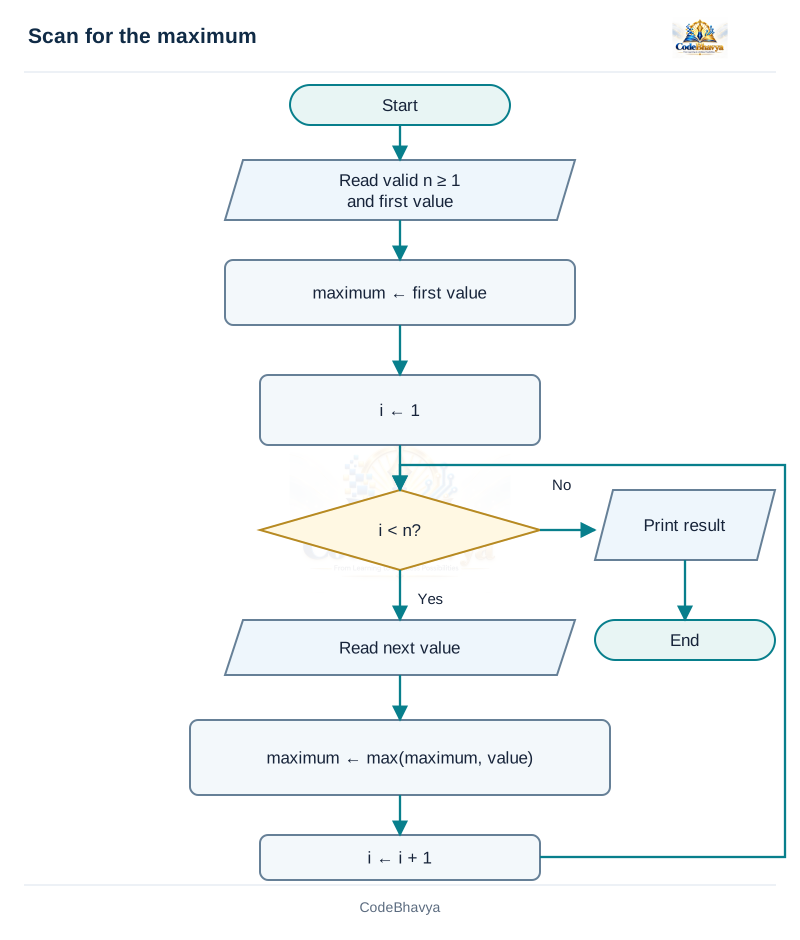
Develop pseudocode to find the largest value in a given set.
5 marks
Answer in brief
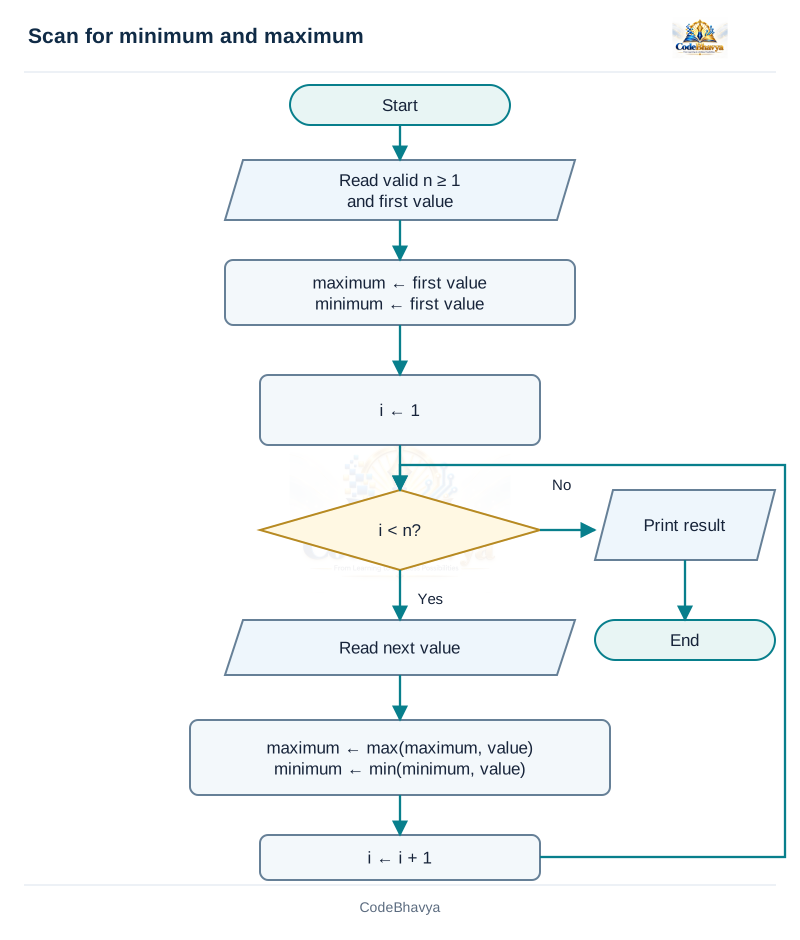
The maximum of a non-empty set can be found by reading each value and updating the current result.
Algorithm
Read n: The count must be at least 1.
Read the first value: Set maximum to this value.
Read each remaining value: If it is greater than maximum, replace maximum.
Display the result: After all values have been checked, output the maximum.
Explanation
The starting value must come from the input. Suppose all values are negative. Starting maximum at zero would give a value that is not even in the input. Starting from the first actual value avoids that mistake. After each new value is checked, the stored result is correct for all values read so far.
Example
For the inputs −8, 3, 3 and −2, maximum starts at −8. Reading 3 changes it to 3. The next 3 and −2 do not change it. Thus the maximum is 3. A repeated maximum is allowed; keeping the current value is sufficient.
Boundary cases
With only one input, that value is the maximum. Equal values do not cause a problem. An empty input is rejected because there is no first value to use. The program accepts 1–100 integers. Each input must fit int. It reads values one at a time, so it does not need an array.
Time and space complexity
Each of n values is read once, with a fixed number of comparisons for each new value. Time is O(n). The program stores only a few counters and result variables, so extra space is O(1). In the flowchart, max and min mean choosing the larger or smaller value; they are mathematical operations, not C library calls used by this program.
Develop an algorithm to find the minimum and maximum in a set.
5 marks
Answer in brief
The minimum and maximum of a non-empty set can be found by reading each value and updating the current result.
Algorithm
Read n: The count must be at least 1.
Read the first value: Set maximum to this value. Also set minimum to this value.
Read each remaining value: If it is greater than maximum, replace maximum. If it is smaller than minimum, replace minimum.
Display the result: After all values have been checked, output the minimum and maximum.
Explanation
The starting value must come from the input. Suppose all values are negative. Starting maximum at zero would give a value that is not even in the input. Starting from the first actual value avoids that mistake. After each new value is checked, the stored result is correct for all values read so far.
Example
For the inputs −8, 3, 3 and −2, maximum starts at −8. Reading 3 changes it to 3. The next 3 and −2 do not change it. Minimum starts at −8 and stays −8. Thus the final minimum is −8 and the maximum is 3.
Boundary cases
With only one input, that value is the minimum and maximum. Equal values do not cause a problem. An empty input is rejected because there is no first value to use. The program accepts 1–100 integers. Each input must fit int. It reads values one at a time, so it does not need an array.
Time and space complexity
Each of n values is read once, with a fixed number of comparisons for each new value. Time is O(n). The program stores only a few counters and result variables, so extra space is O(1). In the flowchart, max and min mean choosing the larger or smaller value; they are mathematical operations, not C library calls used by this program.
Describe the background and important characteristics of C.
5 marks
Answer in brief
C is a general-purpose programming language developed by Dennis Ritchie at Bell Labs in the early 1970s.
Background
C developed alongside the Unix operating system. It provided readable programming statements while also allowing work with memory addresses and bits. These features made it useful for system programs as well as general applications.
Main characteristics of C
Structured programming: A solution can be divided into functions and blocks. This makes a large program easier to organise.
Typed variables: Variables have types such as int, char and double. A type describes the values and operations that can be used.
Operators: C provides arithmetic, comparison, logical and bitwise operators.
Pointers: A pointer stores an address. Pointers allow programs to work with other objects through their locations.
Standard library: Headers such as stdio.h provide declarations for useful functions, including input and output functions.
Portability: Source code can often be used on different systems when it follows standard rules and uses suitable libraries.
Applications
C is used in operating systems, embedded systems, compilers and libraries. The language gives the programmer control, but that also means the programmer must check input, array limits, memory use and numeric ranges. Writing a program in C does not automatically make its algorithm efficient.
Important distinction
C is the language; GCC and Clang are implementations that can compile C. The same source may produce different executable files for different systems. Sizes of types can also differ between implementations. These notes use C11-compatible examples for a hosted environment, where standard startup and input/output facilities are available.
Key points
C source portability depends on the facilities and assumptions used.
Standard library functions need the appropriate declarations.
Explain the structure of a C program with a complete example.
5 marks
Answer in brief
A simple hosted C program contains header inclusion, the main function, declarations and executable statements.
Parts of a C program
Header inclusion: #include <stdio.h> makes declarations for standard input/output functions available. The directive does not print anything by itself.
Main function: int main(void) defines main with no parameters and an int return value. Execution begins here in the hosted environment.
Braces: Opening and closing braces mark the beginning and end of a block.
Declarations: A declaration introduces a name and its type, such as int first = 8;.
Statements: Statements perform actions. For example, total = first + second; calculates and stores a sum.
Return statement: return 0; reports successful termination to the host environment.
Explanation of the example
The program creates first and second with values 8 and 5. It adds them and stores 13 in total. printf displays that value using %d. The newline moves output to the next line. The program then returns zero.
Comments and punctuation
Comments explain the program and are not executed. Declarations and expression statements normally end in semicolons. A preprocessing directive such as #include does not need a semicolon. Match every opening brace with a closing brace.
Important points
C is case-sensitive, so Printf is not the same name as printf. Use the proper header for a library function. Global variables, macros and helper functions are included only when needed; they are not compulsory sections in every program. A larger program can contain several functions and source files.
Reference tables
↔ Scroll horizontally on a small screen
Parts of the example
Part
Purpose
#include <stdio.h>
Makes declarations for standard input/output facilities available.
int main(void)
Defines main with an int result and no parameters.
{ and }
Delimit the function body.
int first = 8;
Declares and initialises a local variable.
printf(...)
Writes formatted output.
return 0;
Indicates successful termination to the host environment.
↔ Scroll horizontally on a small screen
Problems in a first program
Mistake
Why it matters
Correction
Writing Printf instead of printf
C identifiers are case-sensitive.
Use the declared function name.
Omitting a closing brace
The block structure becomes invalid.
Match every opening brace.
Using void main in these examples
It is not the standard no-argument hosted form used here.
Use int main(void).
Placing a semicolon after every line indiscriminately
/* CodeBhavya | PPS AR25 | Learning example */
#include <stdio.h>
int main(void)
{
    int first = 8;
    int second = 5;
    int total = first + second;
    printf("Total = %d\n", total);
    return 0;
}
Sample input and output
This example uses values already written in the program.
Output
Total = 13
Key points
Use int main(void) for these no-argument hosted examples.
Match braces and terminate declarations and expression statements correctly.
What are tokens and identifiers? Explain identifier naming rules in C.
5 marks
Answer in brief
Tokens are the small building blocks of C source code. An identifier is a name given to a variable, function or another program item.
Common token types
Keywords: Words with a fixed language meaning, such as int and while. They cannot be used as ordinary variable names.
Identifiers: Names selected by the programmer, such as total and calculate_sum.
Constants: Values written in the source, such as 25 or 3.5.
String literals: Text written in double quotes, such as "Hello".
Operators and punctuation: Symbols such as +, =, ; and braces help form expressions and statements. C calls these symbols punctuators.
Identifier naming rules
First character: For the simple portable names used here, begin with a letter.
Remaining characters: Use letters, digits and underscores. Spaces and hyphens cannot be part of one identifier.
Case matters: total and Total are different names.
Keywords are not allowed: Do not name a variable int or while.
Avoid reserved names: Do not use leading-underscore patterns in beginner application names.
Examples
total_marks and marks2 are valid names. 2marks is invalid because it begins with a digit. total-marks is read as subtraction, not one name. student count contains two separate names rather than one identifier.
Meaningful names
Choose names that explain the data, such as student_count or total_marks. The source int total = 25; contains the keyword int, identifier total, integer constant 25 and symbols = and ;. Do not memorise an old rule that all C names must have at most eight characters; implementations have limits, but useful names can be longer.
Reference tables
↔ Scroll horizontally on a small screen
Tokens in a declaration
Source fragment
Category
Meaning
int
Keyword
A built-in type specifier.
total
Identifier
A name chosen for the object.
=
Punctuator/operator
Assignment or initialisation notation in context.
25
Integer constant
A numeric value written in the source.
;
Punctuator
Ends the declaration.
↔ Scroll horizontally on a small screen
Check the name
Name
Assessment
total_marks
Valid beginner-style identifier.
marks2
Valid; a digit may follow the first character.
2marks
Invalid; begins with a digit.
total-marks
Parsed as subtraction, not one identifier.
while
A keyword; cannot be your variable name.
Key points
Keywords and identifiers are different token categories.
Uppercase and lowercase letters are distinct.
Related exam questions
Topic matches from the supplied JNTUH papers. Marks below are the printed allocations for those questions.
Explain the basic C data types, their ranges and how to check their sizes.
5 marks
Answer in brief
A data type tells us what kind of value an object can store and which operations can be performed on it.
Basic data types
char: Stores character-sized values. It is commonly used for individual characters and character arrays.
Integer types: short, int, long and long long store whole numbers. Signed forms can represent negative values; unsigned forms represent non-negative values.
Floating types: float, double and long double store approximate values that can include fractions.
Boolean type: In C11, _Bool stores logical values as 0 or 1. The stdbool.h header provides the name bool.
void: Shows the absence of a value, such as a function that returns no result.
Sizes and ranges
Type sizes can differ between implementations. int is not always two bytes, and long double is not always ten bytes. sizeof reports a size in C bytes. sizeof(char) is always 1. CHAR_BIT, from limits.h, tells us how many bits are in a C byte. INT_MIN and INT_MAX give the int limits. Use %zu to print a sizeof result, whose type is size_t.
Enumeration
An enumeration gives names to related integer values. In enum Day { MONDAY, TUESDAY, WEDNESDAY };, the values start at 0 unless other values are specified. Thus TUESDAY has value 1. Names can make the code easier to read than unexplained numbers. Do not assume an enum object always occupies one byte.
Choice of type
Use an integer for a count and a floating type when a fractional result is required. Check the largest allowed value and intermediate calculations. Every fixed-width type has a limited range. A floating type does not store every decimal fraction exactly. Plain char can act as signed or unsigned depending on the implementation; specify the form when that difference matters.
Define a variable. Explain declaration, initialisation and assignment.
5 marks
Answer in brief
A variable is a named object used to store a value. The value of an ordinary modifiable variable can change while the program runs.
Declaration, initialisation and assignment
Declaration: Introduces the name and type. Example: int score;.
Initialisation: Provides a starting value when the object is created. Example: int score = 70;.
Assignment: Stores a new value in an existing variable. Example: score = 75;.
Example
After int score = 70;, score contains 70. If bonus is 5, the statement score = score + bonus; calculates 75 and stores it back in score. The declared type remains int. Only the stored value changes.
Declaration and definition
A declaration gives information about a name. An object definition also provides its storage. For example, a local int count; defines an object even though it does not give it a starting value. extern int shared_count; is an example of a declaration whose definition can be supplied elsewhere. These terms should not be confused with initialisation.
Important points
Initialise before use: An ordinary local automatic variable without an initialiser does not have a useful guaranteed starting value. Give it a valid value before reading it.
Use the correct type: A value must be suitable for the destination type and its range.
Understand const: A const-qualified object cannot be changed through that object.
Use clear names: A name such as total_marks makes the purpose easier to understand.
Reference table
↔ Scroll horizontally on a small screen
Declaration, initialisation and assignment
Operation
Example
Purpose
Declaration
int total;
Introduces total as an int object.
Initialisation
int total = 0;
Supplies the object’s initial value.
Assignment
total = 12;
Replaces the value of an existing modifiable object.
Key points
An ordinary modifiable variable can change during execution.
Initialisation happens as the object is created; assignment happens later.
Related exam questions
Topic matches from the supplied JNTUH papers. Marks below are the printed allocations for those questions.
March/April 2023 · Q1(b) · 3 marks
How do you declare a variable?
Paper P02 · page 1
July 2021 · Q1(a) · 7 marks
Differentiate declaration and definition of a variable, with examples.
Explain constants, literals and symbolic constant names in C.
5 marks
Answer in brief
A constant written in the source represents a fixed value. Its form tells the compiler what kind of value it is.
Types of values in source code
Integer constant: A whole number such as 42. Forms such as 42U or 42LL specify an unsigned or long long form.
Floating constant: A value such as 3.5. It has type double by default; 3.5f has type float.
Character constant: A character in single quotes, such as A written as 'A'. An ordinary character constant has type int in C.
String literal: Characters in double quotes, such as "CodeBhavya". A terminating null character marks the end of the string.
Enumeration constant: A named integer value introduced by an enum declaration.
Named constants
A name can explain a value that is used repeatedly. #define MAX_STUDENTS 60 replaces the macro name during preprocessing. const double tax_rate = 0.05; creates a typed object that cannot be modified through that object. These are different mechanisms; const does not automatically make an object an integer constant expression in C.
Character and string example
'A' is a character constant. "A" is a string literal containing A and a null character, so its array size is 2 C bytes. Single quotes and double quotes are not interchangeable.
Important points
Do not try to assign a new value to a literal or modify a string literal. A writable character array initialised from a string literal has its own elements and is different from the literal itself. Use meaningful constant names to avoid repeating unexplained numbers in a program.
Reference table
↔ Scroll horizontally on a small screen
Values written in source
Form
Example
Meaning
Integer constant
42, 42U, 0x2A
Whole-number constant; suffixes and bases affect type and interpretation.
Floating constant
3.5, 3.5f
double by default; f requests float.
Character constant
'A', '\n'
An ordinary character constant has type int in C.
String literal
"CodeBhavya"
An array of characters including a terminating null character.
Enumeration constant
enum { LIMIT = 10 };
Introduces an integer constant name.
Key points
A macro replacement and a const object are not the same language feature.
The type of a literal depends on its form and suffix.
Explain printf and scanf with suitable format specifiers.
5 marks
Answer in brief
Formatted input and output functions read and display values using a format string. They are declared in the stdio.h header.
printf: formatted output
printf displays values on standard output, usually the screen. A format specifier tells it how to display each value. For example, printf("Age = %d", age); displays an integer. For price = 12.5, printf("%.2f", price); displays 12.50. Here .2 requests two digits after the decimal point. It changes the displayed form, not the stored value.
scanf: formatted input
scanf reads values from standard input, usually the keyboard. For int age;, use scanf("%d", &age);. The & operator gives the address where the value must be stored. Check that scanf returns 1 before using this one value. A different result means the required assignment did not succeed. The input must also be within the range of the destination type.
Common format rules
Integer: Use %d for int.
Floating input: Use %f with float * and %lf with double *. For example, scanf("%lf", &price); reads a double.
Floating output: Use %f for a double. A float passed to printf is converted to double automatically.
Character: Use %c for a character.
Long double: Use %Lf for both input and output with the appropriate argument.
Important points
The format specifier and argument type must match. scanf normally needs addresses; printf normally needs the values to display. stdin is standard input, stdout is normal output and stderr is error output. These streams can be redirected to files. A successful input count does not prove that the whole line is valid.
Explain character input/output and safe whole-line input in C.
5 marks
Answer in brief
Character input/output functions handle individual characters. Line input/output functions handle a string containing a line of text.
Character functions
getchar: Reads one character from standard input. Store its result in int so that the special end-of-input value EOF can be detected.
putchar: Writes one character to standard output. For example, putchar('A'); displays A.
Line functions
fgets: Reads at most one less than the supplied array size and adds a terminating null character when successful. It keeps the newline if it reads one.
puts: Writes a string and then adds a newline.
Header: Include stdio.h before using these functions.
Example
For char name[40];, fgets(name, sizeof name, stdin) reads a line into name if the call succeeds. It can store at most 39 input characters plus the terminating null character. If the line is longer, part of it remains unread. Check that the result is not NULL before using the line.
Important points
Check for EOF before treating a getchar result as a character. Do not use gets: it cannot limit the input size and has been removed from standard C. Functions such as getch from conio.h are not part of standard C. After numeric scanf input, a newline may remain; the next line read may read that newline. Plan the input sequence carefully.
Reference tables
↔ Scroll horizontally on a small screen
Character and line functions
Function
Purpose
Important detail
getchar()
Reads the next input character.
Returns int so it can represent an unsigned-char value or EOF.
putchar(ch)
Writes one character.
Use a character value, not a string pointer.
fgets(buffer, size, stdin)
Reads at most size − 1 characters.
On success, adds a null terminator; a read newline is retained.
puts(text)
Writes a string followed by a newline.
Do not add an unwanted second newline.
↔ Scroll horizontally on a small screen
Input requirements
Need
Suitable starting point
Extra responsibility
One next character
getchar
Handle EOF and any whitespace deliberately.
A bounded whole-line segment
fgets
Detect a missing newline if truncation matters.
A numeric token
Checked formatted input or checked text conversion
An operator is a symbol that tells C to perform an operation on one or more values. The values it works on are called operands.
Types of operators
Arithmetic: +, -, *, / and % perform numeric calculations.
Relational: <, <=, >, >=, == and != compare values.
Logical: &&, || and ! combine or reverse conditions.
Bitwise: &, |, ^, ~, << and >> work with the bits of integers.
Assignment: = stores a value; += and similar forms combine calculation and assignment.
Increment and decrement: ++ adds one and -- subtracts one.
Conditional: ?: selects one of two expressions based on a condition.
Classification by number of operands
Unary: Works on one operand, such as -x or !ready.
Binary: Works on two operands, such as a + b.
Ternary: Works with three operands. The conditional operator is written condition ? value1 : value2.
Example
In total = price * quantity;, * multiplies price and quantity, and = stores the result in total. In age >= 18 && has_id, >= compares age with 18 and && combines the two conditions.
Important points
Do not confuse = with ==: one assigns and the other compares. Likewise & is bitwise AND, while && is logical AND. Parentheses can make grouping clear. Choose types and input values that make the operation valid.
Reference table
↔ Scroll horizontally on a small screen
Operator families
Family
Operators
Example
Arithmetic
+ − * / %
a + b
Relational and equality
< <= > >= == !=
score >= 40
Logical
&& || !
valid && ready
Bitwise
& | ^ ~ << >>
flags & mask
Conditional
?:
a > b ? a : b
Increment/decrement
++ --
++count
Assignment
= += -= *= /= %= and bitwise compound forms
total += value
Other useful operators
sizeof, casts, comma, address and indirection
sizeof(int)
Key points
An operand is the value or expression an operator acts on.
Operator purpose and operand count are two different classifications.
Explain arithmetic operators, integer division and the remainder operator.
5 marks
Answer in brief
Arithmetic operators perform addition, subtraction, multiplication, division and remainder calculations.
Operators and examples
Addition (+): 7 + 2 gives 9.
Subtraction (-): 7 - 2 gives 5.
Multiplication (*): 7 * 2 gives 14.
Division (/): 7 / 2 gives 3 when both operands are integers. 7.0 / 2 gives 3.5.
Remainder (%): 7 % 2 gives 1, the remainder after integer division. Both operands must have integer type.
Integer and floating-point division
Integer division discards the fractional part towards zero. Thus -7 / 2 gives -3. If a floating-point operand is present, floating-point division is used after the required conversions. To calculate a fractional average from integers, write (double)total / count with a non-zero count.
Example
For a = 17 and b = 5, a / b is 3 and a % b is 2. The relationship is 17 = 3 * 5 + 2. This explains the difference between quotient and remainder.
Important points
Never divide by zero or use zero as the divisor of %. Keep results within the allowed type range: signed integer overflow has no defined result in C. Integer division must also have a representable result. Floating-point calculations may contain small rounding errors.
Explain relational, equality and logical operators with short-circuit evaluation.
5 marks
Answer in brief
Relational operators compare values. Logical operators combine conditions. These operators produce int results: 1 for true and 0 for false.
Relational operators
Less than and greater than: Use < and >. For a = 5 and b = 8, a < b gives 1.
Inclusive comparisons: Use <= and >= when equality is also allowed.
Equality: Use == to test equality and != to test inequality. a == b gives 0 for 5 and 8.
Logical operators
AND (&&): True only when both conditions are true. Example: age >= 18 && has_id.
OR (: |)|True when at least one condition is true. Example: day == 6 || day == 7.
NOT (!): Reverses the truth value. !0 gives 1 and !5 gives 0.
Short-circuit evaluation
For &&, C skips the right condition when the left condition is false. For ||, it skips the right condition when the left condition is true. For example, d != 0 && n % d == 0 checks d first. When d is zero, the remainder operation is skipped, avoiding division by zero in that expression.
Important points
Zero is treated as false; a non-zero value is treated as true. Write x > 0 && x < 10 to test a range. Do not write 0 < x < 10, because C first produces 0 or 1 from the first comparison and then compares that result with 10. Use == for comparison, not =.
Reference table
↔ Scroll horizontally on a small screen
Conditions with a = 5 and b = 8
Expression
Result
Reason
a < b
1
5 is less than 8.
a == b
0
The values differ.
a != b
1
The values differ.
a > 0 && b > 0
1
Both conditions are true.
a == 0 || b == 0
0
Neither value is zero.
!a
0
a is non-zero.
Key points
Logical operators normalise their result to 0 or 1.
Short-circuiting can prevent evaluating an unsafe expression.
Explain bitwise operators with a worked binary example.
5 marks
Answer in brief
Bitwise operators work on individual bits of integer values. Unsigned integers make introductory bit examples easier to understand.
Operators
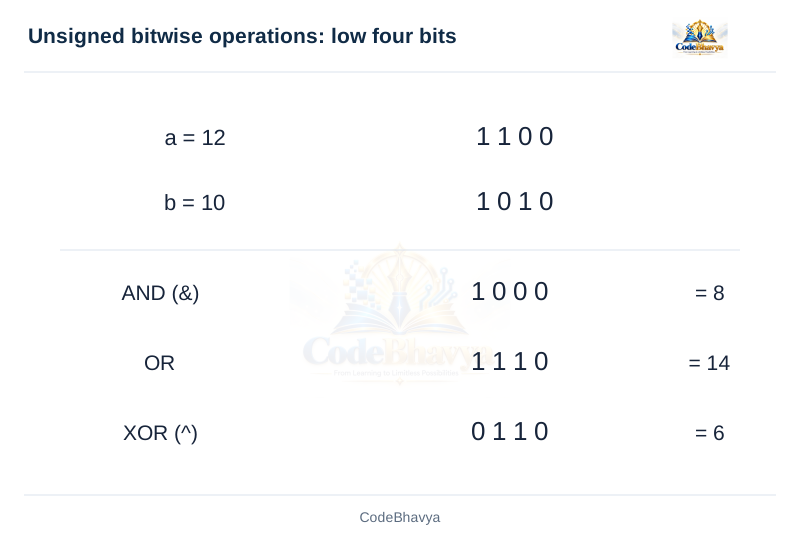
AND (&): Sets a result bit when both input bits are 1.
OR (: )|Sets a result bit when either input bit is 1.
XOR (^): Sets a result bit when the input bits differ.
Complement (~): Reverses every bit of the promoted operand.
Left shift (<<): Moves bits left and fills the new low positions with zeros for unsigned values.
Right shift (>>): For unsigned values, moves bits right and fills the new high positions with zeros.
Worked example
Use a = 12U and b = 10U. Their low four bits are 1100 and 1010. a & b gives 1000, or 8. a | b gives 1110, or 14. a ^ b gives 0110, or 6. Also, 12U << 1 gives 24 and 12U >> 1 gives 6.
Uses
Flags: Store several yes/no settings in different bits of one integer.
Masks: Select, set or clear required bit positions.
Low-level programming: Work with data formats and hardware interfaces where bit positions matter.
Important points
~12U reverses all bits of unsigned int, not only the four displayed bits. A shift count must be non-negative and smaller than the width of the promoted left operand. Signed shifts have extra restrictions. & and | operate on bits; && and || operate on truth values.
Explain the conditional operator ?: with an example.
5 marks
Answer in brief
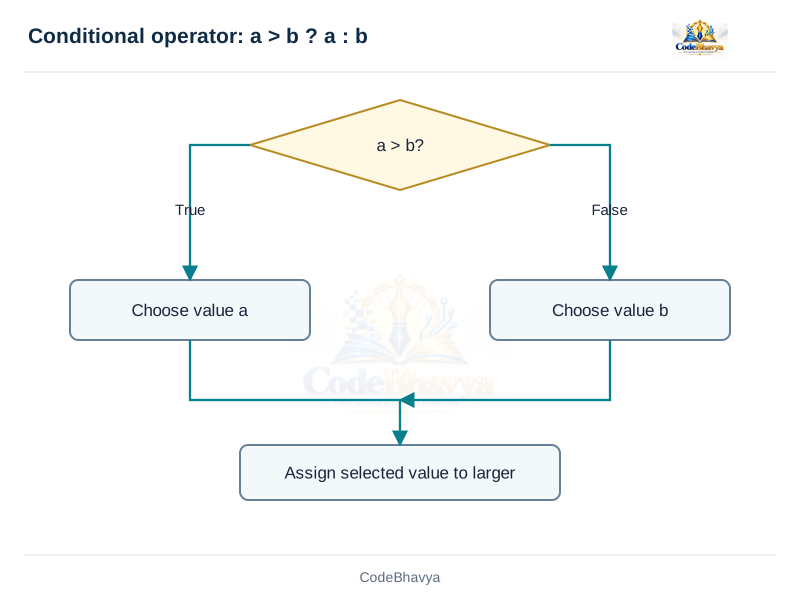
The conditional operator ?: selects one of two expressions according to a condition. It is also called the ternary operator because it has three operands.
First the condition is evaluated. A non-zero condition selects the first alternative. A zero condition selects the second alternative. Only the selected alternative is evaluated.
Example: larger value
Write maximum = a > b ? a : b;. If a = 12 and b = 7, the condition is true and maximum becomes 12. If a = 4 and b = 9, the condition is false and maximum becomes 9. Equal values also give the correct maximum.
Example: even or odd
The expression n % 2 == 0 ? "Even" : "Odd" selects the appropriate string for an integer n. It can be passed to printf or puts. Zero is even because its remainder on division by 2 is zero.
Advantages and important points
Compact form: Useful for a short choice that produces one value.
Readability: Use if-else when the alternatives contain several statements or become difficult to read.
Grouping: Nested conditional operators group from right to left. Add parentheses for clarity.
Types: The alternative expressions must have types permitted by C; C determines a suitable result type.
/* CodeBhavya | PPS AR25 | Learning example */
#include <stdio.h>
int main(void)
{
    int a = 15, b = 9;
    int larger = a > b ? a : b;
    printf("Larger = %d\n", larger);
    return 0;
}
Sample input and output
This example uses values already written in the program.
Output
Larger = 15
Key points
?: is an expression that produces a selected value.
Only one alternative expression is evaluated.
Related exam questions
Topic matches from the supplied JNTUH papers. Marks below are the printed allocations for those questions.
September 2023 · Q3(b) · 4 marks
What is the ternary operator? Write the syntax of switch-case.
Paper P09 · page 1 · Combined subquestion: marks apply to its complete wording.
Differentiate prefix and postfix increment and decrement operators.
5 marks
Answer in brief
The increment operator ++ increases a variable by one. The decrement operator -- decreases it by one. Each has a prefix and a postfix form.
Prefix form
The operator is placed before the variable: ++x or --x. The expression gives the updated value. Starting with x = 5, y = ++x; leaves both x and y equal to 6. Starting with x = 5, y = --x; leaves both equal to 4.
Postfix form
The operator is placed after the variable: x++ or x--. The expression gives the previous value while the variable is updated. Starting with x = 5, y = x++; leaves y equal to 5 and x equal to 6. Starting with x = 5, y = x--; leaves y equal to 5 and x equal to 4.
When used alone
As separate statements, ++x; and x++; both increase x by one. Their difference matters when the expression value is used, as in an assignment. The same rule applies to decrement.
Important points
Writable variable: The operand must be something C permits to be changed. A constant such as 5 cannot be incremented.
Valid range: The updated value must fit the type; signed overflow has no defined result.
Separate changes: Do not use i++ + ++i. It changes i without the required ordering and has undefined behaviour, so there is no guaranteed answer.
Clear code: Use separate statements when several updates would be confusing.
Assignment operators store a value in a writable object, such as an ordinary variable. The simple assignment operator is =.
Simple assignment
In total = 20;, the value 20 is stored in total. In total = a + b;, the right-hand expression is calculated first and its result is converted to the type of total for storage. The left side must be a valid destination; 20 = total; is invalid.
Compound assignment
+=: total += 5 adds 5 to total.
-=: total -= 5 subtracts 5.
*=: total *= 5 multiplies by 5.
/=: total /= 5 divides by 5 using the relevant arithmetic types.
%=: total %= 5 stores the integer remainder.
Bitwise forms: &=, |=, ^=, <<= and >>= combine a bit operation with assignment.
Worked example
Starting with int total = 10;, total += 5; gives 15. Next, total *= 2; gives 30. Finally, total -= 4; gives 26. For a simple variable, total += 5 has the usual effect of total = total + 5. A compound assignment evaluates its left operand only once.
Important points
= assigns; == compares. Assignment operators group from right to left: a = b = 0 stores zero in b and then a, when their types permit it. Do not divide by zero. Check whether a conversion loses a fraction or whether arithmetic exceeds the type range. A const-qualified object cannot be assigned a new value through that object.
Reference table
↔ Scroll horizontally on a small screen
Assignment forms
Form
Simple-variable explanation
x = y
Store the converted value of y in x.
x += y
Add y to x and store the result in x.
x -= y
Subtract y from x.
x *= y
Multiply x by y.
x /= y
Divide x by y, respecting the operand types.
x %= y
Store the integer remainder.
x &= mask
Apply bitwise AND and store the result.
x <<= count
Shift and store the result, subject to valid shift rules.
Key points
= assigns; == compares.
The stored result is converted to the destination type.
Define an expression and explain how its type affects the result.
5 marks
Answer in brief
An expression combines values, variables, operators or function calls to perform a calculation or another operation.
Parts of an expression
Operands: The values or objects used, such as a, b and 10.
Operators: The operations performed, such as + or *.
Parentheses: Show the intended grouping, such as (a + b) * 2.
Types and examples
Arithmetic: a + b * 2 calculates a numeric result.
Relational: a > b produces 1 or 0.
Logical: a > 0 && b > 0 tests two conditions.
Assignment: total = 5 stores a value.
Conditional: a > b ? a : b selects a value.
Expression and expression statement
a + b is an expression. Adding a semicolon gives the expression statement a + b;. That statement calculates the sum and discards it. total = a + b; is useful because it stores the result. int total = 5; is a declaration with initialisation, rather than an expression statement.
Evaluation example
For a = 4 and b = 3, a + b * 2 gives 10 because multiplication groups before addition. (a + b) * 2 gives 14. Operand types also matter: 7 / 2 gives 3, whereas 7.0 / 2 gives 3.5. Avoid expressions that change the same variable without the ordering required by C.
Reference table
↔ Scroll horizontally on a small screen
Expression examples
Expression
What it does
a + b * 2
Computes an arithmetic value.
score >= 40
Produces an int truth value, 0 or 1.
total = 5
Stores a value and has the assigned value as its result.
count++
Modifies count and supplies its previous value.
printf("Hello")
Calls a function; the call also has a return value.
Key points
Grouping, types and sequencing all matter.
An expression can have a value and also change program state.
Explain operator precedence and associativity with the correct precedence table.
5 marks
Answer in brief
Precedence and associativity determine how operators and operands are grouped in an expression.
Precedence
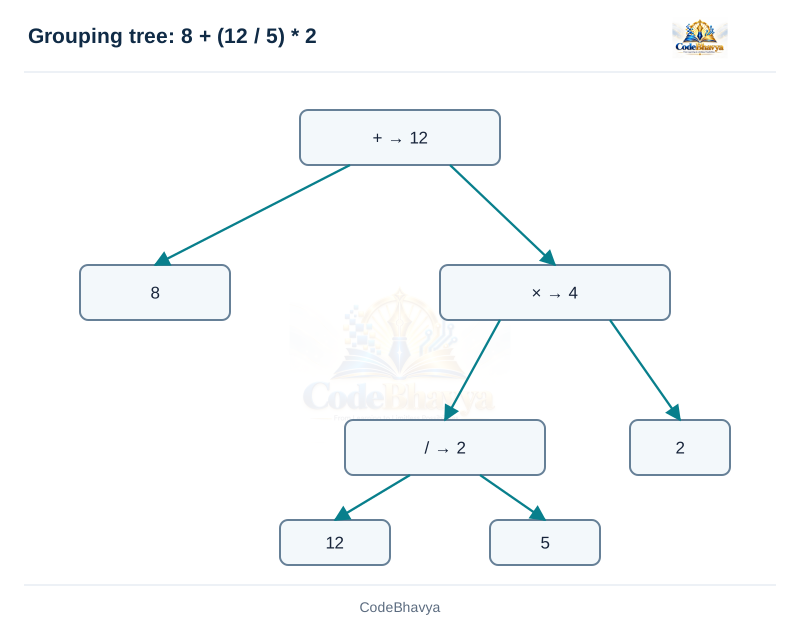
Precedence gives the priority between different operator levels. Multiplication has higher precedence than addition. Therefore 2 + 3 * 4 groups as 2 + (3 * 4) and gives 14. Parentheses can change the grouping: (2 + 3) * 4 gives 20.
Associativity
Associativity decides grouping when operators have the same precedence. Multiplication and division group from left to right. Thus 20 / 5 * 2 means (20 / 5) * 2 and gives 8. Assignment groups from right to left, so a = b = 5 means a = (b = 5).
Common priority levels
Unary operations: Operators such as ! and unary minus group before multiplication.
Multiplication level: *, / and % group before addition and subtraction.
Comparison levels: Relational operators group before equality operators.
Logical levels: && groups before ||.
Assignment: Assignment has lower precedence than these arithmetic and logical operators. Refer to the complete table for all levels.
Important distinction
Grouping is not generally the order in which operands run. For example, multiplication grouping does not say which of two function calls runs first in f() * g(). Write separate statements when order matters. Parentheses improve readability but do not make an otherwise invalid multiple update valid.
Evaluate C expressions step by step and distinguish grouping from evaluation order.
5 marks
Answer in brief
Expression evaluation means finding an expression’s result by applying its grouping rules, operand types and operator meanings.
Steps
Identify types: Check whether operands are integers or floating-point values.
Check parentheses: Use parentheses to identify explicitly grouped parts.
Apply precedence and associativity: Determine which operands belong to each operator.
Calculate valid operations: Use integer or floating-point arithmetic as required.
Check the result: Make sure division is valid and values stay within the supported range.
Worked example: integer arithmetic
Evaluate 8 + 12 / 5 * 2. Division and multiplication have higher precedence than addition and group left to right. First, 12 / 5 gives 2 because both operands are integers. Next, 2 * 2 gives 4. Finally, 8 + 4 gives 12. Thus the result is 12.
Worked example: floating-point arithmetic
In 8 + 12.0 / 5 * 2, 12.0 is double. The division gives approximately 2.4, multiplication gives approximately 4.8, and addition gives approximately 12.8. Changing an operand type can therefore change the answer.
Important points
Do not assume that all operands are evaluated from left to right. Short-circuit operators provide particular ordering rules, but many operators do not. An expression such as i++ + ++i has undefined behaviour and no guaranteed numeric result. Divide only by a valid non-zero divisor, and avoid signed overflow.
Reference tables
↔ Scroll horizontally on a small screen
Evaluation without ambiguous side effects
Expression
Reasoning
Result
8 + 12 / 5 * 2
12 / 5 = 2; 2 * 2 = 4; 8 + 4
12 (int)
(8 + 12) / 5 * 2
20 / 5 = 4; 4 * 2
8 (int)
5 / 2 + 0.5
Integer division gives 2, then convert and add 0.5
Explain implicit type conversion, integer promotions and mixed-type arithmetic.
5 marks
Answer in brief
Implicit type conversion is a conversion performed automatically according to C rules, without writing a cast at that point.
Where conversions occur
Initialisation: In double value = 5;, integer 5 is converted to double.
Assignment: In int count = 3.8;, the fractional part is discarded and count becomes 3.
Mixed arithmetic: In 5 + 2.5, the integer is converted to double and the result is 7.5.
Function arguments: Arguments can be converted to the parameter types. Extra promotion rules apply to functions such as printf.
Integer promotions
Small integer types such as char and short commonly become int before arithmetic. If int cannot represent all values of the original type, the promotion uses unsigned int. This allows many calculations on smaller integer values to use a standard arithmetic type.
Advantages
Convenience: The programmer does not need to write a cast for every permitted conversion.
Mixed calculations: Values of different arithmetic types can be used together according to the language rules.
Limitations and example
Automatic conversion can lose information. Converting 3.8 to int discards .8. Mixing signed and unsigned integers can also produce unexpected comparisons, so check the types. In double average = 7 / 2;, integer division happens first and gives 3; only then is 3 converted to 3.0. Use 7.0 / 2 or convert an operand before division to obtain 3.5.
Reference table
↔ Scroll horizontally on a small screen
Where conversions occur
Context
Example
Effect
Integer promotion
A short used in arithmetic
Often promotes to int; unsigned int is used when int cannot represent all values.
Mixed arithmetic
int + double
The integer value is converted for double arithmetic.
Assignment
double result = 5;
The integer value is converted to double.
Narrowing assignment
int count = 3.9;
A representable floating value is truncated toward zero, producing 3.
Variadic function arguments
printf("%f", a_float)
float is promoted to double.
Key points
Implicit does not mean harmless or lossless.
Signedness matters in comparisons and arithmetic.
Related exam questions
Topic matches from the supplied JNTUH papers. Marks below are the printed allocations for those questions.
June 2022 · Q1(b) · 8 marks
Explain different type-conversion techniques with examples.
Why cast before integer division when a fractional result is needed?
2 marks
Answer
Cast an operand before division to obtain a fractional result from integer values. Casting after integer division cannot restore the discarded fraction.
For total = 7 and count = 2, (double)total / count gives 3.5.
(double)(total / count) gives 3.0 because 7 / 2 first gives integer 3.
Explain explicit type casting and distinguish casting before and after division.
5 marks
Answer in brief
Explicit type conversion uses a cast written by the programmer. Its syntax is (type) expression.
Purpose of a cast
A cast requests a conversion of an expression value to a specified type. For example, (double)total produces a double value from total. It does not change the declared type of total. Casts are useful when a particular arithmetic type is needed.
Cast before division
Let int total = 7 and count = 2;. In (double)total / count, total becomes 7.0 for the calculation. The division uses floating-point arithmetic and gives 3.5. This is useful when calculating an average from integer totals. The count must be non-zero.
Cast after division
In (double)(total / count), the integer division is performed first. 7 / 2 gives 3. Casting that result produces 3.0. The discarded fraction cannot be restored by a later cast. This is why the position of a cast matters.
Important points
Original variable: A cast produces a converted value; total is still an int containing 7.
Possible loss: Casting 3.8 to int gives 3 when representable.
Range: A cast does not make every value fit the target type. Check the supported range.
Clear purpose: Use a cast when the conversion is intended and understood. It should not be used merely to hide a compiler warning.
/* CodeBhavya | PPS AR25 | Learning example */
#include <stdio.h>
int main(void)
{
    int total = 7, count = 2;
    double before = (double)total / count;
    double after = (double)(total / count);
    printf("cast before division = %.1f\n", before);
    printf("cast after division = %.1f\n", after);
    printf("total remains int with value %d\n", total);
    return 0;
}
Sample input and output
This example uses values already written in the program.
Output
cast before division = 3.5
cast after division = 3.0
total remains int with value 7
Key points
Casting a value does not redeclare its variable.
Place a cast before the operation whose arithmetic type must change.
Related exam questions
Topic matches from the supplied JNTUH papers. Marks below are the printed allocations for those questions.
July 2021 · Q2(a) · 5 marks
State the purpose of type casting and type conversion.