Skip to study material
← Question index

QUESTION 05 · Program development

What are compilation and linking?

2 marks

Answer

Compilation checks and translates C source code. Linking combines object files and required library code to make an executable program.

  • The compiler reports errors in the source that it detects.
  • The linker connects references to functions and other code needed by the program.
QUESTION 06 · Program development

How do you create, compile and run a C program? Explain the translation stages.

5 marks

Answer in brief

A C program is created by writing source code, translating it, linking the required code and running the resulting executable file.

Steps to create and run a program

  1. Write the source: Use an editor to write valid C code. Save the file with the .c extension, such as hello.c.
  2. Preprocess: The preprocessor handles instructions such as #include and #define. Header information and macro replacements are prepared.
  3. Compile: The compiler checks the C code and translates it for the selected target. Correct the reported errors.
  4. Assemble: In a usual toolchain, assembly instructions are converted into object code. Some implementations combine these stages.
  5. Link: The linker combines the object files and required library code. It produces an executable program.
  6. Run: The operating system loads the executable. In a hosted C program, execution starts at main.

Object code and executable code

An object file contains translated code, but it may still need code from other files or libraries. An executable is the linked program prepared for the target environment. A successful compilation can still be followed by a linking error, for example when a required function definition is missing.

Types of errors

  1. Syntax error: The code breaks a language rule, such as a missing semicolon. The compiler reports the problem.
  2. Link error: The linker cannot find a required definition or compiled component.
  3. Runtime failure: A problem occurs while the program is running, such as an invalid memory access.
  4. Logical error: The program runs but uses the wrong steps or formula. For example, it subtracts marks instead of adding them.

Compile and run commands

With GCC installed, use the command below. On Linux or macOS, run ./hello. In Windows PowerShell, create hello.exe and run .\hello.exe. Read warnings as well as errors.

gcc -std=c11 -Wall -Wextra -pedantic hello.c -o hello

Reference tables

↔ Scroll horizontally on a small screen
Typical C toolchain stages
StagePurpose
PreprocessingHandles directives such as #include and macro replacement.
CompilationChecks and translates C constructs, commonly into assembly or an intermediate representation.
AssemblyProduces object code from assembly.
LinkingCombines object files and needed library components; resolves external references.
Loading and executionThe operating system prepares the executable to run.
↔ Scroll horizontally on a small screen
Development errors
KindExampleNext action
Syntax or constraint violationA missing semicolon or incompatible declaration.Read the diagnostic and inspect the indicated source region.
Link errorCalling a declared function whose definition is missing.Check the source/object files and libraries supplied to the linker.
Runtime failureAn invalid operation reached during execution.Trace the triggering input and check bounds and preconditions.
Logical errorUsing multiplication instead of addition in a total.Compare the algorithm and actual result with the requirement.

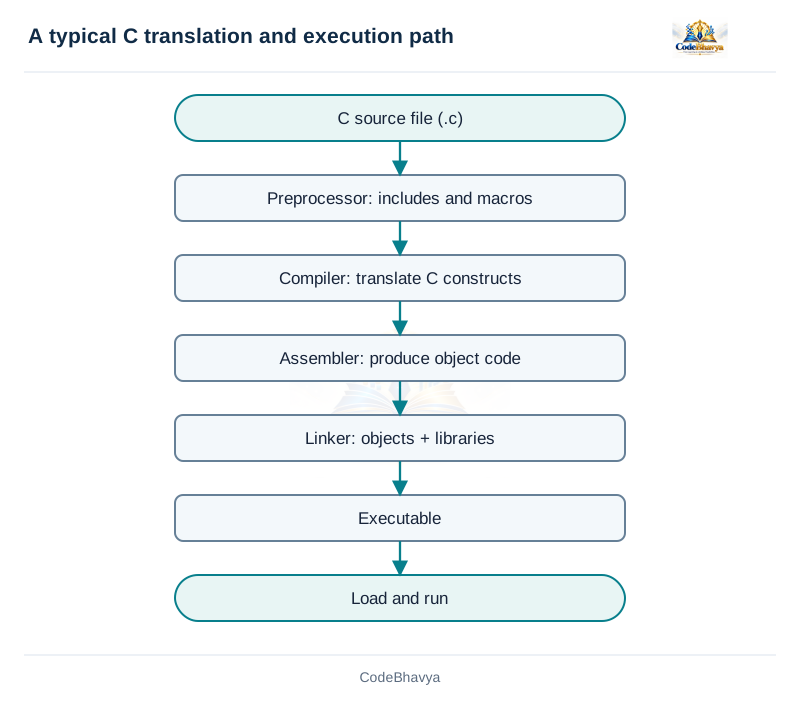
Diagram or flowchart

Source is preprocessed, compiled, assembled and linked to form an executable; the operating system loads it to run.
From source file to running program · Download diagram

C program and output

/* CodeBhavya | PPS AR25 | Learning example */
#include <stdio.h>
int main(void)
{
    puts("Hello, CodeBhavya!");
    return 0;
}

Sample input and output

This example uses values already written in the program.

Output

Hello, CodeBhavya!

Key points

  • A .c file is source, not a native executable.
  • Warnings deserve attention even when an executable is produced.

Related exam questions

Topic matches from the supplied JNTUH papers. Marks below are the printed allocations for those questions.

  • March/April 2023 · Q2(a) · 5 marks

    Write a detailed note on creating and running a program.

    Paper P02 · page 1
  • March/April 2023 · Q1(b) · 1 marks

    What is a syntax error?

    Paper P05 · page 1
  • September 2023 · Q1(a) · 1 marks

    What is a compiler?

    Paper P06 · page 1
View all matching exam references →