QUESTION 01
What is a FILE pointer?
2 marksAnswer
FILE * identifies a C library stream used for input or output. It is not a pointer directly into a file’s stored bytes.

AR25 · I Year II Semester · Unit II — Text and Binary File Pointers
QUESTION 01
FILE * identifies a C library stream used for input or output. It is not a pointer directly into a file’s stored bytes.
QUESTION 02
A file stores data outside the lifetime of one program execution. C accesses file streams through functions declared in stdio.h.
r opens an existing file for reading. w creates or truncates a file for writing. a appends writes at the end. Adding + permits reading and writing. Adding b selects binary mode where the implementation distinguishes it. Opening a missing file with r fails; opening an existing file with w discards its old contents.
The demonstration opens a dedicated sample file with w, writes one line, closes it and reopens it with r. It does not treat fopen success as proof that every later write succeeds. File data can outlast the stream and the program that created it.
Use only a stream obtained successfully and not already closed. fclose releases stream resources; it does not delete the file. A path is interpreted relative to the process working directory unless given otherwise. The examples intentionally create or replace clearly named demonstration files, so use a separate test directory.
The C standard does not prescribe one universal filesystem-operation complexity. Processing n bytes generally involves work proportional to that data plus implementation and device costs.
| Mode | Purpose | Existing contents |
|---|---|---|
| r | Read existing | Preserved |
| w | Write/create | Truncated |
| a | Append/create | Preserved; writes at end |
| r+ | Read/update existing | Preserved |
| w+ | Read/write/create | Truncated |
| a+ | Read/append/create | Preserved; writes at end |
| b suffix | Binary mode | Combine with the appropriate base mode |
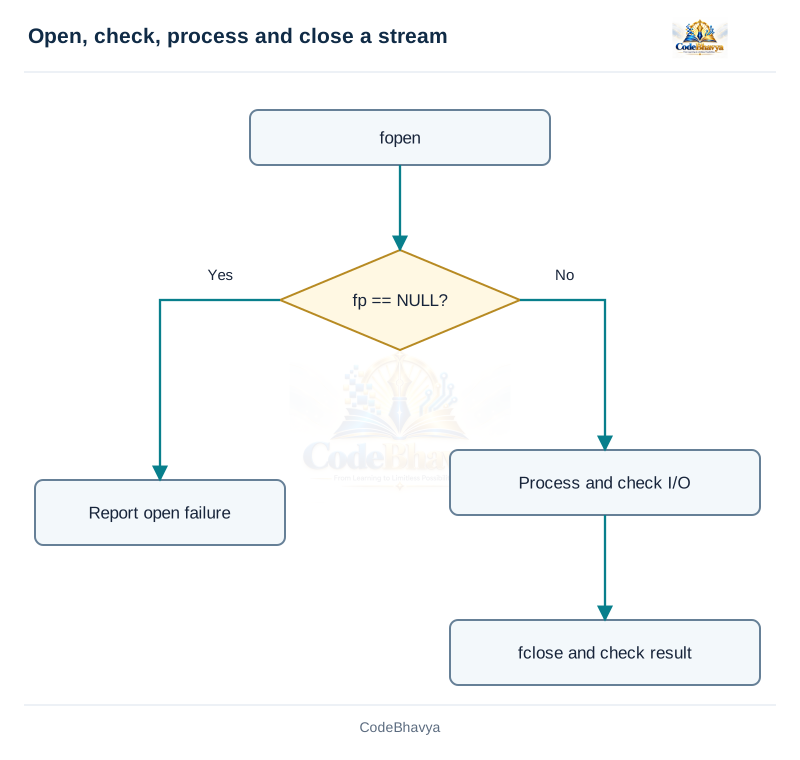
This demonstration creates or replaces its codebhavya_* sample file in the working directory. Run it in a separate test directory. Native binary examples use one compatible implementation.
/* CodeBhavya | Data Structures AR25 | Learning example */
#include <stdio.h>

int main(void)
{
    const char *path = "codebhavya_text_demo.txt";
    FILE *fp = fopen(path, "w");
    if (fp == NULL) { puts("Open failed"); return 1; }
    if (fputs("First line\nSecond line\n", fp) == EOF) { fclose(fp); puts("Write failed"); return 1; }
    if (fclose(fp) != 0) { puts("Close failed"); return 1; }
    fp = fopen(path, "r");
    if (fp == NULL) { puts("Open failed"); return 1; }
    char line[80];
    while (fgets(line, sizeof line, fp) != NULL) { fputs(line, stdout); }
    int failed = ferror(fp);
    if (fclose(fp) != 0 || failed) { puts("Read/close failed"); return 1; }
    return 0;
}The example uses values in the code.
First line
Second lineQUESTION 03
fgetc and fputc read or write characters; fgets and fputs handle bounded input lines or output strings. Check each operation’s documented result.
QUESTION 04
Text streams can be processed a character, formatted field or line at a time.
Store fgetc’s result in int so it can distinguish EOF from character values. fputc writes one character and reports failure with EOF. The loop while ((ch = fgetc(fp)) != EOF) processes successfully read characters; after it ends, inspect ferror if the difference between an error and normal end matters.
fprintf writes values using a format string. fscanf interprets input fields and returns the number of assignments completed, or its specified failure indication. Match each conversion to the actual destination type. Bound string conversions and do not assume a failed conversion leaves a usable new value.
fgets reads at most capacity - 1 characters and terminates successfully read text. A newline is retained if read. fputs writes the string without adding its own newline. puts, in contrast, writes to stdout and adds a newline.
Use characters for byte-oriented text transformations, formats for a controlled field layout, and bounded lines when spaces matter. A long input line can span more than one fgets call; decide whether to process chunks or reject an overlong record.
Scanning n characters is O(n) character work. A fixed-size line buffer adds O(1) space with respect to the whole file length. The total file need not be loaded into memory. The sample writes two lines and prints them using a checked read loop.
This demonstration creates or replaces its codebhavya_* sample file in the working directory. Run it in a separate test directory. Native binary examples use one compatible implementation.
/* CodeBhavya | Data Structures AR25 | Learning example */
#include <stdio.h>

int main(void)
{
    const char *path = "codebhavya_text_demo.txt";
    FILE *fp = fopen(path, "w");
    if (fp == NULL) { puts("Open failed"); return 1; }
    if (fputs("First line\nSecond line\n", fp) == EOF) { fclose(fp); puts("Write failed"); return 1; }
    if (fclose(fp) != 0) { puts("Close failed"); return 1; }
    fp = fopen(path, "r");
    if (fp == NULL) { puts("Open failed"); return 1; }
    char line[80];
    while (fgets(line, sizeof line, fp) != NULL) { fputs(line, stdout); }
    int failed = ferror(fp);
    if (fclose(fp) != 0 || failed) { puts("Read/close failed"); return 1; }
    return 0;
}The example uses values in the code.
First line
Second lineQUESTION 05
Text streams may translate representations such as line endings. Binary mode is used when the program needs the implementation’s binary-stream behaviour.
QUESTION 06
Text files represent data as readable character sequences. Binary files can store a specified byte representation, but portability depends on that representation.
fprintf(fp, "%d ", count) stores a textual number. A reader interprets those characters using a suitable conversion. Text is easy to inspect, but parsing rules, separators and invalid input handling must be defined.
fwrite(values, sizeof values[0], n, fp) writes n int objects using their native representations. fread can recover them on the same compatible implementation. This is a teaching example, not a portable interchange format across arbitrary compilers and machines.
Native representations can vary in integer sizes, byte order, padding and floating-point formats. Writing a whole structure may include padding bytes. A portable binary format must define field widths and encoding explicitly; saving pointer values does not save their targets or make valid pointers for a later process.
Use rb or wb for binary examples. Check element counts returned by fread and fwrite. A short read may be normal end or an error; ferror helps distinguish errors. Always respect the number of elements actually obtained.
Prefer readable text when inspection and editing matter. Use a deliberately designed binary representation when compactness and direct record access are useful. Both require work proportional to the data processed; binary mode alone does not guarantee every operation is faster.
QUESTION 07
It returns the number of complete elements successfully written, not simply the total requested byte count. Check it against the requested element count.
QUESTION 08
fread and fwrite transfer fixed-size elements between a stream and suitable memory objects.
fwrite(array, sizeof array[0], count, fp);
fread(array, sizeof array[0], count, fp);The program writes three ints, 10, 20 and 30. It reopens the file and reads exactly three ints into another array, then prints them. The native representation is used within one execution on the same implementation.
A read requesting ten records may obtain fewer because the file ends. Never loop over all ten as though the missing records had been read. A partial final record is not a complete valid record merely because some bytes were obtained. Inspect stream errors and validate file structure for a real application.
The destination must have enough actual space and a suitable type. Transferring n fixed-size elements involves O(n) element work in the ordinary analysis, plus stream costs. The fixed buffer in this example has three elements. Native binary data is implementation-dependent and should not be described as a portable database format.
This demonstration creates or replaces its codebhavya_* sample file in the working directory. Run it in a separate test directory. Native binary examples use one compatible implementation.
/* CodeBhavya | Data Structures AR25 | Learning example */
#include <stdio.h>

int main(void)
{
    int input[3] = {10, 20, 30}, output[3];
    FILE *fp = fopen("codebhavya_binary_demo.bin", "wb");
    if (fp == NULL) { puts("Open failed"); return 1; }
    if (fwrite(input, sizeof input[0], 3, fp) != 3) { fclose(fp); puts("Write failed"); return 1; }
    if (fclose(fp) != 0) { puts("Close failed"); return 1; }
    fp = fopen("codebhavya_binary_demo.bin", "rb");
    if (fp == NULL) { puts("Open failed"); return 1; }
    if (fread(output, sizeof output[0], 3, fp) != 3) { fclose(fp); puts("Read failed"); return 1; }
    if (fclose(fp) != 0) { puts("Close failed"); return 1; }
    for (int i = 0; i < 3; ++i) { printf("%d\n", output[i]); }
    return 0;
}The example uses values in the code.
10
20
30QUESTION 09
Read each complete record and compare its key with the requested key until a match or end is reached. It does not require sorted records.
QUESTION 10
A simple record database is a file of records whose fields include a key, such as a student ID.
The demonstration writes three native Student records and searches for ID 102. It reads record 101 first, then finds 102 and displays that record’s mark. This is a linear search on file records. It stops without requiring the records to be sorted.
If every read succeeds until normal end and no key matches, report Not found. Decide whether duplicate keys are forbidden, whether the first match is enough or whether all matches should be displayed. A first-match algorithm should not claim to list every duplicate.
Use a stable defined record format for a real shared database. Native structure dumping can include padding and implementation-dependent representation, so the sample is local teaching code. Text records need parsing and validation instead. An index can speed repeated access but is a separate data structure with maintenance costs.
A first-record match needs O(1) record comparisons. An absent key or last-record match requires O(n). Only one record buffer is necessary, giving O(1) auxiliary record space. Actual I/O latency also depends on buffering and the storage system.
This demonstration creates or replaces its codebhavya_* sample file in the working directory. Run it in a separate test directory. Native binary examples use one compatible implementation.
/* CodeBhavya | Data Structures AR25 | Learning example */
#include <stdio.h>
struct Student { int roll, marks; };
int main(void)
{
struct Student records[3] = {{101, 70}, {102, 85}, {103, 80}}, current;
FILE *fp = fopen("codebhavya_records_demo.bin", "wb");
if (fp == NULL) { puts("Open failed"); return 1; }
if (fwrite(records, sizeof records[0], 3, fp) != 3) { fclose(fp); puts("Write failed"); return 1; }
if (fclose(fp) != 0) { puts("Close failed"); return 1; }
fp = fopen("codebhavya_records_demo.bin", "rb");
if (fp == NULL) { puts("Open failed"); return 1; }
int found = 0;
while (fread(¤t, sizeof current, 1, fp) == 1) {
if (current.roll == 102) { printf("Roll = %d, marks = %d\n", current.roll, current.marks); found = 1; break; }
}
int failed = ferror(fp);
if (fclose(fp) != 0 || failed) { puts("Read/close failed"); return 1; }
if (!found) { puts("Not found"); }
return 0;
}The example uses values in the code.
Roll = 102, marks = 85QUESTION 11
The end indicator is set only after a read attempts to pass the available input. Test the read operation itself so stale or invalid data is not processed.
QUESTION 12
Stream status functions describe indicators associated with a FILE stream.
while (fgets(buffer, sizeof buffer, fp) != NULL) {
    /* process this successfully read text */
}
if (ferror(fp)) {
    /* handle a read error */
}Before an attempted read beyond the available data, feof may still be false. A loop controlled only by feof can therefore execute again after the useful input has ended and accidentally process old buffer contents. The successful-read condition prevents that extra processing.
fgetc returns int and uses EOF to signal its end/error result. EOF is not a special ordinary character appended to every file. Once the read loop ends, ferror can distinguish an error from normal completion for the example’s purpose.
A successful fseek clears the EOF indicator. rewind resets position and clears indicators, but it has no returned success value; use suitable checked positioning when failure must be reported. Status checks are fixed-size operations in the interface; scanning the file still requires work proportional to the bytes read.
QUESTION 13
It obtains a stream position indication as long, returning a negative value on failure. Text-stream values need not be simple byte offsets.
QUESTION 14
Positioning functions allow a stream to revisit suitable locations instead of always reading sequentially.
The demonstration writes three ints, then uses a checked fseek with offset sizeof(int) from SEEK_SET. This selects the second native int record, which is read and displayed as 20. The offset is small and representable in long for this example.
Do not assume arbitrary byte arithmetic works on text positions. A portable text-stream seek uses permitted forms such as offset zero or a suitable earlier ftell value with SEEK_SET. For saved positions, fgetpos and fsetpos can preserve stream state represented by fpos_t.
fseek returns zero on success. A successful seek clears the EOF indicator. Positioning can also provide a required transition between reading and writing on an update stream. Do not use an unchecked failed seek and then claim a particular record was accessed.
The interface does not guarantee a universal O(1) physical-device seek. Direct fixed-record indexing avoids comparing every previous record, but filesystem and device costs remain implementation-dependent. Variable-length records require a separate way to discover their boundaries.
This demonstration creates or replaces its codebhavya_* sample file in the working directory. Run it in a separate test directory. Native binary examples use one compatible implementation.
/* CodeBhavya | Data Structures AR25 | Learning example */
#include <stdio.h>

int main(void)
{
    int a[3] = {10, 20, 30}, value;
    FILE *fp = fopen("codebhavya_position_demo.bin", "wb");
    if (fp == NULL) { puts("Open failed"); return 1; }
    if (fwrite(a, sizeof a[0], 3, fp) != 3) { fclose(fp); puts("Write failed"); return 1; }
    if (fclose(fp) != 0) { puts("Close failed"); return 1; }
    fp = fopen("codebhavya_position_demo.bin", "rb");
    if (fp == NULL) { puts("Open failed"); return 1; }
    if (fseek(fp, (long)sizeof(int), SEEK_SET) != 0 || fread(&value, sizeof value, 1, fp) != 1) {
        fclose(fp); puts("Position/read failed"); return 1;
    }
    if (fclose(fp) != 0) { puts("Close failed"); return 1; }
    printf("Second = %d\n", value);
    return 0;
}The example uses values in the code.
Second = 20QUESTION 15
argc gives the number of argument strings, and argv points to them. argv[argc] is a null pointer. When argc is positive, argv[0] represents the program name or an empty string.
QUESTION 16
Command-line arguments let a user supply input when starting a program rather than through later keyboard reads.
int main(int argc, char *argv[])The example requires exactly two user-supplied numeric strings, so it checks argc == 3 before using argv[1] and argv[2]. Accessing a missing argument is invalid. The shell’s quoting rules affect how spaces are grouped before the program receives its arguments.
Use strtol with an end pointer and errno checking. A successful conversion must consume at least one character, end at the string terminator and avoid ERANGE. Then check the application range before converting to int. atoi does not provide the same reliable error-reporting interface.
Running the compiled program with arguments 12 and 8 prints Sum = 20. Supplying abc or an unsupported value reports invalid arguments. The sample accepts values from -10000 through 10000, making their sum safe even within the minimum int range required by C.
Parsing strings of lengths m and n takes O(m + n) character work. The program needs only fixed conversion variables. The online single-file compiler may not expose a command-line-argument field; use a terminal with the shown compile/run command when that option is unavailable.
/* CodeBhavya | Data Structures AR25 | Learning example */
#include <stdio.h>
#include <stdlib.h>
#include <errno.h>
int read_number(const char *text, int *out)
{
    char *end;
    errno = 0;
    long value = strtol(text, &end, 10);
    if (end == text || *end != '\0' || errno == ERANGE || value < -10000 || value > 10000) { return 0; }
    *out = (int)value;
    return 1;
}
int main(int argc, char *argv[])
{
    int a, b;
    if (argc != 3 || !read_number(argv[1], &a) || !read_number(argv[2], &b)) {
        puts("Usage: program integer integer (-10000..10000)"); return 1;
    }
    printf("Sum = %d\n", a + b);
    return 0;
}gcc -std=c11 -Wall -Wextra -pedantic main.c -o program
./program 12 8In Windows PowerShell, use program.exe as the output name and .\program.exe to run it.
The example uses values in the code and the shown command-line arguments.
Sum = 20QUESTION 17
A compatible prototype and an include guard. Put the ordinary function definition in one source file and compile/link the needed source files together.
QUESTION 18
Multifile programming separates interfaces from implementations so a larger program can be organised and built in parts.
The prototype tells each source file how to call the function. The include guard prevents repeated processing of that header’s contents within a translation unit. It does not replace linking, create the function implementation or make multiple ordinary external definitions safe.
Each source file is translated using the declarations visible in it. The linker then connects references to definitions from object files and libraries. A function declaration with no linked definition can lead to a link failure. Keep prototypes and definitions compatible.
Declare an externally shared object with extern in a header and define it in one source file when such sharing is needed. Prefer clear function interfaces over unnecessary shared mutable state. File-scope static declarations can keep helper names internal to one translation unit.
Smaller modules are easier to read, test and maintain. The supplied example has three downloadable files and an exact GCC build command. It is intentionally not presented as one pasteable single-file program; all required source files must be included in the build.
Save all three files in one folder. Compile the two source files together; this example requires a terminal or an environment supporting multiple source files.
#ifndef CODEBHAVYA_OPERATIONS_H
#define CODEBHAVYA_OPERATIONS_H
int add(int a, int b);
#endif#include "operations.h"
int add(int a, int b) { return a + b; }#include <stdio.h>
#include "operations.h"
int main(void) { printf("Sum = %d\n", add(4, 6)); return 0; }gcc -std=c11 -Wall -Wextra -pedantic main.c operations.c -o program
./programIn Windows PowerShell, use program.exe as the output name and .\program.exe to run it.
The example uses values in the code.
Sum = 10QUESTION 19
It opens a stream for reading and appending; writes go to the end. Do not assume a seek changes an append-mode write into an overwrite.
QUESTION 20
Update modes permit both input and output on a stream, but changing direction requires the appropriate operation.
r+ opens an existing file for reading and writing without initial truncation. w+ creates or truncates a readable/writable file. a+ permits reading and append writes. Choose the mode according to whether old contents must be preserved.
After output, use fflush or a file-positioning operation before input. After input, use a file-positioning operation before output, unless the input operation encountered end of file. These are stream rules, not merely style suggestions. An explicit successful fseek is a clear way to express a planned transition.
For a fixed-size binary file, identify the target record, seek to its start, write the replacement and check the result. A seek after reading avoids an invalid direction change. Arbitrary variable-length text replacement is harder because changing a field’s length can shift later contents.
For important files, validate all new data before modifying the stored version. A temporary-file-and-replace approach can reduce partial-update risks, but platform rename and durability behaviour need a deliberate design. The teaching examples use separate demonstration filenames and do not claim crash-safe database transactions.
Appending a known record does not require searching old keys, but device costs are not specified by C. Finding a record sequentially remains O(n) record comparisons; processing or rewriting n records requires work proportional to that data.