QUESTION 01
What is a FILE pointer?
2 marksAnswer
FILE * identifies a C library stream used for input or output. It is not a pointer directly into a file’s stored bytes.
QUESTION 01
FILE * identifies a C library stream used for input or output. It is not a pointer directly into a file’s stored bytes.
QUESTION 02
A file stores data outside the lifetime of one program execution. C accesses file streams through functions declared in stdio.h.
r opens an existing file for reading. w creates or truncates a file for writing. a appends writes at the end. Adding + permits reading and writing. Adding b selects binary mode where the implementation distinguishes it. Opening a missing file with r fails; opening an existing file with w discards its old contents.
The demonstration opens a dedicated sample file with w, writes one line, closes it and reopens it with r. It does not treat fopen success as proof that every later write succeeds. File data can outlast the stream and the program that created it.
Use only a stream obtained successfully and not already closed. fclose releases stream resources; it does not delete the file. A path is interpreted relative to the process working directory unless given otherwise. The examples intentionally create or replace clearly named demonstration files, so use a separate test directory.
The C standard does not prescribe one universal filesystem-operation complexity. Processing n bytes generally involves work proportional to that data plus implementation and device costs.
| Mode | Purpose | Existing contents |
|---|---|---|
| r | Read existing | Preserved |
| w | Write/create | Truncated |
| a | Append/create | Preserved; writes at end |
| r+ | Read/update existing | Preserved |
| w+ | Read/write/create | Truncated |
| a+ | Read/append/create | Preserved; writes at end |
| b suffix | Binary mode | Combine with the appropriate base mode |
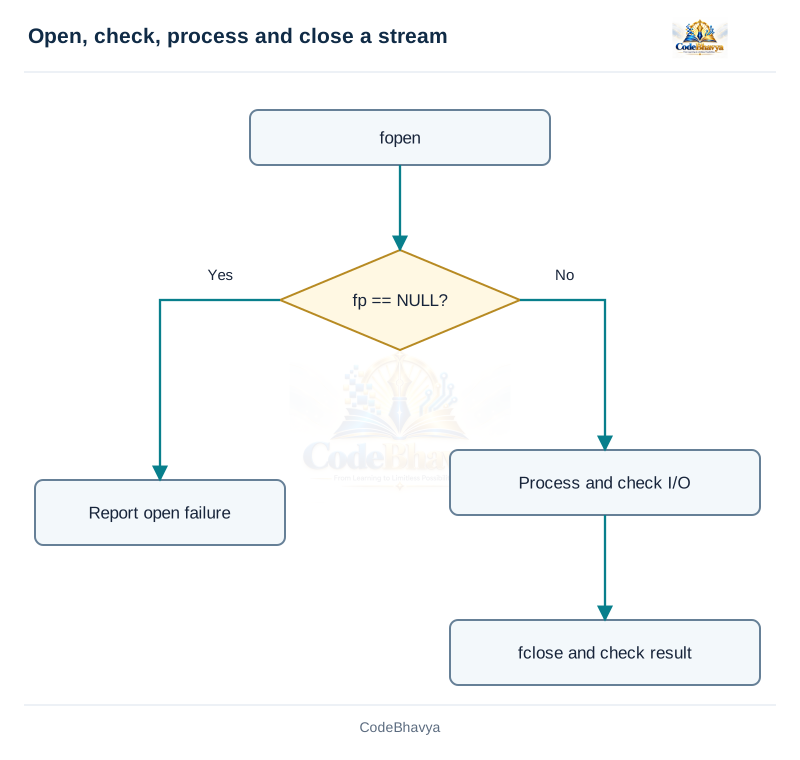
This demonstration creates or replaces its codebhavya_* sample file in the working directory. Run it in a separate test directory. Native binary examples use one compatible implementation.
/* CodeBhavya | Data Structures AR25 | Learning example */
#include <stdio.h>

int main(void)
{
    const char *path = "codebhavya_text_demo.txt";
    FILE *fp = fopen(path, "w");
    if (fp == NULL) { puts("Open failed"); return 1; }
    if (fputs("First line\nSecond line\n", fp) == EOF) { fclose(fp); puts("Write failed"); return 1; }
    if (fclose(fp) != 0) { puts("Close failed"); return 1; }
    fp = fopen(path, "r");
    if (fp == NULL) { puts("Open failed"); return 1; }
    char line[80];
    while (fgets(line, sizeof line, fp) != NULL) { fputs(line, stdout); }
    int failed = ferror(fp);
    if (fclose(fp) != 0 || failed) { puts("Read/close failed"); return 1; }
    return 0;
}The example uses values in the code.
First line
Second line