THE SYLLABUS TASK
What you need to build
Develop an area calculator app using interface and runtime binding.
Full syllabus requirements: classes, fields and methods
Five nonnegative dimensions, one per line: circle radius; rectangle length and width; triangle base and height. Units are consistent but unspecified; areas use squared units.
UNDERSTAND THE IDEA
Explanation
Shape defines area and display behavior without prescribing a representation. Circle, Rectangle and Triangle hold different dimensions and implement their corresponding formulas.
The driver uses Shape references throughout. area returns a double, so the triangle calculation retains halves and the circle uses Math.PI.
TURN THE IDEA INTO STEPS
Step-by-step algorithm
- Validate dimensions.
- Construct the three shape implementations.
- Store them under Shape references.
- Invoke each overridden display method.
- Compute and format the corresponding area.
SEE THE CORE OPERATION
Flowchart
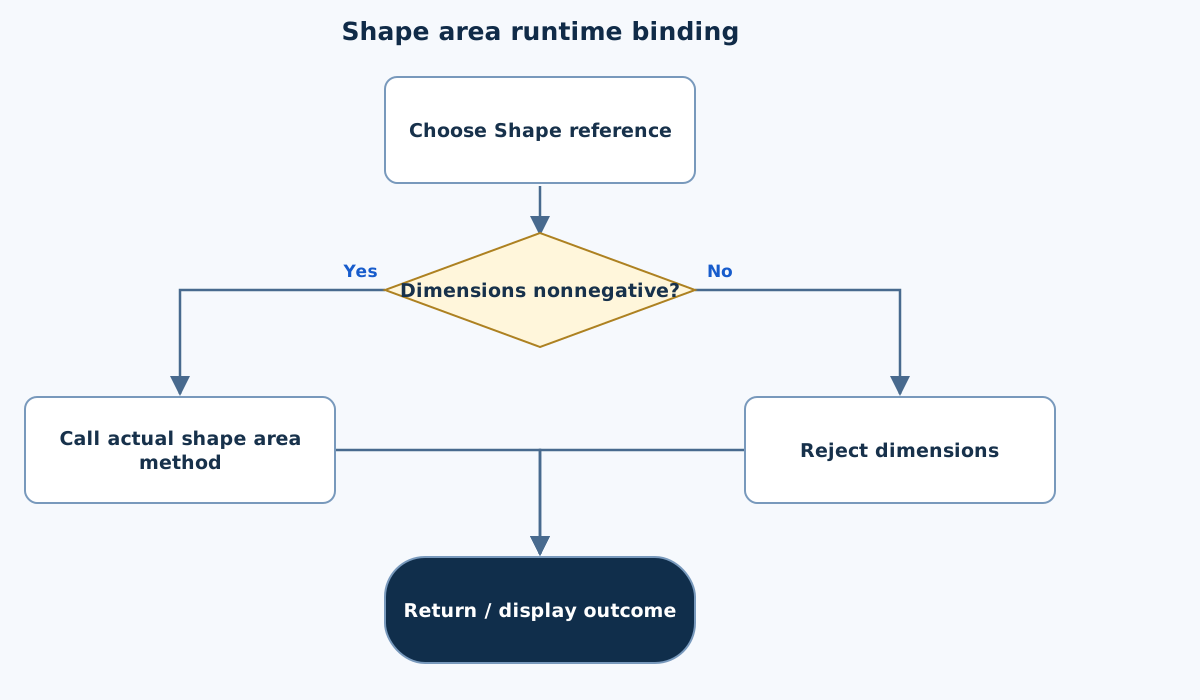
This chart focuses on the named operation or core OOP decision. Diamonds show conditions; labeled branches show outcomes. Read it with the complete algorithm and source for input handling and other operations. Scroll within the diagram on a phone.
Shape area runtime binding
Main.java
import java.util.*;

public class Main {
    private static final Scanner IN = new Scanner(System.in).useLocale(Locale.ROOT);
    static String text() {
        if (!IN.hasNextLine()) throw new IllegalArgumentException("Incomplete input.");
        String value = IN.nextLine().trim();
        if (value.isEmpty() || value.length() > 200) throw new IllegalArgumentException("Text must have 1–200 characters.");
        return value;
    }
    static int integer(int low, int high) {
        int value = Integer.parseInt(text());
        if (value < low || value > high) throw new IllegalArgumentException("Integer out of range.");
        return value;
    }
    static double number(double low, double high) {
        double value = Double.parseDouble(text());
        if (!Double.isFinite(value) || value < low || value > high) throw new IllegalArgumentException("Number out of range.");
        return value;
    }
    static void money(String label, double value) { System.out.printf(Locale.ROOT, "%s: %.2f%n", label, value); }
interface Shape { double area(); void display(); }
    static class Circle implements Shape {
        final double radius; Circle(double r){radius=r;}
        @Override public double area(){return Math.PI*radius*radius;}
        @Override public void display(){money("Circle area",area());}
    }
    static class Rectangle implements Shape {
        final double length,width; Rectangle(double l,double w){length=l;width=w;}
        @Override public double area(){return length*width;}
        @Override public void display(){money("Rectangle area",area());}
    }
    static class Triangle implements Shape {
        final double base,height; Triangle(double b,double h){base=b;height=h;}
        @Override public double area(){return base*height/2;}
        @Override public void display(){money("Triangle area",area());}
    }
    // radius/rectangle length/rectangle width/triangle base/triangle height, one per line.
    public static void main(String[] args) {
        try {
            Shape[] shapes={new Circle(number(0,1000000)),new Rectangle(number(0,1000000),number(0,1000000)),new Triangle(number(0,1000000),number(0,1000000))};
            for(Shape shape:shapes)shape.display();
        } catch(IllegalArgumentException e){System.out.println("Invalid input: "+e.getMessage());}
    }
}
Copy a source file or download the project to preserve its file names.
USE THE RIGHT ENVIRONMENT
How to compile and run
Install a JDK (Java 11 or newer; JDK 17 is suitable), extract this project’s ZIP into its own folder, then open a terminal in that folder.
javac -encoding UTF-8 Main.java
java Main
The standalone source is named Main.java and its entry class is Main. You may also paste it into an online Java compiler and supply the sample input there. Choose Java explicitly; these pages do not change the site compiler or import code automatically.
Each experiment has its own folder because many use the public class Main. Compile and run one experiment at a time.
UNDERSTAND THE JAVA CODE
Line-by-line explanation
These steps follow the exact Java source above. Related statements are grouped; line numbers count blank lines and restart for each file. Start with main to follow execution, then open the constructors, methods or event handlers it uses.
Main.java
Lines 1–4Import utilities and create the shared input reader
import java.util.*;

public class Main {
    private static final Scanner IN = new Scanner(System.in).useLocale(Locale.ROOT);
java.util.* imports utility type names such as Scanner, Locale and collections. Main is the public class matching Main.java. The private static final IN field holds one shared Scanner for System.in; final prevents replacing that reference. The scanner uses Locale.ROOT.
Lines 5–10Read one nonempty trimmed input line
    static String text() {
        if (!IN.hasNextLine()) throw new IllegalArgumentException("Incomplete input.");
        String value = IN.nextLine().trim();
        if (value.isEmpty() || value.length() > 200) throw new IllegalArgumentException("Text must have 1–200 characters.");
        return value;
    }
text checks whether a line exists, reads it and removes leading/trailing whitespace. Reject empty text and lengths above 200 by throwing IllegalArgumentException. Otherwise return the string. One field is read per line, so these helpers do not mix nextInt with leftover newlines.
Lines 11–15Parse and range-check an integer field
    static int integer(int low, int high) {
        int value = Integer.parseInt(text());
        if (value < low || value > high) throw new IllegalArgumentException("Integer out of range.");
        return value;
    }
Integer.parseInt converts the returned string to int or throws NumberFormatException, a subtype of IllegalArgumentException. Reject values outside the caller’s inclusive low/high limits, then return the accepted integer.
Lines 16–20Parse and range-check a finite decimal field
    static double number(double low, double high) {
        double value = Double.parseDouble(text());
        if (!Double.isFinite(value) || value < low || value > high) throw new IllegalArgumentException("Number out of range.");
        return value;
    }
Double.parseDouble reads the string as a double. Double.isFinite rejects NaN and infinities as well as the explicit low/high range check. Return only a finite accepted value; exceptions transfer control to a matching catch block.
Line 21Format a labelled numeric result consistently
static void money(String label, double value) { System.out.printf(Locale.ROOT, "%s: %.2f%n", label, value); }money is a formatting helper: %s prints the label, %.2f prints two decimal places, and %n ends the line. Locale.ROOT fixes locale-sensitive formatting. The helper can also display non-currency quantities; it does not change the stored value.
Line 22Declare the operations every shape must support
interface Shape { double area(); void display(); }Shape is an interface declaring area and display. It specifies behaviour without prescribing the fields or formula of a concrete shape.
Lines 23–27Implement a circle using its radius
    static class Circle implements Shape {
        final double radius; Circle(double r){radius=r;}
        @Override public double area(){return Math.PI*radius*radius;}
        @Override public void display(){money("Circle area",area());}
    }
The constructor stores r. area uses Math.PI times radius squared. The public overrides fulfil the interface; display calls the area method and formats the numeric result.
Lines 28–32Implement a rectangle using length and width
    static class Rectangle implements Shape {
        final double length,width; Rectangle(double l,double w){length=l;width=w;}
        @Override public double area(){return length*width;}
        @Override public void display(){money("Rectangle area",area());}
    }
Store both dimensions and return their product from area. display uses the same method contract as Circle, despite the different representation.
Lines 33–37Implement a triangle using base and height
    static class Triangle implements Shape {
        final double base,height; Triangle(double b,double h){base=b;height=h;}
        @Override public double area(){return base*height/2;}
        @Override public void display(){money("Triangle area",area());}
    }
Store the perpendicular base/height values and compute base*height/2. Because the fields are double, this division can produce a fractional area.
Lines 38–42Read dimensions and dispatch through Shape references
    // radius/rectangle length/rectangle width/triangle base/triangle height, one per line.
    public static void main(String[] args) {
        try {
            Shape[] shapes={new Circle(number(0,1000000)),new Rectangle(number(0,1000000),number(0,1000000)),new Triangle(number(0,1000000),number(0,1000000))};
            for(Shape shape:shapes)shape.display();
Read five nonnegative finite dimensions in the documented order. Construct three concrete objects, store them in a Shape array and call display on each; Java selects the actual subtype method.
Lines 43–45Report invalid input and close the enclosing scopes
        } catch(IllegalArgumentException e){System.out.println("Invalid input: "+e.getMessage());}
    }
}
The catch handles IllegalArgumentException, including invalid numeric strings from the helpers, and prints its message. The final braces close main and Main. Java objects become eligible for garbage collection when no live reference needs them; this program does not manually free them.
FOLLOW THE STATE
Dry run
- Radius 2 yields π×4 ≈12.57.
- Rectangle 3×4 yields 12.
- Triangle base 6 and height 5 yields 15.
- The common Shape call selects the correct formula for each object.
CHECK THE BEHAVIOUR
Sample input & output
These outputs were captured by running the exact delivered Java project.
Sample 1
2
3
4
6
5
Circle area: 12.57
Rectangle area: 12.00
Triangle area: 15.00
Sample 2
0
0
4
6
0
Circle area: 0.00
Rectangle area: 0.00
Triangle area: 0.00
Common mistakes
- Use base×height/2 with floating-point dimensions.
- Do not implement an interface method with weaker visibility.
- Keep unit choices consistent.
WHY THIS GROWTH RATE?
Time and space complexity
O(s) arithmetic work for s shapes; O(1) per shape.
Every formula has a fixed number of multiplications or divisions. The three sample shapes therefore use bounded arithmetic work.
A generalized array of s shapes requires s dispatches and O(s) references; dimension magnitude does not cause an iteration over individual area units.
These bounds describe the implemented data processing. Input/output text length, scheduling, framework rendering and runtime/library internals are identified separately where they matter. Educational limits bound the actual examples.
PREPARE FOR YOUR LAB VIVA
Related viva questions & answers
Try answering aloud, then expand to check your reasoning. Questions focus on this program’s classes, state and behavior.
Why is Shape suitable as an interface?
The program needs a common area/display contract for unrelated dimension layouts. Each concrete shape supplies its own stored dimensions and formula.
Why do the shape implementations mark methods public?
The interface methods are public. Implementations must retain that visibility rather than using package-private overrides.
Why is Math.PI preferable to a rough hardcoded constant?
It supplies the standard double approximation of π. The resulting formula is clearer and more accurate than an arbitrary abbreviated value.
Can a Shape reference call Circle-only fields directly?
No. Its declared type exposes the Shape contract. Runtime dispatch selects Circle’s methods, but it does not add Circle fields to the reference type.
What does a zero dimension mean under this input contract?
It produces a zero area and is accepted as a degenerate demonstration shape. Negative dimensions are rejected by the driver.
Why is runtime binding visible even without instanceof checks?
The same shape.display() call reaches different implementations based on each object’s actual class. The driver does not need to inspect that class explicitly.