THE SYLLABUS TASK
What you need to build
Write a program that accepts two integers from user and performs division.
Full syllabus requirements: classes, fields and methods
Two whitespace-separated 32-bit integers. Integer division truncates toward zero. Invalid tokens, zero divisor and missing operands produce distinct messages.
UNDERSTAND THE IDEA
Explanation
The try block reads both integers and divides them. InputMismatchException reports a token that Scanner cannot read as an int, while ArithmeticException reports an integer zero divisor.
The more specific input-mismatch catch precedes NoSuchElementException because InputMismatchException is its subclass. The final catch additionally handles incomplete input.
TURN THE IDEA INTO STEPS
Step-by-step algorithm
- Read two integers inside try.
- Divide using integer arithmetic.
- Catch ArithmeticException for divisor zero.
- Catch InputMismatchException for invalid integer tokens.
- Catch missing input and display the relevant message.
SEE THE CORE OPERATION
Flowchart
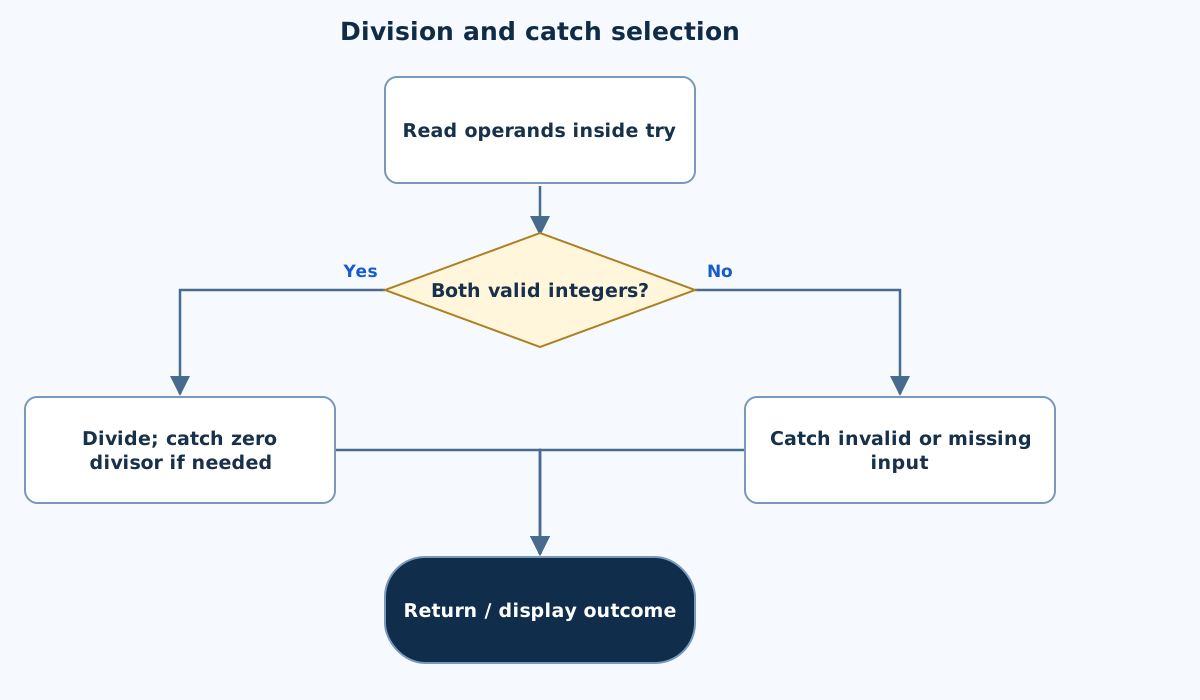
This chart focuses on the named operation or core OOP decision. Diamonds show conditions; labeled branches show outcomes. Read it with the complete algorithm and source for input handling and other operations. Scroll within the diagram on a phone.
Division and catch selection
Main.java
import java.util.InputMismatchException;
import java.util.Scanner;
public class Main {
    public static void main(String[] args) {
        Scanner in=new Scanner(System.in);
        try { int a=in.nextInt(),b=in.nextInt();System.out.println("Quotient: "+(a/b)); }
        catch(ArithmeticException e){System.out.println("Cannot divide by zero.");}
        catch(InputMismatchException e){System.out.println("Enter valid 32-bit integers.");}
        catch(java.util.NoSuchElementException e){System.out.println("Two integers are required.");}
    }
}
Copy a source file or download the project to preserve its file names.
USE THE RIGHT ENVIRONMENT
How to compile and run
Install a JDK (Java 11 or newer; JDK 17 is suitable), extract this project’s ZIP into its own folder, then open a terminal in that folder.
javac -encoding UTF-8 Main.java
java Main
The standalone source is named Main.java and its entry class is Main. You may also paste it into an online Java compiler and supply the sample input there. Choose Java explicitly; these pages do not change the site compiler or import code automatically.
Each experiment has its own folder because many use the public class Main. Compile and run one experiment at a time.
UNDERSTAND THE JAVA CODE
Line-by-line explanation
These steps follow the exact Java source above. Related statements are grouped; line numbers count blank lines and restart for each file. Start with main to follow execution, then open the constructors, methods or event handlers it uses.
Main.java
Lines 1–3Import the scanner and its format-error type
import java.util.InputMismatchException;
import java.util.Scanner;
public class Main {
InputMismatchException identifies an invalid or out-of-range nextInt token. Scanner reads System.in. The public Main class matches the source filename.
Lines 4–6Read two integer tokens and attempt integer division
    public static void main(String[] args) {
        Scanner in=new Scanner(System.in);
        try { int a=in.nextInt(),b=in.nextInt();System.out.println("Quotient: "+(a/b)); }
main creates a scanner, then try encloses both reads and a/b. nextInt accepts whitespace-separated tokens. Integer division truncates toward zero. Any matching exception skips the remaining statements of the try block.
Line 7Catch an integer zero divisor
catch(ArithmeticException e){System.out.println("Cannot divide by zero.");}ArithmeticException from a/b when b is zero prints its own message. No quotient is printed because evaluation failed before println completed.
Line 8Catch malformed or out-of-range integer tokens
catch(InputMismatchException e){System.out.println("Enter valid 32-bit integers.");}InputMismatchException reports a token that nextInt cannot represent as an int. This catch is placed before the broader NoSuchElementException catch because InputMismatchException is its subtype.
Lines 9–11Catch missing tokens and close the program
        catch(java.util.NoSuchElementException e){System.out.println("Two integers are required.");}
    }
}
NoSuchElementException handles input ending before both integers are obtained. Only the first matching catch executes. The braces end main and Main.
FOLLOW THE STATE
Dry run
- Input 7 2 prints quotient 3.
- Input 7 0 enters the arithmetic catch.
- Input abc 2 enters the input-mismatch catch.
- Input 7 alone reports that two integers are required.
CHECK THE BEHAVIOUR
Sample input & output
These outputs were captured by running the exact delivered Java project.
Sample 1
7 2
Quotient: 3
Sample 2
7 0
Cannot divide by zero.
Sample 3
abc 2
Enter valid 32-bit integers.
Common mistakes
- Double division by zero does not behave like int division.
- Place subclass catches before superclass catches.
- Do not assume missing input is an InputMismatchException.
WHY THIS GROWTH RATE?
Time and space complexity
O(1) fixed-width division after parsing; input parsing depends on token length.
The operation performs one machine-int division and at most one catch branch. That numeric operation has fixed-size cost.
Scanner still examines input characters, so describing all input handling as independent of token length would omit parsing work.
These bounds describe the implemented data processing. Input/output text length, scheduling, framework rendering and runtime/library internals are identified separately where they matter. Educational limits bound the actual examples.
PREPARE FOR YOUR LAB VIVA
Related viva questions & answers
Try answering aloud, then expand to check your reasoning. Questions focus on this program’s classes, state and behavior.
Which exception does int division by zero throw?
It throws ArithmeticException. The numeric expression fails before a quotient can be printed.
Which exception does Scanner.nextInt throw for abc?
It throws InputMismatchException because the next token is not a valid int representation. This differs from the stream ending before a token exists.
Why is InputMismatchException caught before NoSuchElementException?
InputMismatchException extends NoSuchElementException. Catching the superclass first would make the more specific catch unreachable.
What happens to the fractional part of 7 divided by 2?
Both operands are integers, so the result is 3. Java integer division truncates toward zero rather than returning 3.5.
Would double operands throw the same zero-divisor exception?
No. Floating-point division may produce infinity or NaN. The exercise intentionally uses int operands to demonstrate ArithmeticException.
What is the result of Integer.MIN_VALUE divided by −1 in Java?
The result remains Integer.MIN_VALUE because of defined int overflow behavior. It does not throw ArithmeticException; zero is the exceptional integer divisor.