THE SYLLABUS TASK
What you need to build
Write a java program that handles all mouse events and shows the event name at the center of the window when a mouse event is fired.
Full syllabus requirements: classes, fields and methods
Desktop interaction inside the central area: click, press, release, enter, exit, move, drag and scroll. The central label shows the latest event; ordinary clicks generate several successive events.
UNDERSTAND THE IDEA
Explanation
MouseAdapter supplies default implementations so the program can override the needed mouse, motion and wheel callbacks. The same adapter is registered through all three listener categories.
The central JLabel shows event names and coordinates relative to that component. A later event replaces the earlier text, so a click’s press/release/click sequence is visible as changing state rather than a permanent log.
TURN THE IDEA INTO STEPS
Step-by-step algorithm
- Create a central event display area.
- Register mouse, motion and wheel listeners.
- On each callback, format the corresponding event name.
- Include coordinates or wheel rotation.
- Replace the central label with the latest event.
SEE THE CORE OPERATION
Flowchart
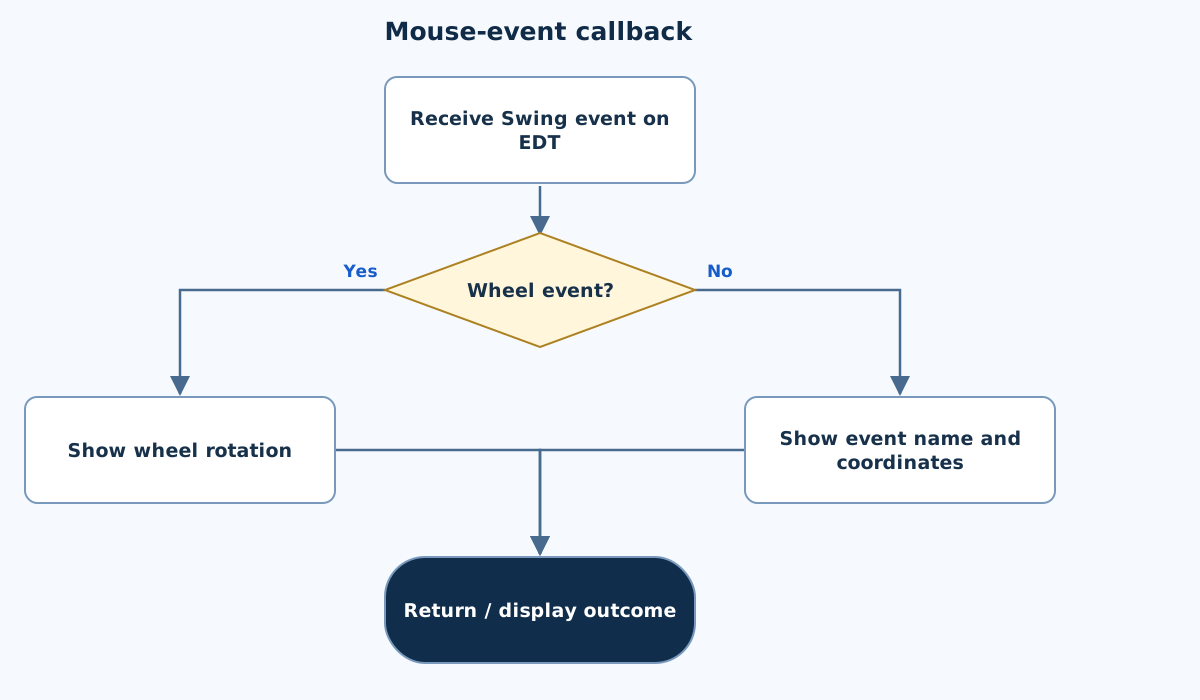
This chart focuses on the named operation or core OOP decision. Diamonds show conditions; labeled branches show outcomes. Read it with the complete algorithm and source for input handling and other operations. Scroll within the diagram on a phone.
Mouse-event callback
Main.java
import javax.swing.*;
import java.awt.*;
import java.awt.event.*;
import java.util.Locale;

public class Main {
    static JPanel root(String title) {
        for(String key:new String[]{"Label.font","Button.font","RadioButton.font","CheckBox.font","TextField.font","TextArea.font","ComboBox.font"})UIManager.put(key,new Font(Font.SANS_SERIF,Font.PLAIN,18));
        JPanel panel=new JPanel(new BorderLayout(12,12));panel.setBorder(BorderFactory.createEmptyBorder(20,20,20,20));
        JLabel heading=new JLabel(title);heading.setFont(new Font(Font.SANS_SERIF,Font.BOLD,24));panel.add(heading,BorderLayout.NORTH);return panel;
    }
    static void show(String title,JPanel panel) {
        JFrame frame=new JFrame(title);frame.setDefaultCloseOperation(JFrame.EXIT_ON_CLOSE);frame.setContentPane(panel);frame.pack();frame.setLocationRelativeTo(null);frame.setVisible(true);
    }

    public static JPanel createPanel(){
        JPanel panel=root("Mouse Event Explorer");JLabel center=new JLabel("Move or click inside this area",SwingConstants.CENTER);center.setName("event");center.setPreferredSize(new Dimension(520,300));center.setBorder(BorderFactory.createLineBorder(new Color(110,130,150)));panel.add(center,BorderLayout.CENTER);
        MouseAdapter listener=new MouseAdapter(){
            void report(String name,MouseEvent e){center.setText(name+" at ("+e.getX()+", "+e.getY()+")");}
            @Override public void mouseClicked(MouseEvent e){report("mouseClicked",e);}
            @Override public void mousePressed(MouseEvent e){report("mousePressed",e);}
            @Override public void mouseReleased(MouseEvent e){report("mouseReleased",e);}
            @Override public void mouseEntered(MouseEvent e){report("mouseEntered",e);}
            @Override public void mouseExited(MouseEvent e){report("mouseExited",e);}
            @Override public void mouseMoved(MouseEvent e){report("mouseMoved",e);}
            @Override public void mouseDragged(MouseEvent e){report("mouseDragged",e);}
            @Override public void mouseWheelMoved(MouseWheelEvent e){center.setText("mouseWheelMoved: rotation "+e.getWheelRotation());}
        };
        center.addMouseListener(listener);center.addMouseMotionListener(listener);center.addMouseWheelListener(listener);return panel;
    }
    public static void main(String[] args){SwingUtilities.invokeLater(()->show("Mouse Event Explorer",createPanel()));}

}
Copy a source file or download the project to preserve its file names.
USE THE RIGHT ENVIRONMENT
How to compile and run
Install a JDK (Java 11 or newer; JDK 17 is suitable), extract this project’s ZIP into its own folder, then open a terminal in that folder.
javac -encoding UTF-8 Main.java
java Main
This program opens a Swing desktop window. Run on your computer with a graphical desktop. A browser compiler or headless server cannot normally display this window. No console sample input is required.
Each experiment has its own folder because many use the public class Main. Compile and run one experiment at a time.
UNDERSTAND THE JAVA CODE
Line-by-line explanation
These steps follow the exact Java source above. Related statements are grouped; line numbers count blank lines and restart for each file. Start with main to follow execution, then open the constructors, methods or event handlers it uses.
Main.java
Lines 1–6Import Swing components, layouts and event types
import javax.swing.*;
import java.awt.*;
import java.awt.event.*;
import java.util.Locale;

public class Main {
javax.swing supplies buttons, labels, panels and frames. java.awt supplies layouts, colours and fonts. java.awt.event supplies listener/event types. Locale is available where text formatting needs it. Main matches the source filename.
Lines 7–8Set readable component fonts in a reusable panel helper
    static JPanel root(String title) {
        for(String key:new String[]{"Label.font","Button.font","RadioButton.font","CheckBox.font","TextField.font","TextArea.font","ComboBox.font"})UIManager.put(key,new Font(Font.SANS_SERIF,Font.PLAIN,18));
root configures the selected UIManager font keys to an 18-point sans-serif font before creating the form’s components. This affects the Java application, not the website’s CSS.
Lines 9–11Create a padded root panel with a heading
        JPanel panel=new JPanel(new BorderLayout(12,12));panel.setBorder(BorderFactory.createEmptyBorder(20,20,20,20));
        JLabel heading=new JLabel(title);heading.setFont(new Font(Font.SANS_SERIF,Font.BOLD,24));panel.add(heading,BorderLayout.NORTH);return panel;
    }
BorderLayout places the heading in NORTH and leaves CENTER for each experiment’s form. The empty border adds padding; the heading uses a larger bold font. Return the JPanel for further assembly.
Lines 12–14Show the completed panel in a desktop window
    static void show(String title,JPanel panel) {
        JFrame frame=new JFrame(title);frame.setDefaultCloseOperation(JFrame.EXIT_ON_CLOSE);frame.setContentPane(panel);frame.pack();frame.setLocationRelativeTo(null);frame.setVisible(true);
    }
show creates a JFrame, installs its content, packs it to component sizes, centres it and makes it visible. EXIT_ON_CLOSE ends this demonstration application when its window closes. The desktop main calls this helper on the event-dispatch thread.
Lines 16–17Create the event-receiving component
    public static JPanel createPanel(){
        JPanel panel=root("Mouse Event Explorer");JLabel center=new JLabel("Move or click inside this area",SwingConstants.CENTER);center.setName("event");center.setPreferredSize(new Dimension(520,300));center.setBorder(BorderFactory.createLineBorder(new Color(110,130,150)));panel.add(center,BorderLayout.CENTER);
A named central JLabel provides a visible area with a preferred size and border. Mouse coordinates reported below are relative to the component receiving the event.
Lines 18–19Use an adapter and a shared position reporter
        MouseAdapter listener=new MouseAdapter(){
            void report(String name,MouseEvent e){center.setText(name+" at ("+e.getX()+", "+e.getY()+")");}
An anonymous MouseAdapter overrides only the callbacks needed by this exercise. report updates the central label with an event name and the event’s x/y coordinates.
Lines 20–24Handle basic button and boundary events
            @Override public void mouseClicked(MouseEvent e){report("mouseClicked",e);}
            @Override public void mousePressed(MouseEvent e){report("mousePressed",e);}
            @Override public void mouseReleased(MouseEvent e){report("mouseReleased",e);}
            @Override public void mouseEntered(MouseEvent e){report("mouseEntered",e);}
            @Override public void mouseExited(MouseEvent e){report("mouseExited",e);}
Each override reports the matching callback: clicked, pressed, released, entered or exited. These are distinct events; one physical interaction can trigger several in sequence.
Lines 25–28Handle motion, dragging and wheel rotation
            @Override public void mouseMoved(MouseEvent e){report("mouseMoved",e);}
            @Override public void mouseDragged(MouseEvent e){report("mouseDragged",e);}
            @Override public void mouseWheelMoved(MouseWheelEvent e){center.setText("mouseWheelMoved: rotation "+e.getWheelRotation());}
        };
Moved and dragged use coordinate reports. The wheel callback displays wheel rotation rather than x/y. The closing brace/semicolon finishes the anonymous listener object.
Lines 29–30Register the same adapter for all three event categories
        center.addMouseListener(listener);center.addMouseMotionListener(listener);center.addMouseWheelListener(listener);return panel;
    }
Mouse, motion and wheel events have separate registration methods. Registering only addMouseListener would not deliver mouseMoved or wheel callbacks. Return the panel after all registrations.
Lines 31–33Create and show Swing UI on the event-dispatch thread
    public static void main(String[] args){SwingUtilities.invokeLater(()->show("Mouse Event Explorer",createPanel()));}

}
SwingUtilities.invokeLater schedules the lambda on Swing’s event-dispatch thread. The lambda creates the panel and calls show. This main needs a graphical desktop; the panel and its event handlers are separate from console input.
FOLLOW THE STATE
Dry run
- Moving into the area triggers mouseEntered.
- Moving within it triggers mouseMoved.
- Pressing and dragging trigger mousePressed then mouseDragged.
- A scroll reports mouseWheelMoved with wheel rotation.
CHECK THE BEHAVIOUR
GUI preview & checks
These panels were rendered from this exact Java source. Event handlers were checked without a desktop window; window decorations and native error-dialog appearance can differ on your computer.
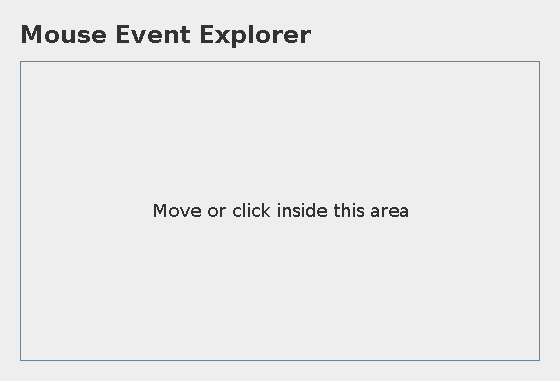
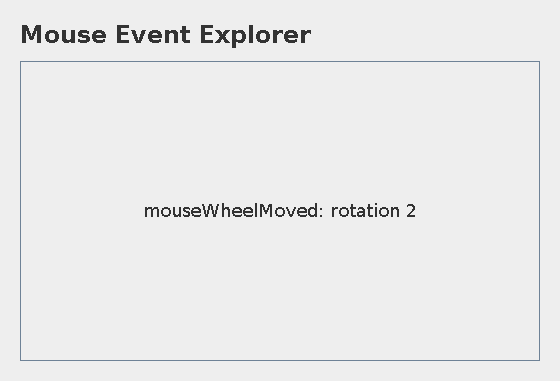
Try these checks
- Moving into the area triggers mouseEntered.
- Moving within it triggers mouseMoved.
- Pressing and dragging trigger mousePressed then mouseDragged.
- A scroll reports mouseWheelMoved with wheel rotation.
Common mistakes
- Motion events require addMouseMotionListener, not only addMouseListener.
- Wheel events require their own registration.
- A click causes multiple callbacks; the last one replaces the label.
WHY THIS GROWTH RATE?
Time and space complexity
O(1) application work per event for bounded coordinate formatting; no accumulated event history.
Each callback formats a short name and a fixed number of numeric fields, then replaces one label. It does not scan stored events.
The system may deliver many motion events. Total useful handler work is proportional to the event count, while Swing schedules their rendering separately.
These bounds describe the implemented data processing. Input/output text length, scheduling, framework rendering and runtime/library internals are identified separately where they matter. Educational limits bound the actual examples.
PREPARE FOR YOUR LAB VIVA
Related viva questions & answers
Try answering aloud, then expand to check your reasoning. Questions focus on this program’s classes, state and behavior.
Why use MouseAdapter rather than implementing every listener from scratch?
It provides default callback bodies. The subclass overrides the required behaviors without writing empty methods for unused callbacks.
Why are three listener registrations needed for the same adapter?
Click/press/enter events, motion events and wheel events belong to separate listener categories. Registering one category does not automatically subscribe to the others.
How do mouseMoved and mouseDragged differ?
Moved is pointer motion without a pressed dragging gesture. Dragged reports motion while a mouse button remains pressed.
Are the displayed coordinates global screen coordinates?
No. getX and getY report coordinates relative to the central component receiving the event.
Why can a click’s displayed message change several times?
Press, release and click are separate events. Each callback updates the same label, so the newest event replaces the preceding one.
What information is reported for a wheel event?
The handler displays the event name and wheel rotation. That value describes scroll movement rather than a clicked button or a pointer position.