THE SYLLABUS TASK
What you need to build
Create a pluggable media player.
Full syllabus requirements: classes, fields and methods
No console input. The driver creates AudioFile, VideoFile and LiveStream demo objects and invokes play, pause and stop through MediaFile references. It prints messages; it does not decode files or connect to streams.
UNDERSTAND THE IDEA
Explanation
MediaFile is abstract because it describes shared file metadata while leaving playback actions to subclasses. Each concrete media type supplies all three operations.
The driver stores the objects in a MediaFile array and calls a common sequence of methods. Different messages demonstrate dynamic dispatch; live pause is explicitly labeled as a simulation.
TURN THE IDEA INTO STEPS
Step-by-step algorithm
- Define common metadata and abstract actions.
- Implement all actions in each subclass.
- Create the three concrete objects.
- Place them under MediaFile references.
- Invoke play, pause and stop for every object.
SEE THE CORE OPERATION
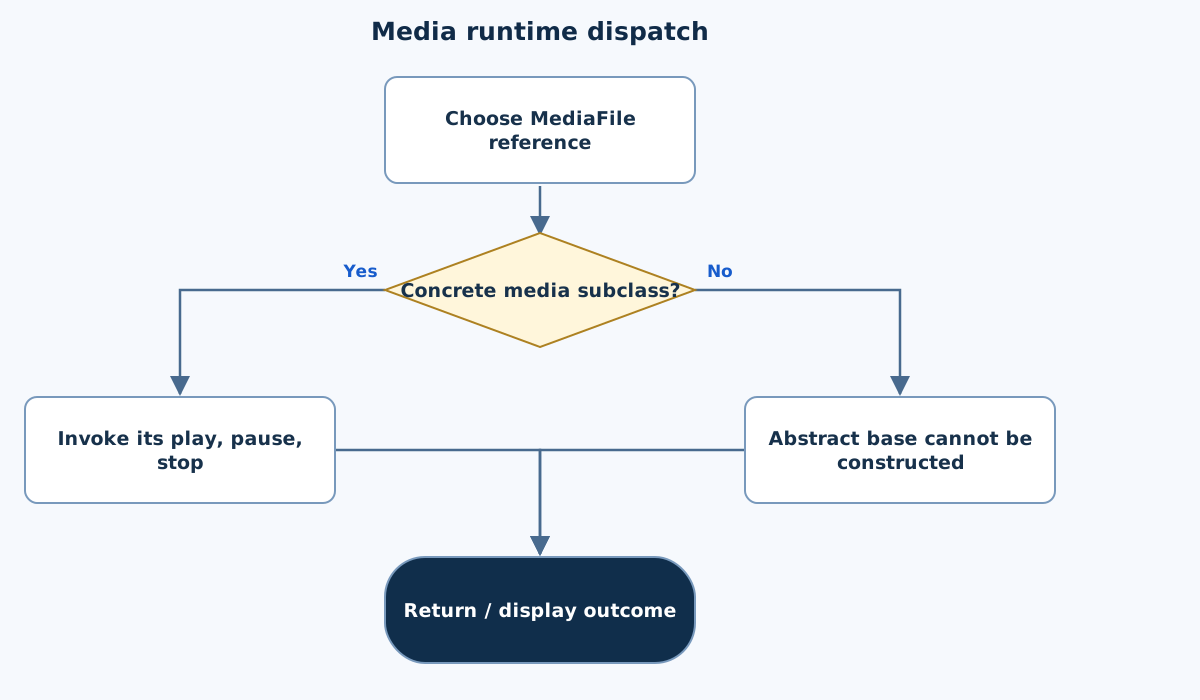
Flowchart
This chart focuses on the named operation or core OOP decision. Diamonds show conditions; labeled branches show outcomes. Read it with the complete algorithm and source for input handling and other operations. Scroll within the diagram on a phone.
Media runtime dispatch
Main.java
import java.util.*;

public class Main {
    private static final Scanner IN = new Scanner(System.in).useLocale(Locale.ROOT);
    static String text() {
        if (!IN.hasNextLine()) throw new IllegalArgumentException("Incomplete input.");
        String value = IN.nextLine().trim();
        if (value.isEmpty() || value.length() > 200) throw new IllegalArgumentException("Text must have 1–200 characters.");
        return value;
    }
    static int integer(int low, int high) {
        int value = Integer.parseInt(text());
        if (value < low || value > high) throw new IllegalArgumentException("Integer out of range.");
        return value;
    }
    static double number(double low, double high) {
        double value = Double.parseDouble(text());
        if (!Double.isFinite(value) || value < low || value > high) throw new IllegalArgumentException("Number out of range.");
        return value;
    }
    static void money(String label, double value) { System.out.printf(Locale.ROOT, "%s: %.2f%n", label, value); }
static abstract class MediaFile {
        final String fileName; final int duration; final double fileSize;
        MediaFile(String name,int duration,double size) { fileName=name;this.duration=duration;fileSize=size; }
        abstract void play(); abstract void pause(); abstract void stop();
        void message(String type,String action) { System.out.println(type+" "+action+": "+fileName); }
    }
    static class AudioFile extends MediaFile {
        AudioFile(String n,int d,double s){super(n,d,s);}
        @Override void play(){message("Audio","play");} @Override void pause(){message("Audio","pause");} @Override void stop(){message("Audio","stop");}
    }
    static class VideoFile extends MediaFile {
        VideoFile(String n,int d,double s){super(n,d,s);}
        @Override void play(){message("Video","play");} @Override void pause(){message("Video","pause");} @Override void stop(){message("Video","stop");}
    }
    static class LiveStream extends MediaFile {
        LiveStream(String n,int d,double s){super(n,d,s);}
        @Override void play(){message("Live","play");} @Override void pause(){message("Live","pause (simulation)");} @Override void stop(){message("Live","stop");}
    }
    public static void main(String[] args) {
        MediaFile[] files={new AudioFile("lesson.mp3",120,5),new VideoFile("demo.mp4",300,50),new LiveStream("class-live",0,0)};
        for(MediaFile file:files){file.play();file.pause();file.stop();}
    }
}
Copy a source file or download the project to preserve its file names.
USE THE RIGHT ENVIRONMENT
How to compile and run
Install a JDK (Java 11 or newer; JDK 17 is suitable), extract this project’s ZIP into its own folder, then open a terminal in that folder.
javac -encoding UTF-8 Main.java
java Main
The standalone source is named Main.java and its entry class is Main. You may also paste it into an online Java compiler and supply the sample input there. Choose Java explicitly; these pages do not change the site compiler or import code automatically.
Each experiment has its own folder because many use the public class Main. Compile and run one experiment at a time.
UNDERSTAND THE JAVA CODE
Line-by-line explanation
These steps follow the exact Java source above. Related statements are grouped; line numbers count blank lines and restart for each file. Start with main to follow execution, then open the constructors, methods or event handlers it uses.
Main.java
Lines 1–4Import utilities and create the shared input reader
import java.util.*;

public class Main {
    private static final Scanner IN = new Scanner(System.in).useLocale(Locale.ROOT);
java.util.* imports utility type names such as Scanner, Locale and collections. Main is the public class matching Main.java. The private static final IN field holds one shared Scanner for System.in; final prevents replacing that reference. The scanner uses Locale.ROOT.
Lines 5–10Read one nonempty trimmed input line
    static String text() {
        if (!IN.hasNextLine()) throw new IllegalArgumentException("Incomplete input.");
        String value = IN.nextLine().trim();
        if (value.isEmpty() || value.length() > 200) throw new IllegalArgumentException("Text must have 1–200 characters.");
        return value;
    }
text checks whether a line exists, reads it and removes leading/trailing whitespace. Reject empty text and lengths above 200 by throwing IllegalArgumentException. Otherwise return the string. One field is read per line, so these helpers do not mix nextInt with leftover newlines.
Lines 11–15Parse and range-check an integer field
    static int integer(int low, int high) {
        int value = Integer.parseInt(text());
        if (value < low || value > high) throw new IllegalArgumentException("Integer out of range.");
        return value;
    }
Integer.parseInt converts the returned string to int or throws NumberFormatException, a subtype of IllegalArgumentException. Reject values outside the caller’s inclusive low/high limits, then return the accepted integer.
Lines 16–20Parse and range-check a finite decimal field
    static double number(double low, double high) {
        double value = Double.parseDouble(text());
        if (!Double.isFinite(value) || value < low || value > high) throw new IllegalArgumentException("Number out of range.");
        return value;
    }
Double.parseDouble reads the string as a double. Double.isFinite rejects NaN and infinities as well as the explicit low/high range check. Return only a finite accepted value; exceptions transfer control to a matching catch block.
Line 21Format a labelled numeric result consistently
static void money(String label, double value) { System.out.printf(Locale.ROOT, "%s: %.2f%n", label, value); }money is a formatting helper: %s prints the label, %.2f prints two decimal places, and %n ends the line. Locale.ROOT fixes locale-sensitive formatting. The helper can also display non-currency quantities; it does not change the stored value.
Lines 22–27Define an abstract media contract and common message helper
static abstract class MediaFile {
        final String fileName; final int duration; final double fileSize;
        MediaFile(String name,int duration,double size) { fileName=name;this.duration=duration;fileSize=size; }
        abstract void play(); abstract void pause(); abstract void stop();
        void message(String type,String action) { System.out.println(type+" "+action+": "+fileName); }
    }
MediaFile keeps metadata and requires play, pause and stop methods. Its concrete message helper formats a type/action/file-name line. An abstract class can supply shared implementation while requiring subtype behaviour.
Lines 28–31Provide audio-specific messages
    static class AudioFile extends MediaFile {
        AudioFile(String n,int d,double s){super(n,d,s);}
        @Override void play(){message("Audio","play");} @Override void pause(){message("Audio","pause");} @Override void stop(){message("Audio","stop");}
    }
AudioFile passes common metadata to super and overrides all three abstract operations. The methods print simulation messages; no audio file is opened or decoded.
Lines 32–35Provide video-specific messages
    static class VideoFile extends MediaFile {
        VideoFile(String n,int d,double s){super(n,d,s);}
        @Override void play(){message("Video","play");} @Override void pause(){message("Video","pause");} @Override void stop(){message("Video","stop");}
    }
VideoFile supplies the same operations with video labels. Matching signatures enable use through MediaFile references.
Lines 36–39Represent a live stream with its own pause wording
    static class LiveStream extends MediaFile {
        LiveStream(String n,int d,double s){super(n,d,s);}
        @Override void play(){message("Live","play");} @Override void pause(){message("Live","pause (simulation)");} @Override void stop(){message("Live","stop");}
    }
LiveStream overrides play, pause and stop. Its pause text explicitly says simulation; this example does not pause a real network stream.
Lines 40–44Call all subtype operations through the parent type
    public static void main(String[] args) {
        MediaFile[] files={new AudioFile("lesson.mp3",120,5),new VideoFile("demo.mp4",300,50),new LiveStream("class-live",0,0)};
        for(MediaFile file:files){file.play();file.pause();file.stop();}
    }
}
main creates one object of each subtype and loops over MediaFile references. Each call resolves at runtime to the receiver’s override. The final braces close the loop, method and Main.
FOLLOW THE STATE
Dry run
- The reference holding AudioFile prints Audio play, pause and stop.
- The VideoFile reference prints Video messages.
- LiveStream prints its own messages, including simulated pause.
- No cast or type-checking branch is needed in the driver.
CHECK THE BEHAVIOUR
Sample input & output
These outputs were captured by running the exact delivered Java project.
Sample 1
(no input)Audio play: lesson.mp3
Audio pause: lesson.mp3
Audio stop: lesson.mp3
Video play: demo.mp4
Video pause: demo.mp4
Video stop: demo.mp4
Live play: class-live
Live pause (simulation): class-live
Live stop: class-live
Common mistakes
- An abstract class cannot be instantiated directly.
- Every concrete subclass must implement all abstract actions.
- Messages are demonstrations, not actual playback.
WHY THIS GROWTH RATE?
Time and space complexity
O(f) method calls for f files, plus filename text output; O(f) stored references.
The driver performs three fixed calls per media object. For f objects, that is O(f) dispatches rather than processing duration or fileSize bytes.
Actual decoding and streaming are outside the program, so their performance must not be inferred from these message-only methods.
These bounds describe the implemented data processing. Input/output text length, scheduling, framework rendering and runtime/library internals are identified separately where they matter. Educational limits bound the actual examples.
PREPARE FOR YOUR LAB VIVA
Related viva questions & answers
Try answering aloud, then expand to check your reasoning. Questions focus on this program’s classes, state and behavior.
Why is MediaFile an abstract class rather than an ordinary concrete file?
It leaves the playback actions unspecified. Concrete media types must supply those actions while inheriting the shared metadata design.
Can the driver construct new MediaFile directly?
No. Abstract classes cannot be instantiated. The driver constructs AudioFile, VideoFile and LiveStream instead.
Why can all three objects fit in a MediaFile array?
Each concrete type extends MediaFile, so its reference is assignment-compatible with the base type.
What must a nonabstract subclass provide here?
It must implement play, pause and stop. Omitting one would require that subclass to remain abstract as well.
Does this exercise process a file for its full duration?
No. It prints action messages only. duration is stored metadata, not a loop bound or actual playback timer.
How does an abstract class differ from this syllabus’s Payment interface?
MediaFile supplies instance fields and a constructor alongside abstract methods. Payment specifies the payment-operation contract, with state stored in implementing classes.