THE SYLLABUS TASK
What you need to build
Write a program implementing a multi-package modular scientific calculator.
Full syllabus requirements: classes, fields and methods
Four-file project. Menu choice per line: 1–5 need two numeric operand lines; 6 sqrt and 7 natural log need one; 0 exits. Preserve calc/basic.java, calc/advanced.java, print/display.java and Test.java.
UNDERSTAND THE IDEA
Explanation
This project separates basic arithmetic, advanced operations and result presentation. It follows the syllabus’s fully qualified names calc.basic, calc.advanced and print.display, with Test in the default package.
Package declarations match the folders. The driver imports those classes and handles invalid operations without terminating the menu immediately. Division by zero, invalid square-root/log domains and nonfinite results produce clear errors.
TURN THE IDEA INTO STEPS
Step-by-step algorithm
- Compile all four files with their package folders intact.
- Read an operation and the required operand count.
- Call basic or advanced through its imported class name.
- Validate the domain and finite result.
- Format with display.result and continue until choice zero.
SEE THE CORE OPERATION
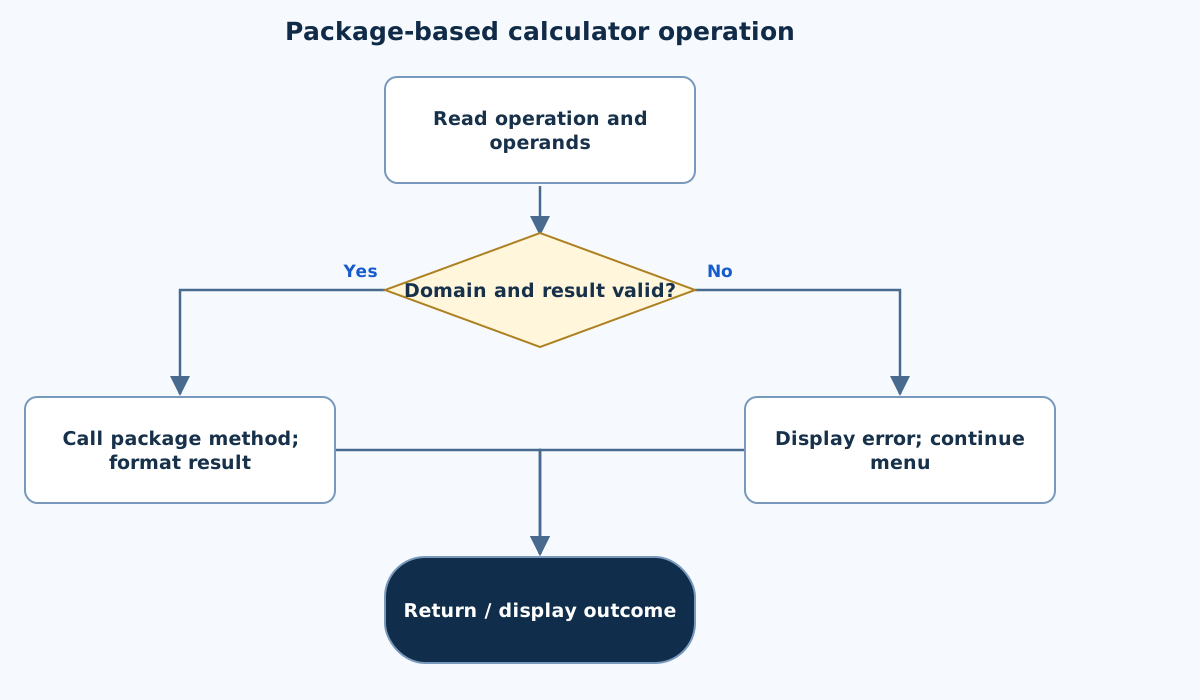
Flowchart
This chart focuses on the named operation or core OOP decision. Diamonds show conditions; labeled branches show outcomes. Read it with the complete algorithm and source for input handling and other operations. Scroll within the diagram on a phone.
Package-based calculator operation
Test.java
import java.util.Scanner;
import java.util.Locale;
import calc.basic;
import calc.advanced;
import print.display;
public class Test {
    public static void main(String[] args) {
        Scanner in=new Scanner(System.in).useLocale(Locale.ROOT);
        System.out.println("1 Add | 2 Subtract | 3 Multiply | 4 Divide | 5 Power | 6 Sqrt | 7 Natural log | 0 Exit");
        while(in.hasNextLine()) {
            try {
                int choice=Integer.parseInt(in.nextLine().trim());if(choice==0)return;
                if(choice<1 || choice>7)throw new IllegalArgumentException("Invalid choice.");
                if(!in.hasNextLine())throw new IllegalArgumentException("Missing operand.");
                double a=Double.parseDouble(in.nextLine().trim()),b=0;
                if(choice<=5){if(!in.hasNextLine())throw new IllegalArgumentException("Missing operand.");b=Double.parseDouble(in.nextLine().trim());}
                if(!Double.isFinite(a)||!Double.isFinite(b))throw new IllegalArgumentException("Finite operands required.");
                double value;
                switch(choice){case 1:value=basic.add(a,b);break;case 2:value=basic.subtract(a,b);break;case 3:value=basic.multiply(a,b);break;case 4:value=basic.divide(a,b);break;case 5:value=advanced.power(a,b);break;case 6:value=advanced.sqrt(a);break;default:value=advanced.log(a);}
                display.result(value);
            } catch(IllegalArgumentException|ArithmeticException e){System.out.println("Error: "+e.getMessage());}
        }
        System.out.println("End with choice 0.");
    }
}
calc/advanced.java
package calc;
public final class advanced {
    private advanced() { }
    public static double power(double a,double b) { return Math.pow(a,b); }
    public static double sqrt(double a) { if(a<0)throw new IllegalArgumentException("Square root needs a nonnegative value.");return Math.sqrt(a); }
    public static double log(double a) { if(a<=0)throw new IllegalArgumentException("Natural log needs a positive value.");return Math.log(a); }
}
calc/basic.java
package calc;
public final class basic {
    private basic() { }
    public static double add(double a,double b) { return a+b; }
    public static double subtract(double a,double b) { return a-b; }
    public static double multiply(double a,double b) { return a*b; }
    public static double divide(double a,double b) { if(b==0)throw new ArithmeticException("Division by zero.");return a/b; }
}
print/display.java
package print;
import java.util.Locale;
public final class display {
    private display() { }
    public static void result(double value) { if(!Double.isFinite(value))throw new ArithmeticException("Non-finite result.");System.out.printf(Locale.ROOT,"Result: %.4f%n",value); }
}
Copy a source file or download the project to preserve its file names.
USE THE RIGHT ENVIRONMENT
How to compile and run
Install a JDK (Java 11 or newer; JDK 17 is suitable), extract this project’s ZIP into its own folder, then open a terminal in that folder.
javac -encoding UTF-8 -d out Test.java calc/basic.java calc/advanced.java print/display.java
java -cp out Test
Keep both package folders intact. Run from the folder containing Test.java. This project needs all four files and is unsuitable for a single-file online compiler.
Each experiment has its own folder because many use the public class Main. Compile and run one experiment at a time.
UNDERSTAND THE JAVA CODE
Line-by-line explanation
These steps follow the exact Java source above. Related statements are grouped; line numbers count blank lines and restart for each file. Start with main to follow execution, then open the constructors, methods or event handlers it uses.
Test.java
Lines 1–5Import standard utilities and the project’s package classes
import java.util.Scanner;
import java.util.Locale;
import calc.basic;
import calc.advanced;
import print.display;
Scanner and Locale come from java.util. basic and advanced are classes in calc, and display is in print. These imports connect the driver to separately compiled source files; they do not copy class code into Test.
Lines 6–9Start the driver and print the supported operation menu
public class Test {
    public static void main(String[] args) {
        Scanner in=new Scanner(System.in).useLocale(Locale.ROOT);
        System.out.println("1 Add | 2 Subtract | 3 Multiply | 4 Divide | 5 Power | 6 Sqrt | 7 Natural log | 0 Exit");
The public class name Test matches Test.java. main creates a scanner and displays choices 1–7 plus 0 for exit.
Lines 10–13Read one operation choice per loop iteration
        while(in.hasNextLine()) {
            try {
                int choice=Integer.parseInt(in.nextLine().trim());if(choice==0)return;
                if(choice<1 || choice>7)throw new IllegalArgumentException("Invalid choice.");
Continue while another input line exists. Parse the choice; 0 returns from main. Reject choices outside 1–7 before attempting operands.
Lines 14–17Read the required finite operands
                if(!in.hasNextLine())throw new IllegalArgumentException("Missing operand.");
                double a=Double.parseDouble(in.nextLine().trim()),b=0;
                if(choice<=5){if(!in.hasNextLine())throw new IllegalArgumentException("Missing operand.");b=Double.parseDouble(in.nextLine().trim());}
                if(!Double.isFinite(a)||!Double.isFinite(b))throw new IllegalArgumentException("Finite operands required.");
Require a first operand. Addition through power need a second operand, while square root and log need only one. Reject NaN and infinities before dispatching the operation.
Lines 18–20Call the package method selected by the choice
                double value;
                switch(choice){case 1:value=basic.add(a,b);break;case 2:value=basic.subtract(a,b);break;case 3:value=basic.multiply(a,b);break;case 4:value=basic.divide(a,b);break;case 5:value=advanced.power(a,b);break;case 6:value=advanced.sqrt(a);break;default:value=advanced.log(a);}
                display.result(value);
The switch assigns value using a static method in basic or advanced. Case 7 reaches the default log branch because the choice was already validated. display.result applies final-result validation and formatting.
Lines 21–25Report a calculation error without losing the loop structure
            } catch(IllegalArgumentException|ArithmeticException e){System.out.println("Error: "+e.getMessage());}
        }
        System.out.println("End with choice 0.");
    }
}
The multi-catch prints input-domain or arithmetic errors. After the current iteration, the loop can read another available choice line. Reaching EOF without explicit 0 prints the final instruction. The braces close main and Test.
calc/advanced.java
Lines 1–3Declare a non-instantiable advanced-operations utility
package calc;
public final class advanced {
    private advanced() { }
The class belongs to calc. It is final with a private constructor, so the intended use is through public static methods.
Line 4Delegate exponentiation to Math.pow
public static double power(double a,double b) { return Math.pow(a,b); }Return a raised to b. This method itself does not reject every non-finite result; the driver passes its result through display.result, which performs that check.
Line 5Check the square-root domain
public static double sqrt(double a) { if(a<0)throw new IllegalArgumentException("Square root needs a nonnegative value.");return Math.sqrt(a); }Negative inputs throw IllegalArgumentException. Zero and positive inputs return Math.sqrt(a). This method consumes only one operand.
Lines 6–7Check the natural-logarithm domain
    public static double log(double a) { if(a<=0)throw new IllegalArgumentException("Natural log needs a positive value.");return Math.log(a); }
}
Require a strictly positive argument before calling Math.log, which uses base e. The final brace closes advanced.
calc/basic.java
Lines 1–3Declare a non-instantiable basic-operations utility
package calc;
public final class basic {
    private basic() { }
package calc requires this file to live in the calc package structure. The public final class cannot be subclassed, and its private constructor prevents ordinary callers from creating an instance.
Lines 4–6Return addition, subtraction and multiplication results
    public static double add(double a,double b) { return a+b; }
    public static double subtract(double a,double b) { return a-b; }
    public static double multiply(double a,double b) { return a*b; }
Each public static method takes two doubles and returns the indicated arithmetic result. Callers use basic.add or similar without an object. A non-finite result is checked by the shared display helper.
Lines 7–8Reject zero before division and close the utility
    public static double divide(double a,double b) { if(b==0)throw new ArithmeticException("Division by zero.");return a/b; }
}
Throw ArithmeticException for b == 0; otherwise return a/b as double. The final brace closes basic.
print/display.java
Lines 1–4Declare the result-formatting utility in its own package
package print;
import java.util.Locale;
public final class display {
    private display() { }
package print matches its directory. Locale is imported for consistent formatting. The final class and private constructor make this a static utility rather than an object intended for construction.
Lines 5–6Reject invalid computed values and format a successful result
    public static void result(double value) { if(!Double.isFinite(value))throw new ArithmeticException("Non-finite result.");System.out.printf(Locale.ROOT,"Result: %.4f%n",value); }
}
Double.isFinite rejects NaN or infinity produced by calculations. Otherwise print Result with four decimal places and a newline. This is why domain or overflow problems can be caught by the driver even after a calculation method returns.
FOLLOW THE STATE
Dry run
- Choice 5 with operands 2 and 3 calls advanced.power.
- The result formatter prints 8.0000.
- Choice 4 with divisor zero reports an error.
- The next menu choice can still be processed.
CHECK THE BEHAVIOUR
Sample input & output
These outputs were captured by running the exact delivered Java project.
Sample 1
5
2
3
6
9
7
1
0
1 Add | 2 Subtract | 3 Multiply | 4 Divide | 5 Power | 6 Sqrt | 7 Natural log | 0 Exit
Result: 8.0000
Result: 3.0000
Result: 0.0000
Sample 2
4
5
0
6
-1
0
1 Add | 2 Subtract | 3 Multiply | 4 Divide | 5 Power | 6 Sqrt | 7 Natural log | 0 Exit
Error: Division by zero.
Error: Square root needs a nonnegative value.
Common mistakes
- Keep package folder names exactly aligned with declarations.
- Run Test from the compiled classpath root.
- Do not paste only Test.java into a single-file compiler.
WHY THIS GROWTH RATE?
Time and space complexity
O(q) fixed operation dispatch for q requests; library-math internals are not analyzed here.
Each request performs one switch selection and invokes one operation. For bounded native doubles, the lesson treats the library operation as a fixed-cost call, giving O(q) driver work.
This is a dispatch/interface analysis, not a proof about Math.pow/log implementation internals. Four source files organize responsibilities without increasing algorithmic input size.
These bounds describe the implemented data processing. Input/output text length, scheduling, framework rendering and runtime/library internals are identified separately where they matter. Educational limits bound the actual examples.
PREPARE FOR YOUR LAB VIVA
Related viva questions & answers
Try answering aloud, then expand to check your reasoning. Questions focus on this program’s classes, state and behavior.
Why do basic.java and advanced.java live in the calc folder?
Both declare package calc. The source layout mirrors that package name and makes the project structure clear to the compiler and reader.
Why does Test import print.display?
display belongs to a different named package. The import allows the default-package driver to refer to that result-formatting class by its simple name.
Why is the driver named Test rather than Main here?
The syllabus explicitly asks for a default-package Test class in the multi-package project. Local commands therefore compile Test.java and launch Test.
What does javac -d out do for this project?
It places compiled classes under the output root, creating package subfolders there. The program is then run with out as its classpath.
What does log mean in this calculator?
It calls Math.log, the natural logarithm. Its input must be positive; it is not a base-ten logarithm operation.
Why does the formatter reject nonfinite results?
Even finite inputs can produce infinity or NaN for some operations. Rejecting those values gives the demonstration a clear valid-result contract.