Control statements decide which statements execute, how often they execute and when control moves to another part of a program.
Sequential execution
Normally, C executes statements in their written order within a block. For example, reading two values, calculating their sum and printing it is a sequence. Control statements change this flow when a problem requires a choice or repeated work.
Selection statements
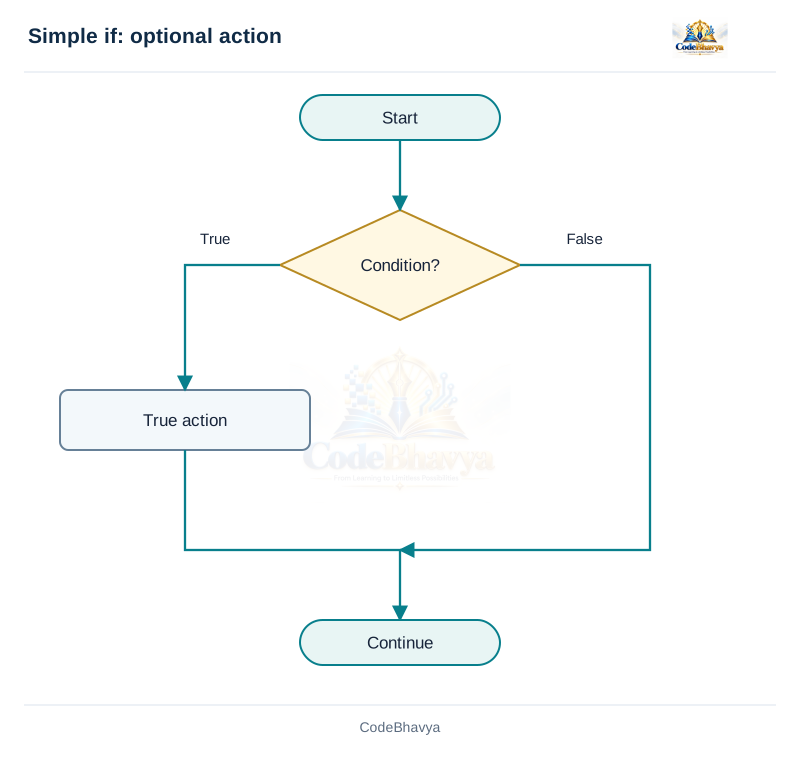
if executes a block when a condition is true.
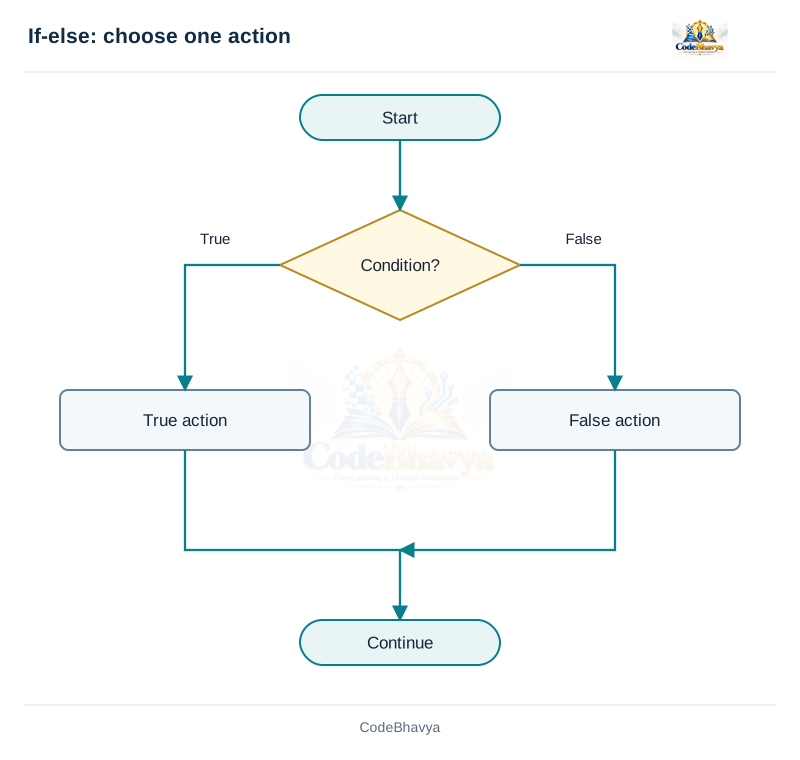
if-else chooses between two alternatives. Nested if and an else-if ladder allow several decisions.
switch selects a starting case using an integer or enumeration value.
Repetition statements
while checks a condition before each iteration.
for places initialisation, a condition and an update together.
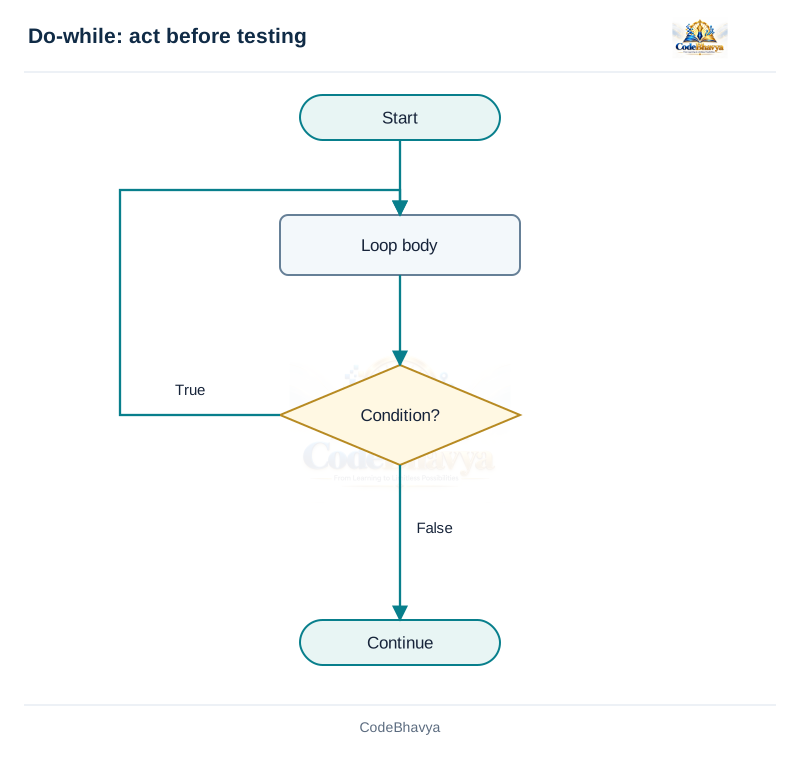
do-while checks the condition after the body, so the body runs at least once.
Jump statements
break leaves the nearest loop or switch.
continue skips the rest of the current loop iteration.
goto transfers control to a label in the same function. return leaves the current function.
Example
A marks-processing program may use a loop to read several marks and an if-else statement to display Pass or Fail for each mark. The loop handles repetition, while the decision handles selection. Use braces to show which statements belong to each block. In a condition, zero means false and a non-zero value means true.
Related exam questions
Related questions in the selection category from the supplied papers. The marks below are the printed allocations, including any combined subquestion.
March/April 2023 · Q3(a) · 5 marks
Discuss decision-making statements with an example.
Paper P02 · page 1
June 2022 · Q2(b) · 8 marks
Illustrate forms of if statements with syntax and examples.
Explain the simple if statement with syntax and an example.
5 marks
Answer in brief
The simple if statement executes a statement or block only when a condition is true.
Syntax
if (condition) {
    /* statements executed when true */
}
Working
Evaluate the condition.
If it is non-zero, execute the body.
If it is zero, skip the body. Continue after the if statement in either case.
Example explanation
Suppose a student receives a certificate when marks are at least 90. For marks = 92, marks >= 90 is true, so the certificate message is printed. For marks = 70, that message is skipped. The final message still prints because it is outside the if block.
Important points
Use braces for a multi-statement body and preferably for a single statement too. Write == to test equality and = to assign a value. Do not put an accidental semicolon after if (condition): that creates an empty body, and a following block executes independently. An if statement makes a decision once; it does not repeat its body. For this fixed-size example, the comparison and optional message require constant work, O(1).
Flowchart
Explain the simple if statement with syntax and an example. · Download diagram
The % operator finds the remainder after integer division. A number is even when division by 2 leaves remainder zero. For n = 8, the condition is true and Even is printed. For n = 7, the condition is false and Odd is printed. Zero is even. Negative even numbers also have remainder zero, so the same condition works for them.
Important points
The else branch is optional in a simple if but necessary when a different action is required for a false condition. Place braces around the branches to make their boundaries clear. There is no condition after else. A later statement outside both branches executes after either branch finishes, unless a jump leaves that path.
Time and space complexity
The program uses one remainder calculation and one decision, regardless of the integer value. For the fixed-width integer model used here, time is O(1). Only a fixed number of variables is used, so auxiliary space is O(1).
Flowchart
Explain if-else with a C program to test whether an integer is even or odd. · Download diagram
A nested if statement places one decision inside another decision. It is useful when a second test is needed only after a first test.
Syntax
if (condition1) {
    if (condition2) {
        /* both conditions true */
    } else {
        /* first true, second false */
    }
} else {
    /* first condition false */
}
Example: largest of three values
First compare a with b. If a >= b, compare a with c; the larger of a and c is the maximum. Otherwise, b is larger than a, so compare b with c. This arrangement checks only the part needed for the selected path.
Worked case
For a = 12, b = 7 and c = 20, a >= b is true. The inner test a >= c is false. Therefore c, which is 20, is selected. For equal maximum values, using >= still selects a correct maximum value.
Matching else
Without braces, an else belongs to the nearest earlier unmatched if. Indentation alone does not change this rule. Braces are the safest way to express the intended nesting. Very deep nesting can be difficult to read; consider an else-if ladder or a simpler condition when suitable.
Complexity
The maximum-of-three example makes a fixed number of comparisons and uses a fixed number of variables. Its time and auxiliary space are both O(1). The result does not require sorting the three numbers.
/* CodeBhavya | PPS AR25 | Learning example */
#include <stdio.h>
int main(void)
{
    int a = 12, b = 7, c = 20, maximum;
    if (a >= b) {
        if (a >= c) { maximum = a; }
        else { maximum = c; }
    } else {
        if (b >= c) { maximum = b; }
        else { maximum = c; }
    }
    printf("Maximum = %d\n", maximum);
    return 0;
}
Sample input and output
This example uses values already written in the program.
Output
Maximum = 20
Related exam questions
Related questions in the selection category from the supplied papers. The marks below are the printed allocations, including any combined subquestion.
March/April 2023 · Q3(a) · 5 marks
Discuss decision-making statements with an example.
Paper P02 · page 1
June 2022 · Q2(b) · 8 marks
Illustrate forms of if statements with syntax and examples.
Check the first condition. If true, execute its branch and leave the ladder.
Otherwise, check the next condition. Continue until a true condition is found.
If no condition is true, execute the final else when it is present.
Example: grade ranges
Use marks from 0 to 100. Reject values outside that range first. Then check marks >= 90 for A, marks >= 75 for B, and marks >= 60 for C. Remaining valid marks receive D. These are example grade boundaries, rather than an official institution policy.
Why order matters
For marks = 82, the first grade condition is false and the second is true, so B is printed. Later conditions are skipped. If marks >= 60 were tested first, 95 would incorrectly receive C because that earlier condition would already be true. Place the highest boundary first when conditions are written this way.
Complexity
With k conditions, at most k tests may be required, giving O(k) time in the general case. This example has a fixed small number of conditions, so its work is O(1) with respect to the input value. Auxiliary space is O(1).
Explain switch with syntax and a menu-based example.
5 marks
Answer in brief
The switch statement selects a starting point in a multi-way decision by comparing an integer value with case labels.
Syntax
switch (choice) {
case 1:
    /* action 1 */
    break;
case 2:
    /* action 2 */
    break;
default:
    /* no matching case */
    break;
}
Working
Evaluate the controlling expression once.
Start at the matching case label. If none matches, start at default when present; otherwise skip the switch.
Execute statements from that point until break or another transfer leaves the switch, or its end is reached.
Example
In the menu example, choice = 2 starts execution at case 2, so Open is printed. break then leaves the switch. A choice such as 9 reaches default and prints Invalid choice. Character constants can also be case values, for example case '+': in a calculator.
Fall-through and restrictions
Without break, execution continues into the statements following later labels. This is called fall-through. Sometimes several labels intentionally share one action; otherwise, a missing break can be a mistake. Case labels cannot use runtime variables or floating-point values. Ranges such as case 1 to 5 are not standard C syntax. Use if-else for range tests.
Time complexity
C does not require one particular switch implementation. A compiler may use comparisons or a jump table. Do not claim that every switch is always O(1). This small fixed menu does only a fixed amount of work.
Both forms choose among alternatives, but they test conditions in different ways.
Else-if ladder
Each branch can test a different condition. Conditions may use relational and logical operators, such as marks >= 90 or age >= 18 && has_id. Conditions are checked in order until one is true. Only that branch executes. A final else can handle the remaining cases.
Switch
One integer expression is compared with integer constant case values. This makes numbered menus or character-based operation choices clear. A default label handles a missing match. Case labels do not stop execution; a break or another transfer is normally used to prevent unwanted fall-through.
Examples
Use an else-if ladder to classify marks into ranges such as 90–100 and 75–89.
Use switch to process a menu choice such as 1 for Add, 2 for View and 3 for Exit.
For two simple alternatives, a plain if-else is usually sufficient.
Choice and efficiency
Choose the form that expresses the actual condition clearly. An else-if ladder may perform up to k tests for k conditions. A switch is not guaranteed by C to be faster: the compiler chooses an implementation. For a small fixed decision, both may involve only constant work. Correct logic and readability matter more than assuming one keyword always improves speed.
Comparison table
↔ Scroll horizontally on a small screen
Else-if ladder and switch
Feature
Else-if ladder
switch
Condition
Separate conditions, including ranges
One integer expression and constant case values
Branch control
First true branch only
Starts at matching label; may fall through
Remaining cases
Final else
default label
Typical use
Grades, eligibility ranges
Menus, operator choices
Related exam questions
Related questions in the selection category from the supplied papers. The marks below are the printed allocations, including any combined subquestion.
March/April 2023 · Q3(a) · 5 marks
Discuss decision-making statements with an example.
Paper P02 · page 1
June 2022 · Q2(b) · 8 marks
Illustrate forms of if statements with syntax and examples.
Explain the while loop with syntax and an example.
5 marks
Answer in brief
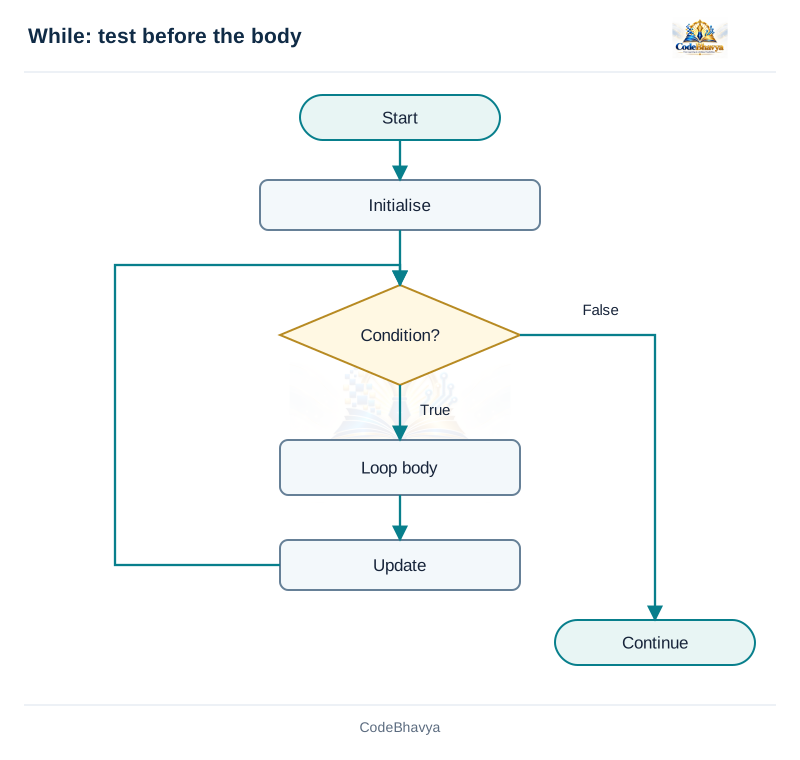
The while loop repeats a body while its condition is true. It is an entry-controlled loop because the test comes before the body.
Syntax
while (condition) {
    /* repeated statements */
}
Working
Set the initial values before the loop.
Test the condition. If false, leave the loop.
Execute the body when true, then return to the condition.
Example trace
The example starts with i = 1. The test i <= 3 succeeds, so 1 is printed and i becomes 2. The next iterations print 2 and 3. After the third update, i becomes 4. The condition is now false and the loop ends. The update is essential: without it, this example would continue printing 1.
Uses and important points
while is useful when repetition is controlled mainly by a condition, such as reading values until a sentinel is entered. The body can execute zero times. Use braces for multiple statements. An accidental semicolon after the condition creates an empty body. When continue is used, make sure an essential update is not skipped.
Complexity
A loop that performs constant work once for each of n values takes O(n) time. This example prints exactly three values, so the displayed run has fixed work. Generalising its limit to n gives O(n) time and O(1) auxiliary space because only a counter is needed.
Flowchart
Explain the while loop with syntax and an example. · Download diagram
Explain the for loop with syntax and its execution order.
5 marks
Answer in brief
The for loop places initialisation, a condition and an update in one header. It is often convenient when a counter controls repetition.
Syntax
for (initialisation; condition; update) {
    /* loop body */
}
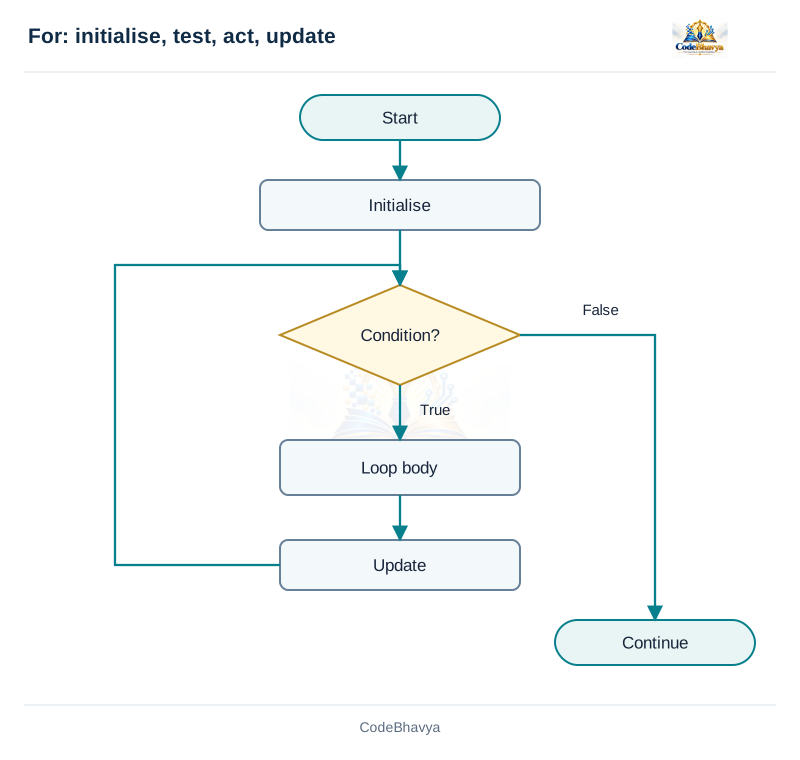
Execution order
Perform initialisation once.
Test the condition. A zero result leaves the loop.
Execute the body when the condition is true.
Perform the update and test the condition again.
Example trace
In for (int i = 1; i <= 3; ++i), i starts at 1. The body prints 1, then the update makes i equal to 2. The next iterations print 2 and 3. When i becomes 4, the condition fails. The variable declared in this loop header is available within the loop, not after its scope ends.
Important points
Any of the three header expressions can be omitted. An omitted condition acts as true, so for (;;) repeats until control leaves it. A continue in a for body goes to the update and then the condition. A break leaves the loop without performing another update. Avoid changing the counter unexpectedly inside the body.
Complexity
When the counter runs from 1 through n and each body execution does constant work, there are n iterations, giving O(n) time. The loop stores only its counter, so auxiliary space is O(1). A for keyword alone does not determine complexity; the number of iterations and the body work do.
Flowchart
Explain the for loop with syntax and its execution order. · Download diagram
Explain the do-while loop and show why it executes at least once.
5 marks
Answer in brief
The do-while loop executes its body first and tests its condition afterwards. It is an exit-controlled loop.
Syntax
do {
    /* loop body */
} while (condition);
Working
Enter the loop and execute the body.
Test the condition after the body.
Repeat the body when the condition is non-zero; otherwise continue after the loop.
Example trace
The example starts with i = 5. The body prints 5 and increments i to 6. Only then is i <= 3 tested. It is false, so the loop stops. This produces one output line even though the starting value would fail an equivalent while loop test.
Uses
do-while is useful when an action must happen before a repeat decision, such as displaying a menu and then checking whether the user requested another operation. It does not automatically validate input: the body must still check whether reading a value succeeded and whether the value is allowed.
Important points and complexity
The final semicolon is part of the syntax. A continue goes to the condition test, not directly to the beginning of the body. A break leaves the loop immediately. If the body performs constant work for n iterations, time is O(n), with at least one execution. A fixed number of variables gives O(1) auxiliary space. The sample deliberately demonstrates a single iteration.
Flowchart
Explain the do-while loop and show why it executes at least once. · Download diagram
/* CodeBhavya | PPS AR25 | Learning example */
#include <stdio.h>
int main(void)
{
    int i = 5;
    do {
        printf("%d\n", i);
        ++i;
    } while (i <= 3);
    return 0;
}
Sample input and output
This example uses values already written in the program.
Output
5
Related exam questions
Related questions in the loops category from the supplied papers. The marks below are the printed allocations, including any combined subquestion.
September/October 2021 · Q6(b) · 8 marks
How is an entry-controlled loop different from an exit-controlled loop? Explain.
Paper P01 · page 1
March/April 2023 · Q2(b) · 5 marks
Devise an algorithm for the sum of n numbers using while and for loops.
The three loops all support repetition, but differ in where their condition is tested and how their control expressions are arranged.
While
The test appears before the body. Initialisation is normally written before the loop and the update inside the body. It is useful when a condition, rather than a simple fixed count, is the main reason for repeating. If its first condition is false, its body does not execute.
For
The header places initialisation, the condition and the update together. Initialisation runs once; then the condition is tested before every body execution. It is convenient for counter-controlled repetition. With continue, the update runs before the next condition test.
Do-while
The body appears before the condition. Therefore at least one execution occurs. It is useful for a menu that must be displayed before deciding whether to repeat. With continue, control moves to the ending condition test. A semicolon follows that test.
Example
Start i at 5 and use i <= 3 as the condition. A while loop and a for loop skip their bodies. A do-while loop executes its body once before discovering that the condition is false. The choice therefore affects program behaviour, not just appearance.
Choosing a loop
Use for for a clear counting task, while for a condition-controlled task, and do-while when the first action is compulsory. These are guidelines, not restrictions. Equivalent loops can have the same complexity. Count iterations and body work to determine time; changing the keyword alone does not improve an algorithm.
Comparison table
↔ Scroll horizontally on a small screen
Loop differences
Feature
while
for
do-while
Test position
Before body
Before body
After body
Minimum executions
0
0
1
continue destination
Condition
Update, then condition
Condition
Common use
Condition-controlled work
Counting
At least one action
Related exam questions
Related questions in the loops category from the supplied papers. The marks below are the printed allocations, including any combined subquestion.
September/October 2021 · Q6(b) · 8 marks
How is an entry-controlled loop different from an exit-controlled loop? Explain.
Paper P01 · page 1
March/April 2023 · Q2(b) · 5 marks
Devise an algorithm for the sum of n numbers using while and for loops.
Explain nested loops with a rectangular output example.
5 marks
Answer in brief
Nested loops repeat one loop inside another. They are useful for rows and columns, tables and repeated comparisons.
Working
The outer loop selects a row.
For that row, the inner loop processes every required column.
After the inner loop ends, the outer loop moves to the next row.
Example trace
The outer loop runs for rows 1 and 2. For each row, the inner loop runs for columns 1, 2 and 3, printing a star each time. A newline is printed after the inner loop so that each outer iteration produces a separate row. Resetting the inner counter at the beginning of its for loop makes all three columns print on every row.
Common mistakes
Printing the newline inside the inner loop puts each star on a different line. Failing to reset an inner counter can cause later rows to print nothing. Use different counter names, such as row and col, so that updating one loop does not accidentally change the other.
Time complexity
For r outer iterations and c inner iterations each time, the body runs r × c times, giving O(rc) time. If both dimensions equal n, this becomes O(n²). Not every nested loop is quadratic: the limits and total number of executions determine the result. This fixed 2-by-3 sample has six star-print operations.
Space complexity
Only two counters are stored in this example. No array grows with the output size, so auxiliary space is O(1). Printed output itself is not counted as working memory.
The break statement immediately leaves the nearest enclosing loop or switch.
Syntax and working
break;
Loop behaviour
When execution reaches break, the remaining statements in that loop body are skipped. Control moves to the statement after the loop. In a for loop, the update is not performed for that abandoned iteration. The statement does not leave the whole function; use return when that is the intention.
Example trace
The example counts from 1 towards 5. It prints 1 and 2. When i reaches 3, the if condition is true and break executes before printf. The loop ends, so neither 3 nor any later value is printed. The message Done then prints because it follows the loop.
Uses and restrictions
Stop a search when the required item is found.
Stop repeated input when a sentinel or stopping condition is detected.
Prevent unwanted switch fall-through.
Use break only inside a loop or switch. It cannot be used as a general jump anywhere in a function.
Nested structures and complexity
A break in an inner loop leaves only that inner loop; the outer loop can continue. A break inside a switch nested in a loop leaves the switch. An early break may reduce work on a particular input, but worst-case complexity still depends on the longest permitted execution. A search through n items can still be O(n) in the worst case.
/* CodeBhavya | PPS AR25 | Learning example */
#include <stdio.h>
int main(void)
{
    for (int i = 1; i <= 5; ++i) {
        if (i == 3) { break; }
        printf("%d\n", i);
    }
    puts("Done");
    return 0;
}
Sample input and output
This example uses values already written in the program.
Output
1
2
Done
Related exam questions
Related questions in the jump statements category from the supplied papers. The marks below are the printed allocations, including any combined subquestion.
Explain the continue statement and its behaviour in different loops.
5 marks
Answer in brief
The continue statement skips the remaining statements of the current loop iteration and moves to the loop’s continuation step.
Syntax
continue;
Behaviour in each loop
In for, continue moves to the update expression and then the condition test.
In while, it moves to the condition test.
In do-while, it moves to the condition test at the end.
Example trace
The example runs i from 1 to 5 and skips 3. For i = 1 and 2, the condition i == 3 is false and printf runs. When i = 3, continue skips printf. The for update still increments i, so the next iterations print 4 and 5. Unlike break, continue does not end the loop.
Important precaution
In a while loop, an update at the end of the body can be skipped by continue. If the counter remains unchanged and the condition stays true, the loop may never finish. Arrange the update so every repeating path makes progress. A continue inside a switch that is itself inside a loop continues the loop; it does not merely leave the switch.
Complexity
Skipping one print does not remove the other counter iterations. A loop from 1 through n that performs constant work per iteration is still O(n), even when some iterations skip later statements. Only a fixed counter is needed, so auxiliary space is O(1).
/* CodeBhavya | PPS AR25 | Learning example */
#include <stdio.h>
int main(void)
{
    for (int i = 1; i <= 5; ++i) {
        if (i == 3) { continue; }
        printf("%d\n", i);
    }
    return 0;
}
Sample input and output
This example uses values already written in the program.
Output
1
2
4
5
Related exam questions
Related questions in the jump statements category from the supplied papers. The marks below are the printed allocations, including any combined subquestion.
In the example, n is negative, so control jumps to the invalid label. The square calculation is skipped and Invalid input is printed. For a non-negative value within the checked range, the program prints the square and returns before reaching the invalid label. A label names a destination; it does not stop ordinary execution from reaching that statement.
Advantages
It can move out of several nested sections to one shared exit or cleanup point.
A carefully chosen forward jump can avoid repeating the same cleanup statements.
It provides a direct transfer when structured alternatives would make a particular cleanup path more complex.
Limitations
Many forward and backward jumps make the execution order difficult to understand.
A jump may skip important initialisation or checks, leading to mistakes.
Testing and maintenance become harder when paths are scattered across the function.
Recommended use
Prefer if, switch and loops for ordinary decisions and repetition. Use goto sparingly for a clear reason. It cannot jump into another function, and C imposes extra restrictions around variably modified types. This introductory example does not use those types. A goto is not a function call and does not arrange a return to the jumping point.
/* CodeBhavya | PPS AR25 | Learning example */
#include <stdio.h>
int main(void)
{
    int n = -4;
    if (n < 0 || n > 100) { goto invalid; }
    printf("Square = %d\n", n * n);
    return 0;
invalid:
    puts("Invalid input");
    return 1;
}
Sample input and output
This example uses values already written in the program.
Output
Invalid input
Related exam questions
Related questions in the jump statements category from the supplied papers. The marks below are the printed allocations, including any combined subquestion.
Write a C program to find the sum of the first n natural numbers using a loop.
5 marks
Answer in brief
The sum of the first n natural numbers is 1 + 2 + ... + n. A loop can build this sum one value at a time.
Algorithm
Read n and check the supported range.
Set sum to 0.
For i from 1 through n, add i to sum.
Print sum.
Worked trace
For n = 4, sum begins at 0. Adding 1 gives 1, adding 2 gives 3, adding 3 gives 6 and adding 4 gives 10. The next counter value is 5, so the loop ends and the program prints 10.
Why initialise to zero?
Zero is the starting value for addition: adding it does not change the result. Using an uninitialised automatic variable would not provide a valid starting sum. For n = 0, the loop is skipped and the already initialised result remains zero.
Equivalent while loop
int i = 1;
while (i <= n) {
    sum += i;
    ++i;
}
Time and space complexity
The for version performs n additions and n counter updates. Each uses constant work in the fixed-width model, so total time grows in proportion to n: O(n). Only n, i and sum are stored, so auxiliary space is O(1). The formula n * (n + 1) / 2 is a different constant-operation method, but the multiplication must fit its type.
Input limits
The sample accepts 0 through 10000 and uses long long for the total. These limits keep the supported calculations within the standard minimum range of that type. The user must supply an integer representable by int.
/* CodeBhavya | PPS AR25 | Learning example */
#include <stdio.h>
int main(void)
{
    int n;
    long long sum = 0;
    if (scanf("%d", &n) != 1 || n < 0 || n > 10000) {
        puts("Unsupported input"); return 1;
    }
    for (int i = 1; i <= n; ++i) { sum += i; }
    printf("Sum = %lld\n", sum);
    return 0;
}
Sample input and output
Input
4
Output
Sum = 10
Related exam questions
Related questions in the loops category from the supplied papers. The marks below are the printed allocations, including any combined subquestion.
September/October 2021 · Q6(b) · 8 marks
How is an entry-controlled loop different from an exit-controlled loop? Explain.
Paper P01 · page 1
March/April 2023 · Q2(b) · 5 marks
Devise an algorithm for the sum of n numbers using while and for loops.
Write a C program to calculate factorial using a loop.
5 marks
Answer in brief
For a non-negative integer n, n! is the product of integers from 1 through n. By definition, 0! equals 1.
Algorithm
Read n and accept values from 0 through 20.
Set factorial to 1.
Multiply factorial by each integer i from 2 through n.
Print factorial.
Worked trace
For n = 5, factorial starts at 1. Multiplication by 2 gives 2; by 3 gives 6; by 4 gives 24; and by 5 gives 120. When i becomes 6, the test fails and the program prints 120.
Boundary cases
For n = 0 or n = 1, the loop body is skipped and the result remains 1. Negative integers are rejected because this program uses the elementary factorial definition. The program does not attempt a factorial above 20, because factorial grows rapidly and a fixed-width integer cannot store arbitrary results.
Data type choice
unsigned long long can represent at least the range needed for 20!. The format %llu matches that type. Choosing a wider type does not remove every limit; it only increases the supported range. An input must still be representable by the type used to read it.
Time and space complexity
For n >= 2, the loop performs n - 1 multiplications. The number grows linearly with n, giving O(n) time for this algorithm under fixed-width arithmetic. The input bound is a safety limit on the example. The program stores a fixed number of values, so auxiliary space is O(1).
Write a C program to print a multiplication table for a given number of rows.
5 marks
Answer in brief
A multiplication table prints the product of a selected number and each row number from 1 through the requested row count.
Algorithm
Read number and rows. Check the supported limits.
Start i at 1.
While i <= rows, print number, i and number * i; then increment i.
Stop after the requested number of rows.
Worked example
For number = 5 and rows = 3, the multipliers are 1, 2 and 3. The products are 5, 10 and 15. Each iteration prints one line. The loop stops when i becomes 4 because 4 <= 3 is false.
Formatting the output
The printf format displays the table as number x multiplier = product. A newline ends each row. Use a format specifier that matches the product type. In the sample, 1LL * number * i performs the multiplication as long long, and %lld displays the result.
Input cases
A negative number is allowed and produces negative products for positive row numbers. Zero produces zero products. A row count of zero prints no rows. A negative row count is rejected. The sample limits the magnitude of number to 10000 and rows to 1000 to keep arithmetic and output manageable.
Time and space complexity
For r rows, there are r multiplications and r printed lines. Each row involves fixed work, so time is O(r). The selected number changes the products, not the iteration count. Only number, rows and i are required, so auxiliary space is O(1).
Write a C program to find the sum of digits of a non-negative integer.
5 marks
Answer in brief
The sum of digits is obtained by extracting each decimal digit and adding it to a running total.
Algorithm
Read a non-negative integer n.
Set sum to 0 and copy n to remaining.
While remaining > 0, add remaining % 10 to sum and divide remaining by 10.
Print sum.
Worked trace
For n = 472, the first digit is 2, sum becomes 2 and remaining becomes 47. Next, digit 7 makes sum equal to 9 and remaining becomes 4. Finally, digit 4 makes sum equal to 13 and remaining becomes 0. The condition is false, so the answer is 13.
Why keep a copy?
Dividing remaining changes it on each iteration. Keeping the original n allows it to be used later if required. The computation itself needs only the current remaining value and the sum.
Boundary cases
For input zero, the while body is skipped and sum stays zero, which is the correct sum of the digits of 0. The example rejects negative input to avoid extra sign-handling rules. It accepts values through 1000000000; the input token must fit long long.
Time and space complexity
If the number has d decimal digits, one digit is removed per iteration. The loop therefore performs d iterations for a positive number: O(d) time. Since the number of digits grows logarithmically with n, this can also be written O(log n) for n > 0. Only a fixed number of integer variables is stored, so auxiliary space is O(1).
Write a C program to print a pattern whose row i contains i copies of i.
5 marks
Answer in brief
This pattern uses nested loops. Row 1 prints one 1, row 2 prints two 2s, and so on through the requested number of rows.
Algorithm
Read the row count n and check its range.
For each row from 1 through n, run an inner loop from 1 through row.
Print the row number on each inner iteration, adding spaces between values.
After each row, print a newline.
Worked example
For n = 3, the first outer iteration prints 1 once. The second prints 2 twice. The third prints 3 three times. Thus the three lines are 1, then 2 2, then 3 3 3. The inner limit changes with the current row, producing a triangle rather than a rectangle.
Output formatting
A space is printed before a value when it is not the first value in its row. This gives clear separation without a trailing space. The newline belongs after the inner loop, because the complete row must be printed before moving down.
Time complexity
The inner loop runs 1 + 2 + ... + n times. This sum is n(n + 1)/2. Its fastest-growing term is proportional to n², so time is O(n²) when each printed integer is treated as constant work. The example bounds n at 9, so each printed value has one digit. The bound also keeps the output easy to read.
Space complexity
Only n, row and col are stored, regardless of the number of output positions. Auxiliary space is O(1); output characters are not stored in a growing array.