THE SYLLABUS QUESTION
What you need to solve
Write a C program that uses functions to perform: I. Addition of Two Matrices. II. Multiplication of Two Matrices.
First enter operation 1 (addition) or 2 (multiplication). Then enter r1 c1 r2 c2, followed by matrix A and matrix B in row-major order. Dimensions: 1–10; elements: -1000 to 1000.
UNDERSTAND THE IDEA
Explanation
Addition requires identical dimensions and adds corresponding elements. Multiplication requires the number of columns in A to equal the number of rows in B.
For multiplication, result[i][j] is the dot product of row i of A and column j of B. Initialize each result cell to zero before accumulating.
Separate read, add, multiply and display functions keep the program organized. Fixed 10 × 10 arrays make the storage bounds explicit. The supported element bounds keep the integer results in range.
PLAN BEFORE CODING
Algorithm
- Read the operation and dimensions.
- Validate sizes and the compatibility rule for the selected operation.
- Read both matrices using a function.
- Call addMatrices or multiplyMatrices.
- Display the result using a function.
SEE THE CONTROL FLOW
Flowchart
Follow the arrows from Start. Diamonds ask a question; labeled arrows show the answer. A returning arrow repeats a loop. Function internals are grouped where needed; later input checks follow the rules in the program.
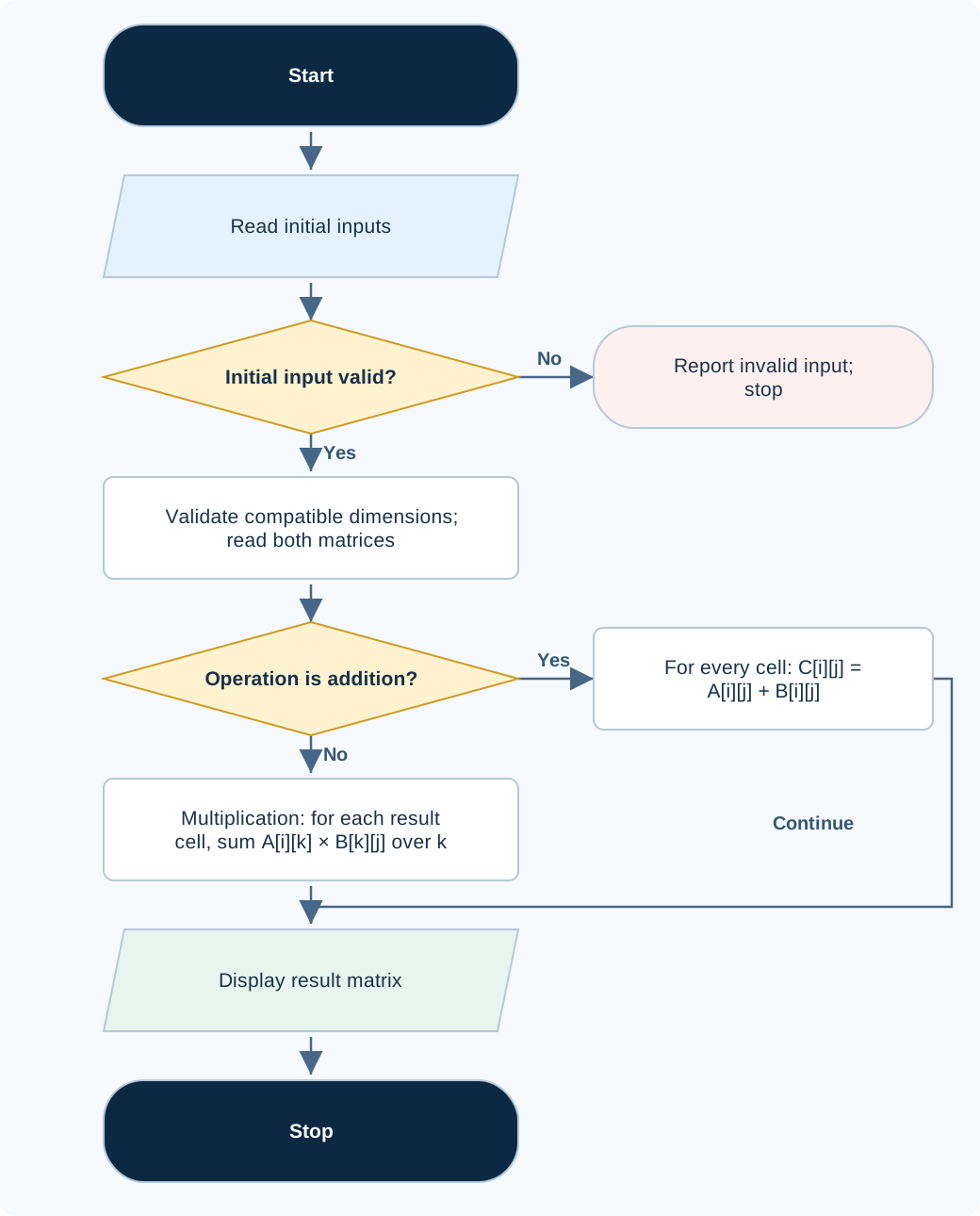
On a phone, scroll sideways to read the diagram at full size. Open full-size flowchart ↗
#include <stdio.h>
#define MAX_DIM 10

int readMatrix(int matrix[][MAX_DIM], int rows, int cols) {
    for (int i = 0; i < rows; ++i)
        for (int j = 0; j < cols; ++j)
            if (scanf("%d", &matrix[i][j]) != 1 ||
                matrix[i][j] < -1000 || matrix[i][j] > 1000) return 0;
    return 1;
}

void addMatrices(int a[][MAX_DIM], int b[][MAX_DIM],
                 int result[][MAX_DIM], int rows, int cols) {
    for (int i = 0; i < rows; ++i)
        for (int j = 0; j < cols; ++j)
            result[i][j] = a[i][j] + b[i][j];
}

void multiplyMatrices(int a[][MAX_DIM], int b[][MAX_DIM],
                      int result[][MAX_DIM], int r1, int c1, int c2) {
    for (int i = 0; i < r1; ++i)
        for (int j = 0; j < c2; ++j) {
            result[i][j] = 0;
            for (int k = 0; k < c1; ++k)
                result[i][j] += a[i][k] * b[k][j];
        }
}

void displayMatrix(int matrix[][MAX_DIM], int rows, int cols) {
    for (int i = 0; i < rows; ++i) {
        for (int j = 0; j < cols; ++j)
            printf("%s%d", j == 0 ? "" : " ", matrix[i][j]);
        putchar('\n');
    }
}

int main(void) {
    int a[MAX_DIM][MAX_DIM], b[MAX_DIM][MAX_DIM], result[MAX_DIM][MAX_DIM];
    int operation, r1, c1, r2, c2;
    if (scanf("%d %d %d %d %d", &operation, &r1, &c1, &r2, &c2) != 5 ||
        (operation != 1 && operation != 2) ||
        r1 < 1 || r1 > MAX_DIM || c1 < 1 || c1 > MAX_DIM ||
        r2 < 1 || r2 > MAX_DIM || c2 < 1 || c2 > MAX_DIM) {
        puts("Invalid input."); return 1;
    }
    if ((operation == 1 && (r1 != r2 || c1 != c2)) ||
        (operation == 2 && c1 != r2)) {
        puts("Incompatible matrix dimensions."); return 1;
    }
    if (!readMatrix(a, r1, c1) || !readMatrix(b, r2, c2)) {
        puts("Invalid input."); return 1;
    }
    if (operation == 1) {
        addMatrices(a, b, result, r1, c1);
        puts("Sum matrix:");
    } else {
        multiplyMatrices(a, b, result, r1, c1, c2);
        puts("Product matrix:");
    }
    displayMatrix(result, r1, operation == 1 ? c1 : c2);
    return 0;
}
Code loads into the existing compiler. Enter the sample input there; sign-in and execution rules stay the same.
Compile and run locally
gcc -std=c17 matrix-functions.c -o lab
./lab
On Windows, run .\lab.exe after compiling with GCC. The interest program requires the math library where applicable.
FOLLOW THE VALUES
Dry run
| Step / state | Operation | Result |
|---|---|---|
| A = [[1,2],[3,4]]; B = [[5,6],[7,8]] | Addition cell (0,0) | 1 + 5 = 6 |
| Multiplication cell (0,0) | 1×5 + 2×7 | 19 |
| Multiplication cell (0,1) | 1×6 + 2×8 | 22 |
| Remaining multiplication row | 3×5 + 4×7; 3×6 + 4×8 | 43, 50 |
CHECK THE BEHAVIOR
Sample input & output
Each output below was produced by compiling and running this exact program. Input values are entered in the stated order; the examples do not print input prompts.
Sample 1
1
2 2 2 2
1 2
3 4
5 6
7 8
Sum matrix:
6 8
10 12
Sample 2
2
2 2 2 2
1 2
3 4
5 6
7 8
Product matrix:
19 22
43 50
Sample 3
2
1 3 3 1
1 2 3
4
5
6
Product matrix:
32
Common mistakes
- Matrix multiplication is not element-by-element multiplication.
- Validate dimensions before reading or calculating, and zero each product cell.
WHY THIS GROWTH RATE?
Time and space complexity
Addition O(r × c); multiplication O(r1 × c1 × c2). Fixed 10 × 10 matrix storage in this implementation.
For addition, r rows × c columns give r × c result cells. Each cell needs one addition, so addition is O(r × c). For multiplication of an r1 × c1 matrix by a c1 × c2 matrix, there are r1 × c2 result cells; each requires c1 multiply-and-add steps.
Multiplication therefore performs r1 × c2 × c1 operations: O(r1 × c1 × c2). Square n × n multiplication becomes O(n³). Reading and displaying the matrices adds work proportional to their cell counts; it does not change this bound for positive compatible dimensions.
This code reserves three fixed 10 × 10 buffers, so its allocated matrix space is constant. If generalized to dynamically sized matrices, storing the two inputs and result requires O(r1 × c1 + c1 × c2 + r1 × c2) space. The loops use O(1) additional scalar space.
Big-O describes how work grows as the stated input quantity grows; fixed factors and lower-order terms are omitted. The analysis treats fixed-width arithmetic as constant cost and the published limits as practical safety bounds.