THE SYLLABUS TASK
What you need to build
Implement a continuous chat exchange between two threads.
Full syllabus requirements: classes, fields and methods
No input. The sender exchanges three demo messages: Hello, How are you?, Goodbye. Each send is followed by its receive. The finite sequence demonstrates continuous exchange and clean termination.
UNDERSTAND THE IDEA
Explanation
A Chat monitor contains a single message slot and an available flag. Sender waits while the slot is full; Receiver waits while it is empty.
Both use the same object’s monitor. After changing the slot state they call notifyAll, and guarded while loops recheck readiness. A closed flag wakes waiting workers and lets the receiver drain the final message before finishing.
TURN THE IDEA INTO STEPS
Step-by-step algorithm
- Start sender and receiver concurrently.
- Wait for an empty slot before sending.
- Publish and print the message under synchronization.
- Receive and clear that slot, waking the sender.
- Close after the final send and drain any pending message.
SEE THE CORE OPERATION
Flowchart
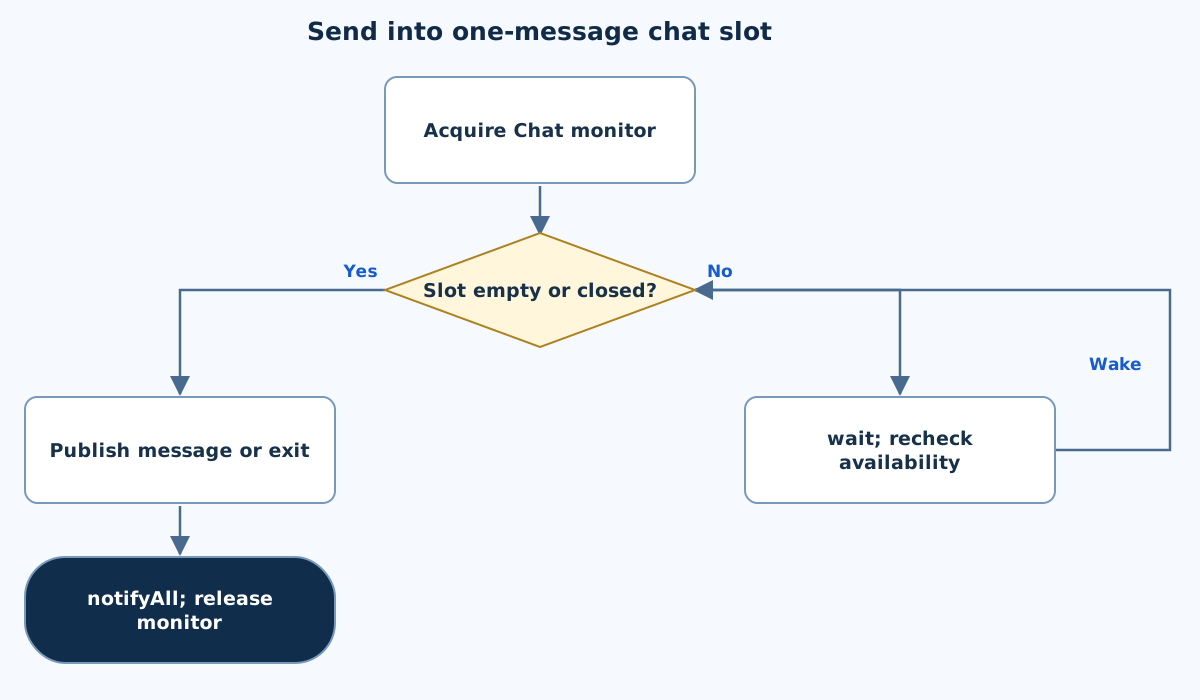
This chart focuses on the named operation or core OOP decision. Diamonds show conditions; labeled branches show outcomes. Read it with the complete algorithm and source for input handling and other operations. Scroll within the diagram on a phone.
Send into one-message chat slot
Main.java
public class Main {
    static class Chat {
        private String message; private boolean available,closed;
        synchronized void send(String text) throws InterruptedException {
            while(available && !closed)wait();if(closed)return;
            message=text;System.out.println("Sender: "+text);available=true;notifyAll();
        }
        synchronized String receive() throws InterruptedException {
            while(!available && !closed)wait();if(!available)return null;
            String result=message;System.out.println("Receiver: "+result);available=false;notifyAll();return result;
        }
        synchronized void close(){closed=true;notifyAll();}
    }
    static class Sender extends Thread {
        final Chat chat;Sender(Chat chat){this.chat=chat;}
        @Override public void run(){
            try{for(String text:new String[]{"Hello","How are you?","Goodbye"})chat.send(text);}
            catch(InterruptedException e){Thread.currentThread().interrupt();}
            finally{chat.close();}
        }
    }
    static class Receiver extends Thread {
        final Chat chat;Receiver(Chat chat){this.chat=chat;}
        @Override public void run(){
            try{while(chat.receive()!=null){/* Continue until sender closes and slot drains. */}}
            catch(InterruptedException e){chat.close();Thread.currentThread().interrupt();}
        }
    }
    public static void main(String[] args) throws InterruptedException {
        Chat chat=new Chat();Thread sender=new Sender(chat),receiver=new Receiver(chat);sender.start();receiver.start();
        try{sender.join();receiver.join();}catch(InterruptedException e){chat.close();sender.interrupt();receiver.interrupt();throw e;}
    }
}
Copy a source file or download the project to preserve its file names.
USE THE RIGHT ENVIRONMENT
How to compile and run
Install a JDK (Java 11 or newer; JDK 17 is suitable), extract this project’s ZIP into its own folder, then open a terminal in that folder.
javac -encoding UTF-8 Main.java
java Main
The standalone source is named Main.java and its entry class is Main. You may also paste it into an online Java compiler and supply the sample input there. Choose Java explicitly; these pages do not change the site compiler or import code automatically.
Each experiment has its own folder because many use the public class Main. Compile and run one experiment at a time.
UNDERSTAND THE JAVA CODE
Line-by-line explanation
These steps follow the exact Java source above. Related statements are grouped; line numbers count blank lines and restart for each file. Start with main to follow execution, then open the constructors, methods or event handlers it uses.
Main.java
Lines 1–3Keep one message slot and its state together
public class Main {
    static class Chat {
        private String message; private boolean available,closed;
Chat stores a message, whether it is available, and whether the sender has closed. Both threads share this same Chat object.
Lines 4–7Wait for an empty slot before sending
        synchronized void send(String text) throws InterruptedException {
            while(available && !closed)wait();if(closed)return;
            message=text;System.out.println("Sender: "+text);available=true;notifyAll();
        }
The synchronized method waits while a previous message is available and the chat is open. If closed, return. Otherwise store and print the new text, mark it available and wake waiters. The sender cannot overwrite an unread message.
Lines 8–11Receive a pending message or signal completion
        synchronized String receive() throws InterruptedException {
            while(!available && !closed)wait();if(!available)return null;
            String result=message;System.out.println("Receiver: "+result);available=false;notifyAll();return result;
        }
Wait while the slot is empty and open. If no message remains after closure, return null. Otherwise copy the text, print it, clear available and notify the sender. A pending final message is still delivered after close.
Lines 12–13Close the shared chat and wake waiters
        synchronized void close(){closed=true;notifyAll();}
    }
Setting closed under the same monitor makes the state change visible to synchronized send/receive calls. notifyAll lets them recheck their stop conditions.
Lines 14–20Send the three demonstration messages and close in finally
    static class Sender extends Thread {
        final Chat chat;Sender(Chat chat){this.chat=chat;}
        @Override public void run(){
            try{for(String text:new String[]{"Hello","How are you?","Goodbye"})chat.send(text);}
            catch(InterruptedException e){Thread.currentThread().interrupt();}
            finally{chat.close();}
        }
Sender saves the shared reference. Its run sends the three strings in array order. On interruption it restores the flag, and finally closes the chat on either normal or interrupted completion.
Lines 21–28Receive until the slot is drained after closure
    }
    static class Receiver extends Thread {
        final Chat chat;Receiver(Chat chat){this.chat=chat;}
        @Override public void run(){
            try{while(chat.receive()!=null){/* Continue until sender closes and slot drains. */}}
            catch(InterruptedException e){chat.close();Thread.currentThread().interrupt();}
        }
    }
Receiver saves the same Chat and repeats receive until null. If interrupted, it closes the chat and restores the flag. These braces finish run and the Receiver class.
Lines 29–33Start the two workers and wait for completion
    public static void main(String[] args) throws InterruptedException {
        Chat chat=new Chat();Thread sender=new Sender(chat),receiver=new Receiver(chat);sender.start();receiver.start();
        try{sender.join();receiver.join();}catch(InterruptedException e){chat.close();sender.interrupt();receiver.interrupt();throw e;}
    }
}
main starts sender and receiver on a shared Chat. join waits for both; an interrupted main closes shared state, interrupts both workers and rethrows. The monitor protocol, not timing delays, controls message handoff.
FOLLOW THE STATE
Dry run
- Sender publishes Hello, setting available=true.
- Receiver prints Hello and clears the flag.
- The next message can then be published.
- After Goodbye, close wakes waiters and the receiver still consumes the pending final message.
CHECK THE BEHAVIOUR
Sample input & output
These outputs were captured by running the exact delivered Java project.
Sample 1
(no input)Sender: Hello
Receiver: Hello
Sender: How are you?
Receiver: How are you?
Sender: Goodbye
Receiver: Goodbye
Common mistakes
- Call wait/notifyAll while owning the same monitor.
- Do not close by discarding an available final message.
- Use a condition loop rather than assuming any notification means data exists.
WHY THIS GROWTH RATE?
Time and space complexity
O(m+T) useful processing for m messages containing T total text characters; O(L) one-slot message state.
Each message is sent and received once, and printing writes its text. The protocol retains only one pending message rather than an unbounded history.
Scheduling and waiting can change elapsed time. The finite demonstration uses three fixed messages and joins both workers for clean completion.
These bounds describe the implemented data processing. Input/output text length, scheduling, framework rendering and runtime/library internals are identified separately where they matter. Educational limits bound the actual examples.
PREPARE FOR YOUR LAB VIVA
Related viva questions & answers
Try answering aloud, then expand to check your reasoning. Questions focus on this program’s classes, state and behavior.
Why does Chat store an available flag separately from message?
It records whether the one-slot buffer currently contains unread data. The last String value alone cannot distinguish an old consumed message from a newly published one.
Why must sender wait while the slot is full?
Overwriting it would lose a message before Receiver consumes it. The guarded wait provides one-message backpressure.
Why does receiver clear available after reading?
It marks the slot free for the next send. Leaving it true would make Sender wait even though the prior message was already consumed.
Why does close call notifyAll?
A worker may be waiting for data or space when exchange ends. Waking waiters lets them observe closed and terminate instead of blocking forever.
How does the receiver preserve a final message sent just before close?
It returns null only when the slot is empty. If available is still true, it consumes that message even though closed has been set.
Why is this demonstration bounded rather than an endless chat loop?
A finite message list makes output reproducible and lets students test shutdown. The same send/receive protocol can serve a longer stream while retaining an explicit close condition.