THE SYLLABUS TASK
What you need to build
Build a producer-consumer order system.
Full syllabus requirements: classes, fields and methods
No input. Producer creates orders 1–6, Consumer processes them FIFO. Queue capacity is three. Interleaving of produced/processed lines may vary; each ordered stream remains 1–6.
UNDERSTAND THE IDEA
Explanation
The shared OrderQueue wraps an ArrayDeque with synchronized put and take methods. Producer waits when capacity is reached, and Consumer waits when no order is available.
Closing after production does not discard queued orders. Consumer drains them and stops only when the queue is both closed and empty. This exercise permits several produced lines in a row; it does not impose the chat exercise’s one-for-one alternation.
TURN THE IDEA INTO STEPS
Step-by-step algorithm
- Start producer and consumer.
- Before put, wait while size equals capacity.
- Enqueue and notify waiting consumers.
- Before take, wait while empty and production remains open.
- Process FIFO orders; after close, drain the queue and finish.
SEE THE CORE OPERATION
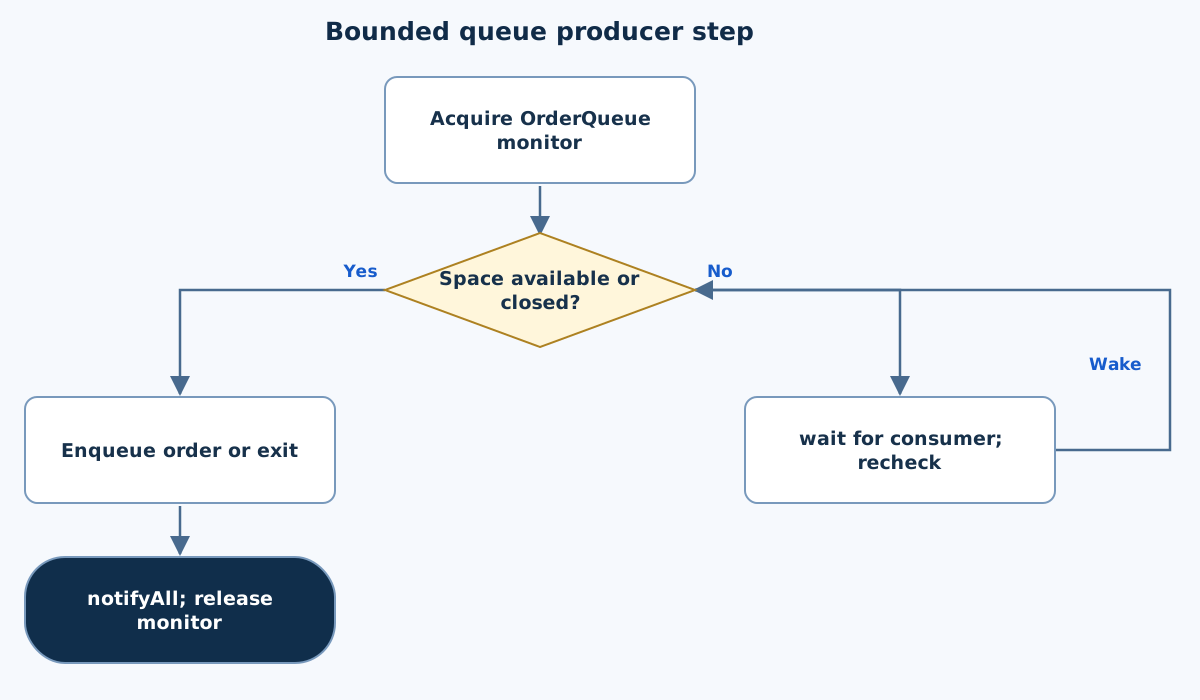
Flowchart
This chart focuses on the named operation or core OOP decision. Diamonds show conditions; labeled branches show outcomes. Read it with the complete algorithm and source for input handling and other operations. Scroll within the diagram on a phone.
Bounded queue producer step
Main.java
import java.util.ArrayDeque;
import java.util.Queue;
public class Main {
    static class OrderQueue {
        private final Queue<Integer> orders=new ArrayDeque<>();
        private final int capacity=3;private boolean closed;
        synchronized void put(int order) throws InterruptedException {
            while(orders.size()==capacity && !closed)wait();if(closed)return;
            orders.add(order);System.out.println("Produced order "+order);notifyAll();
        }
        synchronized Integer take() throws InterruptedException {
            while(orders.isEmpty() && !closed)wait();if(orders.isEmpty())return null;
            int order=orders.remove();System.out.println("Processed order "+order);notifyAll();return order;
        }
        synchronized void close(){closed=true;notifyAll();}
    }
    static class Producer extends Thread {
        final OrderQueue queue;Producer(OrderQueue q){queue=q;}
        @Override public void run(){try{for(int i=1;i<=6;i++)queue.put(i);}catch(InterruptedException e){Thread.currentThread().interrupt();}finally{queue.close();}}
    }
    static class Consumer extends Thread {
        final OrderQueue queue;Consumer(OrderQueue q){queue=q;}
        @Override public void run(){try{while(queue.take()!=null){/* Simulated processing. */}}catch(InterruptedException e){queue.close();Thread.currentThread().interrupt();}}
    }
    public static void main(String[] args) throws InterruptedException {
        OrderQueue queue=new OrderQueue();Thread producer=new Producer(queue),consumer=new Consumer(queue);producer.start();consumer.start();
        try{producer.join();consumer.join();}catch(InterruptedException e){queue.close();producer.interrupt();consumer.interrupt();throw e;}
    }
}
Copy a source file or download the project to preserve its file names.
USE THE RIGHT ENVIRONMENT
How to compile and run
Install a JDK (Java 11 or newer; JDK 17 is suitable), extract this project’s ZIP into its own folder, then open a terminal in that folder.
javac -encoding UTF-8 Main.java
java Main
The standalone source is named Main.java and its entry class is Main. You may also paste it into an online Java compiler and supply the sample input there. Choose Java explicitly; these pages do not change the site compiler or import code automatically.
Each experiment has its own folder because many use the public class Main. Compile and run one experiment at a time.
UNDERSTAND THE JAVA CODE
Line-by-line explanation
These steps follow the exact Java source above. Related statements are grouped; line numbers count blank lines and restart for each file. Start with main to follow execution, then open the constructors, methods or event handlers it uses.
Main.java
Lines 1–6Represent a bounded shared order queue
import java.util.ArrayDeque;
import java.util.Queue;
public class Main {
    static class OrderQueue {
        private final Queue<Integer> orders=new ArrayDeque<>();
        private final int capacity=3;private boolean closed;
Queue is the interface and ArrayDeque its concrete FIFO storage. OrderQueue keeps that storage private, capacity fixed at 3 and a closed flag for completion/cancellation.
Lines 7–10Produce only when queue capacity is available
        synchronized void put(int order) throws InterruptedException {
            while(orders.size()==capacity && !closed)wait();if(closed)return;
            orders.add(order);System.out.println("Produced order "+order);notifyAll();
        }
The synchronized put method waits in a while loop while full and open. On closure it returns without adding. Otherwise add the order, print its production and notify waiters. wait releases the monitor so a consumer can remove an item.
Lines 11–14Consume an item or report that the closed queue is drained
        synchronized Integer take() throws InterruptedException {
            while(orders.isEmpty() && !closed)wait();if(orders.isEmpty())return null;
            int order=orders.remove();System.out.println("Processed order "+order);notifyAll();return order;
        }
Wait while empty and open. If still empty after closure, return null as the end signal. Otherwise remove the oldest order, print it and notify producers. Integer permits null; primitive int would not.
Lines 15–16Close input and wake both kinds of waiter
        synchronized void close(){closed=true;notifyAll();}
    }
close sets the shared flag and notifies all. Already queued items can still be removed; closure does not clear them.
Lines 17–20Produce six orders and always close the queue afterward
    static class Producer extends Thread {
        final OrderQueue queue;Producer(OrderQueue q){queue=q;}
        @Override public void run(){try{for(int i=1;i<=6;i++)queue.put(i);}catch(InterruptedException e){Thread.currentThread().interrupt();}finally{queue.close();}}
    }
Producer stores the same queue reference. Its run sends orders 1–6. Catch restores interruption status; finally closes the queue whether production completed or was interrupted.
Lines 21–24Consume until take reports completion
    static class Consumer extends Thread {
        final OrderQueue queue;Consumer(OrderQueue q){queue=q;}
        @Override public void run(){try{while(queue.take()!=null){/* Simulated processing. */}}catch(InterruptedException e){queue.close();Thread.currentThread().interrupt();}}
    }
Consumer repeatedly calls take until it returns null. An interruption closes the queue to wake other workers and restores the current thread’s flag. Printed producer/consumer interleaving can vary, while FIFO order is preserved.
Lines 25–29Start both threads and join them
    public static void main(String[] args) throws InterruptedException {
        OrderQueue queue=new OrderQueue();Thread producer=new Producer(queue),consumer=new Consumer(queue);producer.start();consumer.start();
        try{producer.join();consumer.join();}catch(InterruptedException e){queue.close();producer.interrupt();consumer.interrupt();throw e;}
    }
}
main creates one shared OrderQueue, starts a producer and a consumer, and waits for both. If main is interrupted, close the queue, interrupt workers and rethrow so blocked operations can terminate.
FOLLOW THE STATE
Dry run
- Producer may add orders 1,2,3 before Consumer runs.
- At capacity three, further put waits.
- Consumer removes order 1 and wakes Producer.
- After order 6 is produced, close lets Consumer drain the remainder without hanging.
CHECK THE BEHAVIOUR
Sample input & output
These outputs were captured by running the exact delivered Java project.
One valid run is shown. Thread interleaving can vary: produced and processed orders must each remain 1–6, with queue occupancy between zero and three.
Sample 1
(no input)Produced order 1
Processed order 1
Produced order 2
Processed order 2
Produced order 3
Processed order 3
Produced order 4
Processed order 4
Produced order 5
Processed order 5
Produced order 6
Processed order 6
Common mistakes
- Guard both overfill and underflow.
- Do not assume an identical thread log on every run.
- A close signal must still allow existing queued orders to be consumed.
WHY THIS GROWTH RATE?
Time and space complexity
O(n) queue operations for n orders; O(c) queue state for capacity c.
ArrayDeque add/remove at the ends are amortized constant-time. Each order is inserted and removed once, giving O(n) useful queue work.
Printing, thread scheduling and waits contribute wall-clock behavior. Queue occupancy is bounded by c, which is fixed at three in this example.
These bounds describe the implemented data processing. Input/output text length, scheduling, framework rendering and runtime/library internals are identified separately where they matter. Educational limits bound the actual examples.
PREPARE FOR YOUR LAB VIVA
Related viva questions & answers
Try answering aloud, then expand to check your reasoning. Questions focus on this program’s classes, state and behavior.
Why does Producer wait at orders.size() == capacity?
Adding another order would exceed the bounded-buffer contract. Waiting releases the monitor so Consumer can remove an order and create space.
Why does Consumer wait only while empty and not closed?
An empty open queue may receive future orders. An empty closed queue cannot, so Consumer should terminate rather than wait forever.
What guarantees FIFO processing?
ArrayDeque adds orders at one end and removes from the opposite end. Synchronization preserves those operations without concurrent corruption.
Why can the console output differ between valid runs?
The scheduler may let Producer enqueue several orders before Consumer runs, or alternate them more often. The queue’s FIFO and capacity rules still hold.
Why does notifyAll follow both put and take?
A put can enable a waiting consumer; a take can enable a waiting producer. Waking waiters allows each to recheck its own condition.
Why is synchronized access needed even with only one producer and one consumer?
Both mutate or inspect shared queue state. Protecting condition checks together with updates prevents races and supplies the required visibility between threads.