THE SYLLABUS TASK
What you need to build
Develop a BankAccount Management application in Java using classes and objects.
Full syllabus requirements: classes, fields and methods
Two account records: holder, account number, opening balance, type. Then commands, one field per line: 1 id amount deposit; 2 id amount withdraw; 3 id balance; 4 id rate annual interest; 0 exit. IDs are 1 and 2.
UNDERSTAND THE IDEA
Explanation
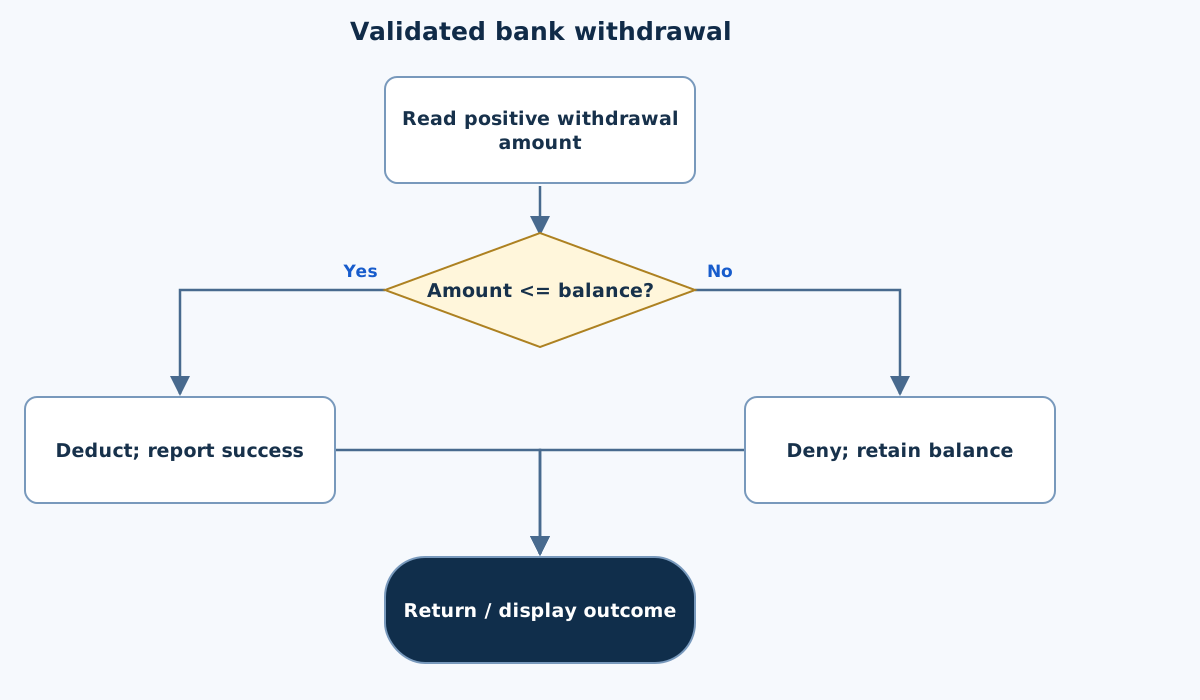
Each account owns a separate balance. Methods validate an operation before changing it, and a withdrawal larger than the balance returns failure without deducting anything.
Interest is defined here as one-year simple interest on the current balance. calculateInterest returns that value without crediting it. Account numbers are strings so leading zeros are preserved.
TURN THE IDEA INTO STEPS
Step-by-step algorithm
- Construct two validated accounts.
- Choose the account by its one-based driver ID.
- Validate a positive deposit or withdrawal.
- Reject insufficient funds before deducting.
- Display balance or calculate annual interest when requested.
SEE THE CORE OPERATION
Flowchart
This chart focuses on the named operation or core OOP decision. Diamonds show conditions; labeled branches show outcomes. Read it with the complete algorithm and source for input handling and other operations. Scroll within the diagram on a phone.
Validated bank withdrawal
Main.java
import java.util.*;

public class Main {
    private static final Scanner IN = new Scanner(System.in).useLocale(Locale.ROOT);
    static String text() {
        if (!IN.hasNextLine()) throw new IllegalArgumentException("Incomplete input.");
        String value = IN.nextLine().trim();
        if (value.isEmpty() || value.length() > 200) throw new IllegalArgumentException("Text must have 1–200 characters.");
        return value;
    }
    static int integer(int low, int high) {
        int value = Integer.parseInt(text());
        if (value < low || value > high) throw new IllegalArgumentException("Integer out of range.");
        return value;
    }
    static double number(double low, double high) {
        double value = Double.parseDouble(text());
        if (!Double.isFinite(value) || value < low || value > high) throw new IllegalArgumentException("Number out of range.");
        return value;
    }
    static void money(String label, double value) { System.out.printf(Locale.ROOT, "%s: %.2f%n", label, value); }
static class BankAccount {
        private final String accountHolder, accountNumber, accountType;
        private double balance;
        BankAccount(String holder, String account, double balance, String type) {
            if (!Double.isFinite(balance) || balance < 0 || balance > 1000000) throw new IllegalArgumentException("Invalid opening balance.");
            this.accountHolder = holder; this.accountNumber = account; this.balance = balance; this.accountType = type;
        }
        void deposit(double amount) {
            if (!Double.isFinite(amount) || amount <= 0 || balance + amount > 1000000000) throw new IllegalArgumentException("Invalid deposit.");
            balance += amount;
        }
        boolean withdraw(double amount) {
            if (!Double.isFinite(amount) || amount <= 0) throw new IllegalArgumentException("Invalid withdrawal.");
            if (amount > balance) return false; balance -= amount; return true;
        }
        double checkBalance() { return balance; }
        double calculateInterest(float rate) {
            if (!Float.isFinite(rate) || rate < 0 || rate > 100) throw new IllegalArgumentException("Invalid rate.");
            return balance * rate / 100;
        }
        void display() { System.out.println(accountNumber + " | " + accountHolder + " | " + accountType); money("Balance", balance); }
    }
    // Two accounts: holder/number/balance/type each. Then 1 id amount=deposit,
    // 2 id amount=withdraw, 3 id=balance, 4 id rate=annual interest, 0=exit. IDs 1 or 2.
    public static void main(String[] args) {
        try {
            BankAccount[] accounts = new BankAccount[2];
            for (int i = 0; i < 2; i++) accounts[i] = new BankAccount(text(), text(), number(0, 1000000), text());
            while (true) {
                int command = integer(0, 4); if (command == 0) break;
                BankAccount account = accounts[integer(1, 2) - 1];
                if (command == 1) { account.deposit(number(0, 1000000)); System.out.println("Deposited."); }
                else if (command == 2) System.out.println(account.withdraw(number(0, 1000000)) ? "Withdrawn." : "Denied: insufficient funds.");
                else if (command == 3) account.display();
                else money("Annual interest (not credited)", account.calculateInterest((float)number(0, 100)));
            }
        } catch (IllegalArgumentException e) { System.out.println("Invalid input: " + e.getMessage()); }
    }
}
Copy a source file or download the project to preserve its file names.
USE THE RIGHT ENVIRONMENT
How to compile and run
Install a JDK (Java 11 or newer; JDK 17 is suitable), extract this project’s ZIP into its own folder, then open a terminal in that folder.
javac -encoding UTF-8 Main.java
java Main
The standalone source is named Main.java and its entry class is Main. You may also paste it into an online Java compiler and supply the sample input there. Choose Java explicitly; these pages do not change the site compiler or import code automatically.
Each experiment has its own folder because many use the public class Main. Compile and run one experiment at a time.
UNDERSTAND THE JAVA CODE
Line-by-line explanation
These steps follow the exact Java source above. Related statements are grouped; line numbers count blank lines and restart for each file. Start with main to follow execution, then open the constructors, methods or event handlers it uses.
Main.java
Lines 1–4Import utilities and create the shared input reader
import java.util.*;

public class Main {
    private static final Scanner IN = new Scanner(System.in).useLocale(Locale.ROOT);
java.util.* imports utility type names such as Scanner, Locale and collections. Main is the public class matching Main.java. The private static final IN field holds one shared Scanner for System.in; final prevents replacing that reference. The scanner uses Locale.ROOT.
Lines 5–10Read one nonempty trimmed input line
    static String text() {
        if (!IN.hasNextLine()) throw new IllegalArgumentException("Incomplete input.");
        String value = IN.nextLine().trim();
        if (value.isEmpty() || value.length() > 200) throw new IllegalArgumentException("Text must have 1–200 characters.");
        return value;
    }
text checks whether a line exists, reads it and removes leading/trailing whitespace. Reject empty text and lengths above 200 by throwing IllegalArgumentException. Otherwise return the string. One field is read per line, so these helpers do not mix nextInt with leftover newlines.
Lines 11–15Parse and range-check an integer field
    static int integer(int low, int high) {
        int value = Integer.parseInt(text());
        if (value < low || value > high) throw new IllegalArgumentException("Integer out of range.");
        return value;
    }
Integer.parseInt converts the returned string to int or throws NumberFormatException, a subtype of IllegalArgumentException. Reject values outside the caller’s inclusive low/high limits, then return the accepted integer.
Lines 16–20Parse and range-check a finite decimal field
    static double number(double low, double high) {
        double value = Double.parseDouble(text());
        if (!Double.isFinite(value) || value < low || value > high) throw new IllegalArgumentException("Number out of range.");
        return value;
    }
Double.parseDouble reads the string as a double. Double.isFinite rejects NaN and infinities as well as the explicit low/high range check. Return only a finite accepted value; exceptions transfer control to a matching catch block.
Line 21Format a labelled numeric result consistently
static void money(String label, double value) { System.out.printf(Locale.ROOT, "%s: %.2f%n", label, value); }money is a formatting helper: %s prints the label, %.2f prints two decimal places, and %n ends the line. Locale.ROOT fixes locale-sensitive formatting. The helper can also display non-currency quantities; it does not change the stored value.
Lines 22–24Encapsulate identity and a mutable balance
static class BankAccount {
        private final String accountHolder, accountNumber, accountType;
        private double balance;
Each BankAccount has final identity strings and a private balance. Identity references are assigned once; balance changes only through the methods supplied by this example.
Lines 25–28Create an account with a valid opening balance
        BankAccount(String holder, String account, double balance, String type) {
            if (!Double.isFinite(balance) || balance < 0 || balance > 1000000) throw new IllegalArgumentException("Invalid opening balance.");
            this.accountHolder = holder; this.accountNumber = account; this.balance = balance; this.accountType = type;
        }
Require a finite balance from 0 to 1,000,000, then assign holder, account number, balance and type. Account numbers remain strings so leading zeros can be retained.
Lines 29–32Validate before increasing the balance
        void deposit(double amount) {
            if (!Double.isFinite(amount) || amount <= 0 || balance + amount > 1000000000) throw new IllegalArgumentException("Invalid deposit.");
            balance += amount;
        }
deposit requires a positive finite amount and caps the resulting balance. Only after every check passes does balance += amount change the object.
Lines 33–36Distinguish a bad amount from insufficient funds
        boolean withdraw(double amount) {
            if (!Double.isFinite(amount) || amount <= 0) throw new IllegalArgumentException("Invalid withdrawal.");
            if (amount > balance) return false; balance -= amount; return true;
        }
A nonpositive or non-finite amount throws an exception. A valid amount above the balance returns false without deduction. Otherwise subtract it and return true.
Lines 37–41Read the balance and calculate uncredited annual interest
        double checkBalance() { return balance; }
        double calculateInterest(float rate) {
            if (!Float.isFinite(rate) || rate < 0 || rate > 100) throw new IllegalArgumentException("Invalid rate.");
            return balance * rate / 100;
        }
checkBalance returns the stored amount. calculateInterest validates its float rate and computes balance*rate/100 for one year. Returning the interest does not deposit it or modify balance.
Lines 42–43Display one account through its fields and formatter
        void display() { System.out.println(accountNumber + " | " + accountHolder + " | " + accountType); money("Balance", balance); }
    }
Print the identity line, then the current balance. The brace closes BankAccount.
Lines 44–49Document commands and create two separate accounts
    // Two accounts: holder/number/balance/type each. Then 1 id amount=deposit,
    // 2 id amount=withdraw, 3 id=balance, 4 id rate=annual interest, 0=exit. IDs 1 or 2.
    public static void main(String[] args) {
        try {
            BankAccount[] accounts = new BankAccount[2];
            for (int i = 0; i < 2; i++) accounts[i] = new BankAccount(text(), text(), number(0, 1000000), text());
main constructs exactly two BankAccount objects from holder/number/balance/type lines. The array stores their references, not two aliases to the same object.
Lines 50–52Read an operation and select a valid account
            while (true) {
                int command = integer(0, 4); if (command == 0) break;
                BankAccount account = accounts[integer(1, 2) - 1];
Command 0 exits the loop. Other commands require ID 1 or 2; subtract one after validation to obtain an array index.
Lines 53–56Dispatch deposit, withdrawal, display or interest
                if (command == 1) { account.deposit(number(0, 1000000)); System.out.println("Deposited."); }
                else if (command == 2) System.out.println(account.withdraw(number(0, 1000000)) ? "Withdrawn." : "Denied: insufficient funds.");
                else if (command == 3) account.display();
                else money("Annual interest (not credited)", account.calculateInterest((float)number(0, 100)));
Methods operate on the selected account. A failed withdrawal prints a denial. The interest branch casts the accepted rate to float and labels the returned interest as not credited.
Lines 57–60End the command loop and handle invalid input
            }
        } catch (IllegalArgumentException e) { System.out.println("Invalid input: " + e.getMessage()); }
    }
}
The first brace ends the loop. The catch prints invalid-input messages; the remaining braces close main and Main. An insufficient-funds false result does not reach this catch.
FOLLOW THE STATE
Dry run
- An account starts at 100.
- A request to withdraw 200 is denied and the balance remains 100.
- Depositing 25 changes it to 125.
- At 10%, returned annual interest is 12.50; balance stays 125.
CHECK THE BEHAVIOUR
Sample input & output
These outputs were captured by running the exact delivered Java project.
Sample 1
Asha
001
100
Savings
Ravi
002
50
Current
2
1
200
3
1
1
1
25
4
1
10
0
Denied: insufficient funds.
001 | Asha | Savings
Balance: 100.00
Deposited.
Annual interest (not credited): 12.50
Sample 2
Asha
001
100
Savings
Ravi
002
50
Current
2
2
50
3
2
0
Withdrawn.
002 | Ravi | Current
Balance: 0.00
Common mistakes
- Do not subtract before checking funds.
- Reject nonpositive or nonfinite amounts.
- Interest calculation does not automatically credit the account.
WHY THIS GROWTH RATE?
Time and space complexity
O(1) arithmetic/state work per operation; O(q) for q commands, plus text I/O.
Choosing an account by array index and updating a few numeric fields uses fixed work. A sequence of q commands therefore needs O(q) state processing.
Names and formatted output contribute their character lengths. The example uses double for educational arithmetic, so it is not a production banking ledger.
These bounds describe the implemented data processing. Input/output text length, scheduling, framework rendering and runtime/library internals are identified separately where they matter. Educational limits bound the actual examples.
PREPARE FOR YOUR LAB VIVA
Related viva questions & answers
Try answering aloud, then expand to check your reasoning. Questions focus on this program’s classes, state and behavior.
Why is the bank balance private?
It makes callers use validated deposit and withdrawal methods instead of directly assigning arbitrary values. Those methods maintain the account’s state rules.
Why does withdraw return false before changing the balance?
A failed operation must leave the account unchanged. Checking funds first avoids making the balance negative and then attempting to repair it.
Why is accountNumber stored as String rather than int?
Account identifiers are labels, not arithmetic quantities. A String preserves leading zeros and can support formats that contain more than digits.
Does calculateInterest change the balance?
No. It returns one-year simple interest for the supplied percentage. Crediting that interest would require a separate explicit operation.
Why are two accounts represented by two objects?
Each object holds its own balance and account details. Operating on one object does not alter the second account’s state.
Why is a zero deposit rejected by the account method?
It does not represent a positive transfer into the account. The stated contract accepts positive finite amounts, so zero is treated as an invalid operation.